
Introduction
A B Day Schedule Maker | Managing a school timetable can become complicated when students attend different classes on alternating days. Teachers need to know which subjects they teach, students must remember their daily classes, and administrators have to coordinate rooms, resources, and instructional time. Without a clear system, missed lessons, scheduling conflicts, and confusion can quickly become routine.
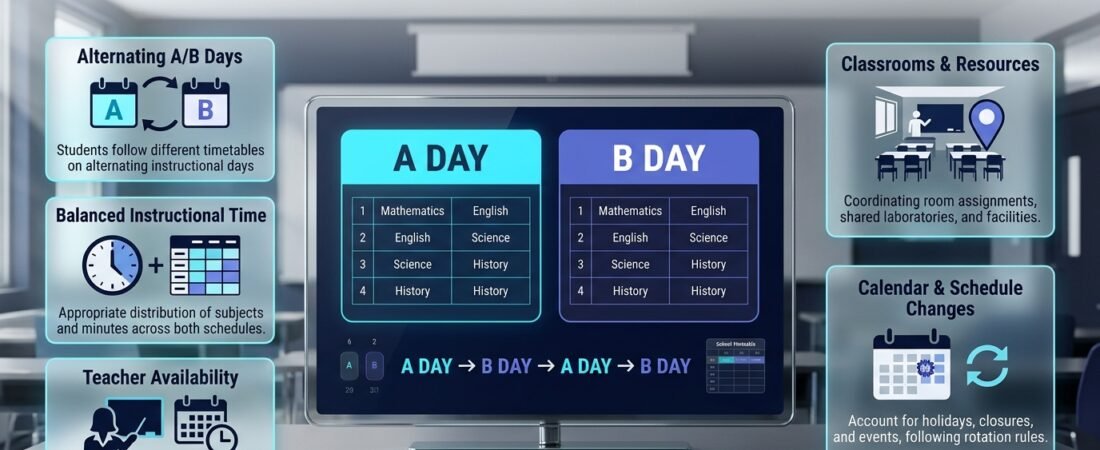
An A B day schedule maker helps schools organize alternating-day timetables so students and teachers can follow a predictable academic routine. Instead of attending every subject every day, students follow an A-day schedule on one school day and a B-day schedule on another. The pattern then continues according to the school’s calendar and rotation rules.
For schools considering this approach, the goal is not simply to divide classes into two groups. A successful schedule must balance instructional time, teacher availability, student workload, room assignments, and school events. It should also remain easy to understand when holidays, closures, or unexpected changes interrupt the normal rotation.
This guide explains how an A/B schedule works, how to create one step by step, which scheduling methods are most practical, and how to avoid common mistakes. It also explores how digital planning tools, including RTI Scheduler, can support broader academic planning and help schools maintain a more organized timetable.
What Is an A B Day Schedule Maker?
An A B day schedule maker is a planning tool or structured method for creating a school timetable that alternates between two different instructional schedules. On A days, students attend one group of classes; on B days, they attend another. The rotation repeats according to a defined calendar, allowing schools to distribute subjects across alternating days.
For example, a middle school might schedule English, mathematics, science, and physical education on A days, while social studies, art, technology, and another mathematics or language session take place on B days. The exact arrangement depends on the school’s curriculum, instructional requirements, and available resources.
The schedule maker helps administrators assign subjects, teachers, classrooms, and periods to the appropriate day. A well-designed system also identifies which rotation applies after weekends, holidays, professional development days, and school closures.
How Does an A/B Day Schedule Work?
An A/B schedule uses two distinct daily timetables rather than repeating the same sequence of classes every day. Each timetable has its own periods, subjects, and assignments, but both work together as part of one academic plan.
A typical rotation looks like this:
| School day | Schedule | Example classes |
|---|---|---|
| Monday | A Day | English, Mathematics, Science, Art |
| Tuesday | B Day | History, Mathematics, Technology, Physical Education |
| Wednesday | A Day | English, Mathematics, Science, Art |
| Thursday | B Day | History, Mathematics, Technology, Physical Education |
| Friday | A Day | English, Mathematics, Science, Art |
This example assumes that the school alternates on each instructional day. Some schools use different rotation rules, such as alternating on a numbered cycle or continuing the sequence across certain breaks.
The most important rule is to decide what happens when the school calendar changes. If Monday is a holiday, does Tuesday become an A day because it is the next instructional day, or does the school follow a fixed calendar that already assigns Tuesday as a B day? Either policy can work, but everyone must understand the chosen rule.
Why Do Schools Use A/B Day Schedules?
Schools often adopt alternating schedules to provide longer instructional periods, reduce the number of different classes students attend each day, or create more flexibility for specialized subjects.
Instead of dividing a student’s attention across seven or eight subjects every day, an A/B model may allow fewer subjects to receive longer periods. Teachers can use that time for laboratory experiments, extended writing assignments, projects, discussions, and practical activities.
Common reasons for using an A/B timetable include:
- Longer class periods: Teachers have more time for lessons that require discussion, practice, or hands-on work.
- Fewer daily transitions: Students may move between fewer classrooms during a school day.
- More flexible teaching: Departments can organize projects and activities around longer instructional blocks.
- Improved resource planning: Laboratories, specialist rooms, and equipment can be assigned across two timetables.
- More manageable daily workloads: Students may need to prepare for fewer subjects each evening, although assignments still require careful coordination.
An alternating schedule is not automatically better than a traditional timetable. Its effectiveness depends on the school’s teaching methods, student needs, subject requirements, and ability to communicate changes clearly.
Organizing a Consistent Six-Day School Rotation Schedule
Managing a six-day school cycle requires careful coordination to ensure that every subject receives appropriate instructional time and that teachers, classrooms, and student groups follow a predictable rotation. Unlike a traditional five-day timetable, a six-day cycle moves through six instructional days, which may continue across calendar weeks rather than restarting every Monday. Without a clearly structured plan, schools can experience confusion about which cycle day comes next, uneven subject distribution, and scheduling conflicts involving teachers or shared classrooms. A well-organized six-day rotation helps administrators distribute lessons more evenly, maintain consistent teaching periods, and give students a clear understanding of their academic routine. Schools should establish the sequence of cycle days, assign subjects and teaching periods, review staff availability, and account for holidays or unexpected closures before finalizing the schedule. Communicating the rotation clearly to teachers, students, and parents also helps everyone follow the same timetable without confusion.
For a more structured approach to planning six-day academic rotations, explore 👉 Six Day School Cycle Planner
This resource can help schools organize rotating instructional days, coordinate subject schedules, and maintain a consistent cycle that supports smoother academic operations.
What Should an A/B Schedule Include?
A useful A/B schedule must show more than the letters A and B. It needs enough detail for teachers, students, administrators, and families to understand exactly what happens during each instructional day.
At minimum, the schedule should include the day designation, period times, subject names, teacher assignments, classroom locations, and any special instructions. Schools may also need to identify lunch periods, passing time, intervention sessions, advisory periods, and extracurricular activities.
Essential Elements of a School A/B Timetable
| Schedule element | What to include | Why it matters |
|---|---|---|
| Rotation label | A Day or B Day | Prevents confusion about the applicable timetable |
| Period number | Period 1, Period 2, and so on | Establishes the order of classes |
| Start and end times | Exact instructional times | Keeps the day consistent |
| Subject | Course or activity name | Helps students prepare for lessons |
| Teacher | Assigned instructor | Clarifies teaching responsibility |
| Room | Classroom or specialist space | Prevents room conflicts |
| Breaks | Lunch and passing periods | Supports realistic daily planning |
| Calendar rule | How rotation continues after breaks | Maintains the correct sequence |
| Change notices | Approved exceptions and revisions | Helps users respond to disruptions |
A schedule becomes easier to use when these details are consistent across printed timetables, classroom displays, school announcements, and digital calendars.
Creating a Reliable Rotational Timetable for Academic Planning
A rotational timetable helps schools manage changing lesson patterns without relying on the same subject arrangement every day. This approach is particularly useful for institutions that operate on A/B days, multi-day cycles, rotating periods, or alternative classroom schedules. However, an effective rotation requires a clearly defined sequence so that students do not miss important lessons and teachers can manage their teaching responsibilities consistently. Administrators should first determine the rotation length, identify the subjects and periods included in each cycle, and assign lessons according to instructional priorities. Teacher availability, classroom capacity, practical sessions, and shared learning spaces should also be considered before the timetable is finalized. A well-planned sequence makes it easier to distribute teaching hours fairly, reduce overlapping assignments, and maintain continuity when the school moves from one cycle day to another. Regular reviews also help administrators identify scheduling gaps and make adjustments when academic requirements change.
To simplify the process of organizing repeating lesson patterns and academic rotations, explore 👉 Rotational Timetable Sequence Builder
This resource can support schools in structuring rotating lesson sequences, coordinating periods, and maintaining a more organized timetable throughout the academic cycle.
How Many Periods Should an A/B Schedule Have?
There is no universal number of periods for an A/B schedule. Some schools use four longer periods per day, while others use five, six, or another arrangement based on their operating hours and instructional requirements.
The best structure is the one that meets the school’s academic objectives without creating unrealistic teaching loads or insufficient time for required subjects.
For example, a school operating from 8:00 a.m. to 3:00 p.m. might divide its day into four extended instructional blocks, with passing time and lunch included in the overall timetable. Another school may prefer six periods to accommodate more subjects and specialist activities.
Before selecting the number of periods, administrators should review:
- Required instructional minutes for each subject.
- Teacher preparation periods and contractual requirements.
- Student lunch and break arrangements.
- Laboratory, workshop, and physical education requirements.
- Available classrooms and specialist facilities.
- Transportation schedules and the end of the school day.
A realistic timetable starts with these constraints rather than choosing attractive period lengths first and trying to fit everything in afterward.
How to Create an A/B Day Schedule Step by Step
Creating an effective alternating timetable is easier when schools follow a consistent planning process. Rather than assigning subjects randomly to A and B days, begin with the school’s academic requirements, identify scheduling constraints, and then test the proposed rotation before publishing it.
A structured process reduces timetable conflicts and makes the schedule easier to maintain throughout the academic year.
Step 1: Identify the School’s Scheduling Requirements
What to do: Determine which subjects, grade levels, instructional periods, and special activities must fit into the timetable.
Start by collecting the information that affects the schedule. This includes the number of classes, student groups, teachers, rooms, daily operating hours, and required instructional time for each subject.
A secondary school may have separate requirements for science laboratories, art studios, physical education facilities, and technology rooms. These requirements should be identified before subjects are assigned to periods.
Why it matters: If the school starts creating the timetable without understanding these limitations, administrators may have to rebuild large portions of it later.
Professional advice: Create a simple requirements checklist before using a spreadsheet or scheduling tool.
For example:
- English must meet its required weekly instructional time.
- Mathematics must appear regularly across the rotation.
- Science lessons requiring laboratory access must use suitable rooms.
- Every teacher must have a workable assignment schedule.
- Lunch, breaks, and required support periods must be protected.
Step 2: Decide How the A/B Rotation Will Operate
What to do: Establish the exact rule that determines whether an instructional day is an A day or a B day.
This decision affects every timetable, school announcement, and calendar entry. A school might alternate on each instructional day, follow a predefined calendar, or use a numbered cycle that continues across weekends and selected breaks.
There is no single rule suitable for every institution. The important thing is to choose one policy and communicate it clearly.
Consider two possible approaches:
| Rotation policy | How it works | Main consideration |
|---|---|---|
| Instructional-day rotation | The next school day switches between A and B | The sequence may shift after holidays |
| Fixed-calendar rotation | Each date has a predefined A/B designation | Changes must be updated when the calendar changes |
Example: Suppose Monday is an A day and Tuesday is a B day. If Wednesday is a school holiday, an instructional-day rotation would make Thursday an A day. Under a fixed-calendar system, Thursday would retain whichever designation was assigned to it originally unless administrators formally changed it.
Common mistake: Assuming that everyone understands how the rotation continues after an unexpected closure. Write the policy down and use the same rule in every official schedule.
Schools coordinating multiple rotation patterns can also benefit from reviewing School Rotation Scheduling when developing a broader scheduling process.
Step 3: Divide Subjects Between A Days and B Days
What to do: Assign subjects to each timetable while considering instructional time, student workload, teacher availability, and curriculum requirements.
The goal is to create two balanced schedules rather than placing every difficult subject on one day and every practical activity on the other.
For instance, English might appear on A days while history appears on B days. Mathematics may be included on both days if the school’s instructional model requires frequent practice. Science could alternate between classroom instruction and laboratory work, provided that both components meet the curriculum requirements.
Why it matters: An unbalanced division can make one day academically demanding while leaving the other comparatively light.
A practical planning method is to create a subject allocation table:
| Subject | A Day | B Day | Planning consideration |
|---|---|---|---|
| English | Yes | Optional or no | Reading and writing continuity |
| Mathematics | Yes | Yes, if needed | Regular practice |
| Science | Theory or lab | Theory or lab | Equipment and room access |
| Social studies | Optional or no | Yes | Reading and discussion |
| Physical education | Based on curriculum | Based on curriculum | Gym or field availability |
| Art or technology | Based on curriculum | Based on curriculum | Specialist facilities |
This table is an example, not a universal subject allocation rule. Each school should adapt it to its own curriculum and timetable.
Expert tip: Review the full rotation, not just one day. A subject that meets every other day may require different preparation and homework expectations from a subject taught daily.
Step 4: Set Period Lengths and Breaks
What to do: Decide how long each instructional period will last and where lunch, passing time, and other breaks fit into the school day.
Longer periods can support projects, experiments, extended writing, and detailed discussions. However, they require thoughtful lesson design and suitable classroom management.
For example, a 75-minute period might include a short introduction, guided practice, independent work, and a review. Simply extending a traditional lesson without changing its structure can leave students disengaged.
Why it matters: Period lengths affect teaching quality, student concentration, room transitions, and the total number of subjects that can fit into each day.
Before finalizing the timetable, confirm that the total schedule fits within the school’s opening and closing times.
Step 5: Assign Teachers and Classrooms
What to do: Match every scheduled class with an available teacher and a suitable classroom.
This is one of the most important validation stages. A timetable may look balanced on paper but still be impossible to operate if a teacher is assigned to two classes at the same time or a specialist room is booked twice.
Check each teacher’s availability across both A and B days. Then review room capacity, accessibility, equipment, and any subject-specific requirements.
For larger schools, a Class Timetable Grid Builder can be a useful reference for organizing period-by-period assignments.
Practical example: If two science classes need laboratory access during Period 3, administrators must confirm that separate laboratories and qualified teachers are available. Otherwise, one class needs a different period or a suitable alternative activity.
Step 6: Check the Complete Rotation for Conflicts
What to do: Review the entire A/B schedule before publishing it.
Do not validate only Monday’s A timetable and Tuesday’s B timetable. Check the full sequence, including specialist rooms, shared teachers, support periods, and classes that require specific resources.
Use a checklist to confirm that:
- No teacher is double-booked.
- No room is assigned to two classes simultaneously.
- Required instructional minutes are satisfied.
- Student groups can reach their next classes on time.
- Lunch and breaks are realistic.
- Subject distribution is balanced.
- Both A and B timetables are clearly labeled.
A digital Academic Planning and Scheduling Tools approach can help schools organize scheduling information alongside other academic responsibilities.
Professional advice: Ask at least one teacher and one administrator who did not build the original timetable to review it. A fresh perspective can reveal confusing labels and practical problems that the planner overlooked.
Step 7: Publish the Schedule and Explain the Rules
What to do: Share the approved timetable through the school’s established communication channels.
Students should be able to identify the current rotation without guessing. Teachers need access to the same official version, and families should understand how to check the correct day’s classes.
Use consistent labels, dates, period times, room numbers, and subject names. If the school provides printed schedules, ensure that they match the digital version.
The Student Class Period Organizer is relevant when planning how students can organize their classes and understand their daily period assignments.
Why it matters: Even a technically correct timetable can fail when students and staff use different versions or misunderstand the rotation.
A short launch announcement should explain when the schedule begins, how A and B days alternate, what happens after holidays, and where users can find approved updates.
Step 8: Monitor the Schedule and Make Controlled Updates
What to do: Review how the timetable works after implementation and document any changes.
Teachers may identify periods that are consistently too short, room assignments that cause delays, or subject combinations that create an excessive workload. Administrators should evaluate these concerns and make targeted changes rather than frequently redesigning the entire rotation.
A change log can record the date, affected class, reason for the change, approval, and communication method.
For broader academic coordination, a Weekly Lesson Period Planner can help connect the timetable with teachers’ lesson preparation.
Expert tip: Review the schedule at sensible intervals, such as after the first few weeks and at the end of each term. Avoid changing established routines for minor issues that can be solved through clearer communication.
A/B Day Schedule Examples for Different Schools

A/B schedules should reflect the needs of the students and teachers who use them. A secondary school with laboratories has different requirements from an elementary school or a small institution with limited staff.
The examples below illustrate how administrators can adapt the same basic rotation principle to different situations.
Example 1: A Secondary School Schedule
A secondary school may use longer periods to accommodate subject-specific instruction and practical work.
| Period | A Day | B Day |
|---|---|---|
| Period 1 | English | History |
| Period 2 | Mathematics | Mathematics |
| Period 3 | Science | Technology |
| Lunch | Lunch | Lunch |
| Period 4 | Physical Education | Art |
| Period 5 | Elective | Social Studies |
This example gives mathematics a place on both days, which may suit a school that wants regular practice. Other subjects alternate, providing longer blocks for activities that need additional time.
The final design should reflect actual curriculum requirements. A subject should not receive fewer instructional minutes merely because it is easier to fit into one side of the rotation.
Example 2: A Middle School Schedule
Middle schools often need a balance between core subjects, practical activities, and student support.
| Period | A Day | B Day |
|---|---|---|
| Period 1 | Language Arts | Social Studies |
| Period 2 | Mathematics | Mathematics |
| Period 3 | Science | World Language |
| Period 4 | Physical Education | Music or Art |
| Support period | Intervention or advisory | Intervention or advisory |
The support period may remain at the same time each day, helping students and staff maintain a predictable routine.
Schools should confirm that students who need additional support can access it regardless of their rotation group. Support services should not accidentally become available only on the days that some students attend particular classes.
Example 3: A Small School With Limited Staff
A smaller school may have teachers who serve multiple grade levels or teach several subjects. Its A/B schedule must therefore consider staff availability before distributing classes.
Administrators can start by mapping teacher assignments, identifying shared rooms, and checking where students from different groups require the same resources.
For this situation, a Subject Timetable Maker can be a useful planning reference for organizing subject assignments.
The key is to avoid copying a timetable designed for a much larger institution. A smaller school may need fewer periods, combined groups, or a different subject distribution to make the schedule operational.
A/B Day Schedule Maker vs. Traditional Daily Timetable
The main difference between an A/B timetable and a traditional daily timetable is how often students attend each subject. In a traditional schedule, the same subjects generally appear each school day. In an A/B schedule, subjects are distributed across alternating timetables.
Neither model is universally superior. The right choice depends on teaching objectives, curriculum requirements, student age, staffing, and available facilities.
| Feature | A/B day schedule | Traditional daily timetable |
|---|---|---|
| Daily subject count | Usually fewer subjects | Often more subjects |
| Period length | Often longer | Often shorter |
| Subject frequency | Depends on rotation | Commonly daily |
| Practical lessons | Can allow extended blocks | May need careful lesson segmentation |
| Daily preparation | Fewer classes may need attention | More subjects may require preparation |
| Rotation management | Requires clear A/B rules | Usually simpler day-to-day |
| Holiday adjustments | May require rotation decisions | Often easier to understand |
What Are the Main Benefits of an A/B Schedule?
A well-planned A/B schedule can provide longer periods for complex lessons, reduce the number of classroom transitions, and give teachers greater flexibility in designing activities.
Students may also find it easier to focus on a smaller set of subjects each day. However, this benefit depends on how homework, assessments, and long gaps between classes are managed.
Important benefits include:
- More time for experiments, projects, and extended discussions.
- Fewer subject changes during the day.
- Greater flexibility for certain elective and specialist classes.
- Opportunities to coordinate shared facilities across the rotation.
- A predictable structure when the calendar is maintained correctly.
What Are the Potential Drawbacks?
Alternating schedules can create problems if students forget which classes meet on a particular day or if teachers expect students to remember material from a lesson that occurred several days earlier.
A long gap between classes can also make continuity more difficult, particularly for subjects that rely on frequent practice.
Schools should consider these risks:
- Students may arrive without the correct books or equipment.
- Missed classes can create a longer gap before the next scheduled lesson.
- Homework and tests may cluster on one day.
- Holidays and closures can create confusion about the next rotation.
- Longer periods require effective lesson pacing.
These challenges can be reduced through clear reminders, structured lesson recaps, balanced assessment planning, and consistent calendar management.
How to Manage Holidays, Closures, and Rotation Changes
A reliable A/B schedule needs a clear calendar policy because the school year rarely follows an uninterrupted sequence of instructional days. Public holidays, staff training, weather closures, examination periods, and special events can all affect the rotation.
The school should decide in advance whether a missed day changes the sequence or whether the original calendar remains in place. Once that policy is established, administrators can apply it consistently and explain any exceptions.
How Should an A/B Schedule Handle School Holidays?
Schools should decide whether holidays pause the rotation or whether the rotation follows a fixed calendar. The correct choice depends on the school’s policy, but the rule must be applied consistently so students and teachers know which schedule comes next.
A school using instructional-day rotation might follow this sequence:
- Monday: A Day
- Tuesday: B Day
- Wednesday: School holiday
- Thursday: A Day
- Friday: B Day
A school using fixed-calendar rotation might preserve Thursday’s original designation instead, even if Wednesday was a holiday.
The school should not switch between these approaches without an explicit decision. Otherwise, different departments may publish conflicting schedules.
A dedicated Academic Calendar Planning process can help administrators coordinate the timetable with term dates, holidays, and other important school activities.
How Can Schools Prevent Holiday Confusion?
The simplest approach is to maintain one authoritative calendar and communicate changes before they take effect.
Administrators should:
- Mark holidays and non-instructional days before publishing the schedule.
- Apply the official rotation policy to affected dates.
- Check whether the change affects examinations, specialist rooms, or teacher assignments.
- Update the approved calendar and relevant timetable documents.
- Notify teachers, students, and families through the usual channels.
Schools can also use an Academic Holiday Calendar Builder as a relevant planning resource when coordinating holiday dates with academic activities.
For important dates across an entire term, a Semester Milestone Calendar can help connect rotation planning with reporting periods, assessment deadlines, and other academic milestones.
How Should Unexpected School Closures Be Managed?
An unexpected closure should trigger a review of the next scheduled instructional day. Administrators should confirm the applicable A/B designation, assess whether any lessons or examinations need rescheduling, and communicate the decision through the school’s official channels.
For example, if severe weather closes the school on a scheduled B day, the administration must determine whether the next open day remains a B day or switches to the next day in the rotation.
The decision should follow the published policy rather than being made differently by individual teachers.
A School Year Event Calendar can support broader coordination of school events, closures, and academic activities.
How to Balance Subjects, Homework, and Assessments
A timetable can be free of room conflicts and still create an unreasonable academic workload. Students might have several demanding lessons on one day, followed by multiple assignments or tests that all require preparation at the same time.
Administrators should therefore review not only where classes fit but also how students experience the full rotation.
How Should Subjects Be Balanced Across A and B Days?
Begin by considering the learning requirements of each subject. Practical lessons, reading-heavy subjects, written assignments, and courses requiring frequent practice may need different arrangements.
Mathematics, for example, may benefit from regular practice between formal lessons. A science course may need extended periods for experiments, while language classes may require opportunities to review vocabulary and develop speaking skills.
The best allocation depends on the curriculum and teaching approach. Avoid assuming that every subject should appear on only one of the two days.
Use these principles when distributing subjects:
- Place subjects requiring frequent practice at appropriate intervals.
- Check that extended periods have enough meaningful activities.
- Avoid concentrating all demanding lessons on one day.
- Consider how students will review content between meetings.
- Confirm that subject assignments meet required instructional time.
A Weekly Lesson Period Planner can help teachers organize individual lessons around the larger timetable.
How Can Schools Prevent Homework Overload?
Schools should coordinate major assignments and assessments across the rotation rather than allowing each department to plan independently.
For example, a student might have a science report, a history essay, and a mathematics test scheduled around the same time. Each task may be reasonable on its own, but the combined workload can become difficult to manage.
Teachers can reduce this problem by sharing major deadlines, coordinating assessment dates, and giving students realistic preparation time.
A useful process includes:
- Recording major assignments and examination dates.
- Checking the workload across both A and B days.
- Avoiding unnecessary clustering of high-stakes assessments.
- Providing clear instructions for work due after a long gap between classes.
- Reviewing whether students have sufficient time for preparation.
An Academic Deadline Management process can help schools organize important deadlines, while a Coursework Due Date Manager can support the coordination of longer assignments.
A separate Assignment Submission Calendar can help students and teachers keep track of submission dates across different subjects.
How Should Schools Schedule Examinations on A/B Days?
Examination scheduling requires additional checks because a regular class rotation may not provide enough information about candidate groups, rooms, invigilators, or the length of each examination.
Schools should identify the required examination sessions first, then fit them into the calendar while protecting instructional time and avoiding conflicts.
A useful process is to:
- List all examinations and their required durations.
- Identify which student groups must attend each session.
- Check room capacity and specialist requirements.
- Assign appropriate staff and invigilators.
- Review clashes with regular lessons and other examinations.
- Publish the approved examination timetable.
An Exam Schedule Generator can be a useful planning reference for arranging examination dates and times. Schools working with individual assessment dates can also review the Test Date Timetable Planner.
For more detailed coordination of examination periods, the Exam Session Calendar Builder and Assessment Sitting Schedule provide relevant planning concepts. An Examination Timetable Organizer can also help frame the wider task of organizing examination sessions.
These resources address related but distinct planning needs. Schools should choose the approach that matches their actual scheduling requirements instead of treating every timetable as the same problem.
Common A/B Day Scheduling Mistakes to Avoid

Most scheduling problems occur when administrators focus on creating a timetable but overlook the rules and practical constraints that make it usable. Identifying these mistakes early can prevent confusion after the schedule has been published.
Mistake 1: Creating Two Timetables Without a Rotation Policy
Why it happens: Planners concentrate on assigning subjects to A and B days but do not decide what happens after holidays or closures.
Why it causes problems: Teachers may follow different interpretations, resulting in incorrect classes, missed lessons, and inconsistent announcements.
How to avoid it: Document the rotation rule and include clear examples of how it works across weekends, holidays, and unexpected closures.
Mistake 2: Ignoring Instructional Time Requirements
Why it happens: Administrators try to balance the number of subjects rather than the total time allocated to each subject.
Why it causes problems: Some courses may receive insufficient instructional time, even when the timetable looks balanced.
How to avoid it: Calculate required instructional minutes before assigning periods, then verify the total across the complete rotation.
Mistake 3: Scheduling Teachers or Rooms Twice
Why it happens: Different departments build their timetables separately without checking shared resources.
Why it causes problems: Teachers may be expected to teach two classes simultaneously, or students may arrive at an occupied classroom.
How to avoid it: Maintain a shared assignment grid and validate every teacher, room, and specialist resource across both schedules.
Mistake 4: Forgetting About Student Workload
Why it happens: Each teacher plans assignments and tests independently.
Why it causes problems: Several major deadlines can fall together, creating unnecessary pressure for students.
How to avoid it: Coordinate major assessments and assignments using a shared academic calendar. Review the workload across the full week, not just each individual day.
Mistake 5: Making Changes Without Updating Every Version
Why it happens: An administrator changes a timetable but forgets a printed notice, classroom display, or digital calendar.
Why it causes problems: Staff and students receive contradictory information.
How to avoid it: Assign responsibility for publishing updates and identify one official version. Withdraw or clearly mark outdated copies.
Mistake 6: Making the Schedule Too Complicated
Why it happens: Schools add multiple labels, exceptions, and special rotation rules without explaining how they relate.
Why it causes problems: Students and teachers must memorize too many details to identify the correct schedule.
How to avoid it: Use consistent labels, simple calendar views, and written instructions. Where exceptions are necessary, explain them separately from the normal rotation.
Mistake 7: Failing to Review the Schedule After Launch
Why it happens: Administrators assume that a timetable is complete once it has been published.
Why it causes problems: Small operational problems can continue for weeks, affecting lessons and staff coordination.
How to avoid it: Collect feedback, monitor recurring conflicts, and review the schedule at planned intervals. Make controlled changes when evidence shows they are necessary.
Expert Tips for Building a More Reliable A/B Schedule
A professional scheduling process considers the timetable as part of the school’s wider academic system. The most useful improvements often come from better planning rules, clear ownership, and consistent communication rather than adding more complexity.
Start With Constraints, Not Subject Names
List teacher availability, room capacity, instructional requirements, operating hours, and specialist facilities before placing subjects into periods.
This approach makes it easier to identify impossible assignments early. It also reduces the need to rebuild the schedule when a critical conflict appears.
Design the Calendar Before Publishing the Timetable
The A/B timetable and the school calendar should work together. Establish the rotation policy, mark holidays and non-instructional days, and identify major events before distributing the final version.
For broader academic planning, schools can use a School Deadline Overview Tool as a reference for organizing important dates and responsibilities. An Academic Milestone Reminder Planner is also relevant when coordinating reminders for important academic events.
Test Realistic Scenarios
Before launch, test the timetable against situations that are likely to occur.
For example:
- A teacher is absent during a scheduled lesson.
- A laboratory becomes unavailable.
- A public holiday interrupts the rotation.
- A school event uses rooms normally assigned to classes.
- An examination conflicts with a regular lesson.
- A student needs a timetable adjustment for an approved reason.
These tests help identify weaknesses that may not be visible in a normal weekly view.
Keep Changes Controlled and Traceable
Every significant timetable change should have a reason, an approval process, and a communication plan.
A change record can include the affected date, original assignment, revised assignment, reason for the revision, and date the update was communicated.
This practice is particularly useful in larger schools where multiple departments may depend on the same rooms, teachers, and student groups.
Use the Right Planning Tool for the Right Problem
Different tools address different scheduling needs. A timetable grid organizes periods and assignments, a school calendar organizes dates, and a deadline planner tracks academic responsibilities.
Schools developing a complete scheduling process can review the Academic Planning and Scheduling Tools resource alongside their timetable and calendar requirements.
The aim is not to use every possible tool. It is to ensure that the school has a reliable way to create, verify, publish, and maintain its schedule.
How to Choose the Best A/B Day Schedule Maker
The best A/B day schedule maker is one that helps the school create an accurate timetable, communicate the rotation clearly, and maintain the schedule when circumstances change. A simple spreadsheet may be sufficient for a small school, while a larger institution may need a more structured scheduling process.
Before choosing a solution, decide which tasks it must support. Some schools mainly need a clear A/B calendar, while others must coordinate multiple grade levels, shared teachers, room availability, examinations, and academic deadlines.
Which Features Matter Most?
Look for the following capabilities when evaluating a scheduling method or tool.
| Feature | Why it is useful | Priority |
|---|---|---|
| Separate A/B timetables | Keeps the two schedules distinct | Essential |
| Clear rotation calendar | Shows which schedule applies on each date | Essential |
| Teacher and room assignments | Helps identify scheduling conflicts | Essential |
| Holiday handling | Supports consistent rotation decisions | Essential |
| Easy-to-read timetable | Helps students and staff find information quickly | Essential |
| Change management | Keeps updates consistent | Highly useful |
| Assessment coordination | Helps reduce examination conflicts | Useful for schools with complex assessment needs |
| Deadline tracking | Supports workload planning | Useful for academic coordination |
| Multiple class groups | Helps larger schools coordinate timetables | Depends on school size |
Do not choose a system based on the number of features alone. A complicated tool can create more work if the school only needs two clear daily timetables.
Can a School Create an A/B Schedule in a Spreadsheet?
Yes. A spreadsheet can work well for a small school or a straightforward rotation, provided that the planner checks assignments carefully and maintains one authoritative version.
Create separate worksheets or clearly labeled sections for the A-day timetable, B-day timetable, calendar, and teacher or room assignments. Use consistent period times and record any exceptions.
A spreadsheet becomes harder to manage when many teachers, student groups, rooms, and exceptions must be coordinated. In that situation, a structured scheduling tool or a more formal review process may be worth considering.
When Should a School Use a Dedicated Scheduling Tool?
A dedicated tool becomes more valuable when administrators must coordinate multiple grade levels, manage shared resources, review recurring conflicts, or update schedules frequently.
Schools can explore the School Rotation Schedule Generator when considering ways to structure a recurring rotation. The Rotating School Day Calendar is another relevant planning resource for mapping alternating school days onto the calendar.
For schools that need to coordinate their timetable with wider academic activities, the RTI Scheduler academic planning approach can be considered as part of a broader planning workflow.
When evaluating any tool, verify its actual features before relying on it for automated conflict detection, calendar synchronization, notifications, or other functions. A resource about a scheduling task does not necessarily mean every feature is built into the product.
How Do You Create an Effective A/B Day Schedule for a School?
Creating an effective A/B day schedule starts with understanding how the school operates. Administrators need to consider the number of subjects, required instructional hours, teacher availability, classroom capacity, and the length of the school day. The goal is to distribute lessons across A and B days without creating scheduling conflicts or placing too much academic work on one day.
A practical approach is to establish the rotation rules first, assign subjects to each timetable, and then check the complete schedule against the school calendar. For example, a school might schedule English, science, and art on A days while placing history, technology, and physical education on B days. Mathematics could appear on both days if regular practice is an academic priority.
Important points to consider:
Define how A and B days alternate, including what happens after holidays.
Balance subjects according to curriculum requirements and instructional time.
Check teacher availability, classroom assignments, and specialist facilities.
Test the timetable before publishing it to identify conflicts.
Use a shared calendar so students, teachers, and families follow the same schedule.
A well-designed schedule should be straightforward to understand and flexible enough to accommodate genuine school needs without creating unnecessary confusion.
What Is the Best A/B Day Schedule Maker for Teachers and School Administrators?
The best A/B day schedule maker depends on the school’s size, scheduling complexity, and administrative requirements. A small school may manage its timetable with a carefully organized spreadsheet, while a larger school may need a more structured system to coordinate multiple grade levels, shared classrooms, teacher assignments, and academic events.
When evaluating a scheduling solution, look beyond its ability to display two timetables. It should help administrators organize the rotation clearly, maintain accurate dates, and make approved changes without leaving outdated versions in circulation. If the school also needs examination planning or academic deadline tracking, those requirements should be evaluated separately.
Features worth prioritizing:
Separate, clearly labeled A-day and B-day timetables.
A calendar showing the applicable rotation on each instructional day.
Organized teacher, subject, and classroom assignments.
A straightforward process for handling holidays and schedule changes.
Readable layouts that students and teachers can access easily.
Support for coordinating assessments and academic deadlines when needed.
Schools can also explore RTI Scheduler and its Academic Planning and Scheduling Tools resource when evaluating their broader academic planning needs. Before choosing a tool, confirm that its actual features match the school’s requirements.
How Should Schools Handle Holidays and Unexpected Closures in an A/B Day Schedule?
Holidays and unexpected closures can disrupt an alternating timetable when the school has not established a clear rotation policy. The most reliable solution is to decide in advance whether the A/B sequence continues according to instructional days or follows fixed calendar dates.
Under an instructional-day rotation, the next day follows the last completed instructional day. Under a fixed-calendar approach, each date retains its assigned A or B designation unless administrators officially change it. Both methods can work, but inconsistent use of the two approaches can lead to missed classes and conflicting announcements.
For example, if Wednesday is a scheduled B day but the school closes unexpectedly, administrators must determine whether Thursday will remain a B day or switch to A day under the school’s established rules.
Best practices for managing disruptions:
Publish the rotation policy before the academic year begins.
Mark holidays and non-instructional days on the official school calendar.
Review the next scheduled rotation after unexpected closures.
Update examination and classroom arrangements when necessary.
Communicate changes through the school’s established channels.
Ensure that printed schedules and digital calendars show the same information.
A coordinated Academic Calendar Planning process can help schools align their rotation with holidays, term dates, and major academic events. Clear rules reduce uncertainty and help students return to the correct classes after interruptions.
How Can Teachers Balance Homework and Exams Across A and B Days?
Balancing homework and examinations requires teachers to consider the student’s complete academic workload rather than planning each subject independently. Although an A/B schedule may reduce the number of classes attended each day, students can still become overwhelmed when several subjects assign major projects, tests, or deadlines at the same time.
For example, a student might attend science on Monday, history on Tuesday, and mathematics on Wednesday while preparing for a science report, a history essay, and a mathematics test. Each assignment may be reasonable individually, but the combined workload can become difficult to manage.
Teachers should coordinate major assessments and use a shared calendar to identify deadline conflicts before they affect students.
Practical strategies for balancing workload:
Record major tests, projects, and assignment deadlines in a shared calendar.
Avoid scheduling several demanding assessments on the same day where possible.
Give students enough preparation time between lessons and assessments.
Break large assignments into manageable stages.
Consider the workload across the entire week, including both A and B days.
Provide clear instructions about work due before the next class meeting.
Schools can use Academic Deadline Management as a planning reference for coordinating important dates. A Coursework Due Date Manager can also support the organization of coursework deadlines.
The objective is not to eliminate academic challenges. It is to distribute them more thoughtfully so students have a realistic opportunity to prepare, learn, and complete their work successfully.
What Are the Most Common Mistakes to Avoid When Using an A/B Day Schedule Maker?
The most common mistakes involve unclear rotation rules, unbalanced subject assignments, scheduling conflicts, and poor communication. A timetable may look organized but still fail in practice if teachers are double-booked, required instructional time is overlooked, or students cannot determine which classes they should attend.
Another frequent problem is treating the schedule as a finished document rather than an ongoing planning responsibility. Changes in staffing, school events, room availability, and examination dates can all affect how well the original timetable works.
Common mistakes and how to prevent them:
Unclear rotation rules: Establish one policy for weekends, holidays, and closures.
Unequal subject distribution: Check instructional minutes and curriculum requirements across the full rotation.
Teacher or room conflicts: Verify all assignments before publishing the timetable.
Excessive student workload: Coordinate major homework deadlines and assessments.
Outdated timetable copies: Maintain one official version and communicate revisions consistently.
Ignoring feedback: Review recurring problems and make targeted improvements.
Overcomplicated schedules: Use clear labels, consistent terminology, and simple calendar layouts.
Before launching a new timetable, administrators should test realistic situations, including a holiday interruption, a teacher absence, a room conflict, and an examination scheduled during a regular class period.
A reliable School Rotation Scheduling process can help administrators think through the wider rotation requirements. The most effective schedule is one that remains understandable, accurate, and practical throughout the academic year.
Conclusion
An A/B day schedule maker helps schools create a structured and manageable alternating timetable that supports effective teaching, organized classroom assignments, and a more predictable learning routine. By dividing subjects between A and B days, schools can plan longer instructional periods, coordinate specialist facilities, and give teachers more flexibility in delivering lessons. However, the success of an alternating schedule depends on careful planning, balanced subject distribution, and clear communication.
To build an effective A/B day schedule, administrators should establish consistent rotation rules, verify teacher and classroom availability, coordinate homework and examinations, and account for holidays and unexpected closures. Regularly reviewing the timetable also helps schools identify scheduling conflicts and make improvements without disrupting students’ routines.
Using a well-organized academic planning process alongside resources such as RTI Scheduler can help schools coordinate their timetables with wider academic responsibilities. Ultimately, the best A/B day schedule is one that is easy to follow, meets instructional requirements, and works effectively for both teachers and students throughout the school year.