
Introduction
Academic Holiday Calendar Builder | An academic year can quickly become difficult to manage when school holidays, examination dates, semester schedules, teacher training days, and public holidays all need to fit into one organized plan. A single scheduling mistake can affect classroom preparation, student attendance, staff availability, and family plans. For educational administrators, keeping every date accurate is an important responsibility.
An academic holiday calendar builder provides a structured way to organize these dates, prepare a reliable academic schedule, and communicate important changes. Whether you’re managing a small school, a college, a university, or several educational campuses, the right planning process can reduce confusion and save administrative time.
At RTI Scheduler, academic scheduling is a useful starting point for understanding how structured planning can make educational calendars easier to manage. A dependable calendar should do more than display dates. It should help people understand when classes begin, when holidays occur, when examinations are scheduled, and what changes they need to prepare for.
In this comprehensive guide, you’ll learn how an academic holiday calendar builder works, which features matter most, how to create an accurate calendar step by step, how to calculate instructional days, and how to prevent common scheduling problems. You’ll also discover practical examples, calendar management strategies, and ways to make the final schedule useful for students, parents, teachers, and administrators.
What Is an Academic Holiday Calendar Builder?
An academic holiday calendar builder is a digital tool, spreadsheet, or structured planning system used to create and maintain an educational calendar. It brings school holidays, term dates, examinations, academic breaks, and other important institutional events into one organized schedule.
Instead of maintaining separate lists of dates across emails, documents, and noticeboards, administrators can use a calendar builder to develop a central reference. Depending on the tool, they may also be able to categorize events, customize dates, export the calendar, share it with staff, or update it when circumstances change.
A well-prepared academic calendar commonly includes:
- Academic year start and end dates.
- Semester or term opening and closing dates.
- Summer, winter, spring, and other scheduled breaks.
- Public and national holidays.
- Religious observances and institution-specific holidays.
- Midterm and final examination periods.
- Teacher training and professional development days.
- Registration deadlines and orientation sessions.
- Parent-teacher meetings and graduation dates.
- Emergency closure arrangements and revised teaching days.
The exact contents depend on the institution. A primary school may need a simple calendar showing holidays and reopening dates, while a university may require separate schedules for admissions, examinations, registration, and individual faculties.
How Does an Academic Holiday Calendar Builder Work?
Most calendar-building systems follow a straightforward process. Administrators define the academic year, add confirmed dates, categorize events, review the schedule, and publish the approved version.
A basic spreadsheet may require manual entry, while a dedicated calendar builder might offer reusable templates, recurring events, filters, or sharing options.
For example, an administrator planning a school year from August through June could first enter the term dates, add verified public holidays, schedule winter and spring breaks, and then place examination periods around the available teaching weeks.
The result is a single calendar that shows how these events fit together.
The important point is that the tool organizes information; it doesn’t automatically guarantee that the information is correct. Dates must still be checked against official announcements, institutional policies, and academic requirements.
Why Do Schools and Universities Need an Academic Holiday Calendar Builder?
An organized academic calendar helps educational institutions coordinate teaching, examinations, staff activities, and holidays without relying on disconnected schedules.
Its value becomes especially clear when several departments need to work together or when a change affects hundreds of students and families.
1. It Improves Academic Planning
Teachers need enough time to complete the curriculum before examinations. Administrators need to coordinate terms, assessments, and holidays without creating unnecessary pressure on students or staff.
A calendar builder allows these activities to be reviewed together.
For example, suppose a school schedules its final examinations shortly after a winter break. Before approving the dates, administrators can check whether teachers will have enough instructional time to complete the syllabus and whether students will have sufficient revision opportunities.
This type of review helps identify problems before the calendar reaches families.
2. It Reduces Administrative Work
Creating a new calendar from scratch every year can involve repeated data entry, formatting, date verification, and document preparation.
A reusable academic calendar template reduces some of this work. Administrators can retain the basic structure, review recurring events, update dates that have changed, and remove outdated information.
However, reuse should never mean copying the previous calendar without checking it. Public holidays, religious observances, term dates, and examination schedules may change from one academic year to another.
3. It Makes Communication More Consistent
When different departments publish different dates, students and parents may receive conflicting information.
A central academic calendar gives everyone a common reference. Staff can direct families to the approved version rather than repeatedly answering questions about the same holidays or reopening dates.
It also becomes easier to communicate changes because administrators know which schedule needs to be updated.
4. It Helps Families Plan Ahead
Parents often organize childcare, transportation, travel, and work commitments around school holidays. Students may also need to arrange study schedules, accommodation, or travel during university breaks.
Publishing an accurate calendar early gives families more time to prepare.
A calendar is especially useful when it clearly distinguishes ordinary holidays from teacher training days, examination periods, and institutional closures that affect attendance differently.
5. It Supports Better Use of Teaching Time
Holidays reduce available instructional time when they fall on scheduled teaching days. If administrators don’t consider their combined effect, the academic year may become difficult to manage.
A calendar builder makes it easier to count teaching days, identify unusually short terms, and review the placement of examinations.
Pro Tip: Assign one person or department responsibility for maintaining the official academic calendar. Clear ownership reduces the risk of outdated schedules circulating among staff and families.
Who Can Benefit From an Academic Holiday Calendar Builder?
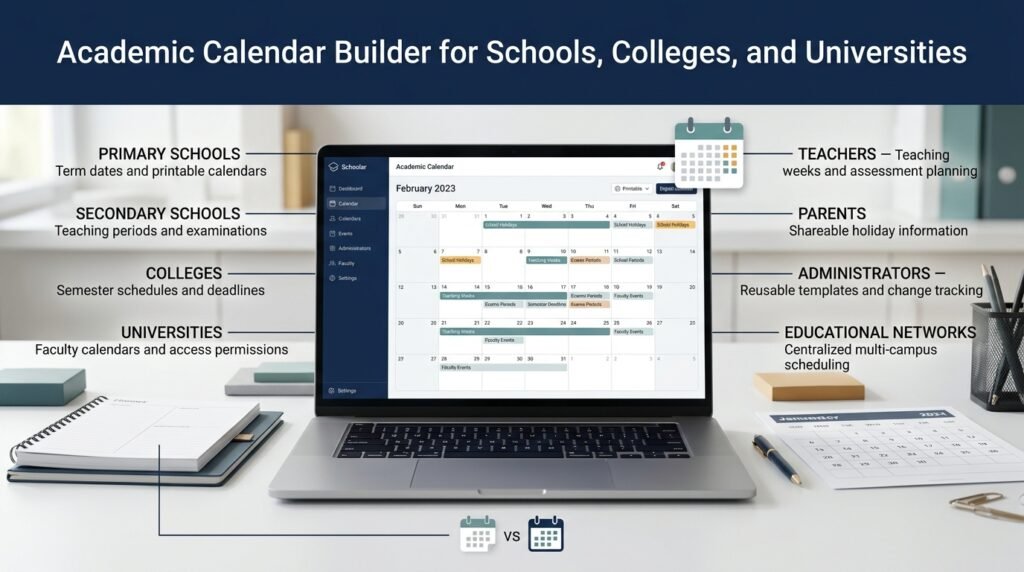
Different educational institutions have different scheduling requirements. The most suitable calendar builder depends on the number of users, the complexity of the academic year, and the level of coordination required.
| User | Main requirement | Useful calendar features |
|---|---|---|
| Primary schools | Holidays, term dates, and school reopening | Simple layouts and printable calendars |
| Secondary schools | Teaching periods, examinations, and breaks | Event categories and assessment dates |
| Colleges | Semester schedules and academic deadlines | Flexible term structures and exports |
| Universities | Registration, examinations, and faculty schedules | Multiple calendars and access permissions |
| Teachers | Lesson preparation and assessment planning | Clear teaching weeks and deadlines |
| Parents | Holidays and student attendance information | Easy-to-read, shareable calendars |
| School administrators | Institution-wide scheduling | Reusable templates and change tracking |
| Educational networks | Coordination across campuses | Centralized management and campus-specific events |
A small institution may only need a spreadsheet and a downloadable PDF. A larger organization may need a digital system that supports multiple departments, separate campus schedules, and controlled editing permissions.
The goal is not to select the most complicated tool. It’s to choose a system that staff can maintain consistently.
What Features Should an Academic Holiday Calendar Builder Include?
The most useful calendar builders combine flexibility, clarity, and dependable information management. Before choosing a platform, identify the features that solve actual scheduling problems for your institution.
Customizable Academic Year and Term Dates
The tool should allow users to define the beginning and end of the academic year and organize it into terms, semesters, trimesters, or other instructional periods.
This flexibility matters because educational institutions do not all follow the same structure.
A school operating on three terms needs different date groupings from a university running two semesters with an optional summer session.
Look for a system that allows you to adjust these periods without rebuilding the entire calendar whenever the institution changes its academic structure.
Holiday Categories and Event Labels
Different events should be easy to distinguish.
Useful categories include public holidays, institutional breaks, religious observances, examination periods, teacher training days, and student-free administrative days.
Color coding can improve readability, but colors should be supported by clear text labels. A calendar that depends entirely on color may be difficult to understand when printed in black and white or viewed by people with color-vision deficiencies.
Recurring Events
Some activities happen regularly, such as monthly staff meetings or recurring administrative deadlines.
A recurring-event feature can save time by allowing an administrator to enter an event once and repeat it according to a defined pattern.
However, recurring events require review. A date that falls on a weekend in one year may fall on a weekday in another, and official holidays may follow different dates each year.
Sharing and Export Options
Different users may need different formats.
A teacher may prefer a digital calendar, while a parent may want a PDF that can be printed and placed on the refrigerator.
Useful export and distribution options can include:
- Printable PDF calendars.
- Spreadsheet files for administrative review.
- Downloadable digital calendar files.
- Shared calendars with read-only access.
- Website-ready calendar displays.
- Separate internal and public versions.
Confirm that the selected tool supports the formats your institution actually uses. Not every calendar builder includes every export option.
Notifications and Change Management
A calendar becomes less useful when important updates fail to reach the people affected.
Some platforms provide notifications when events change or reminders when a deadline approaches. These features can help, but the institution still needs a clear policy for approving and communicating changes.
For example, changing an examination date should trigger an update to the official calendar and a notification to students, teachers, and other relevant groups.
Multiple Campus and Department Support
Educational networks often need one shared institutional framework alongside campus-specific schedules.
A central calendar might include institution-wide holidays, while individual campuses add approved local events.
If your organization has several departments, check whether the platform supports different permissions and prevents users from editing schedules outside their responsibilities.
Accessibility and Mobile Compatibility
A calendar should be readable on a desktop computer, a mobile phone, and a printed page.
Use clear headings, sufficient contrast, understandable event names, and a layout that doesn’t require users to zoom excessively.
Mobile accessibility matters because many students and parents check school information on their phones rather than opening a computer.
Academic Holiday Calendar Builder vs. Manual Calendar Planning
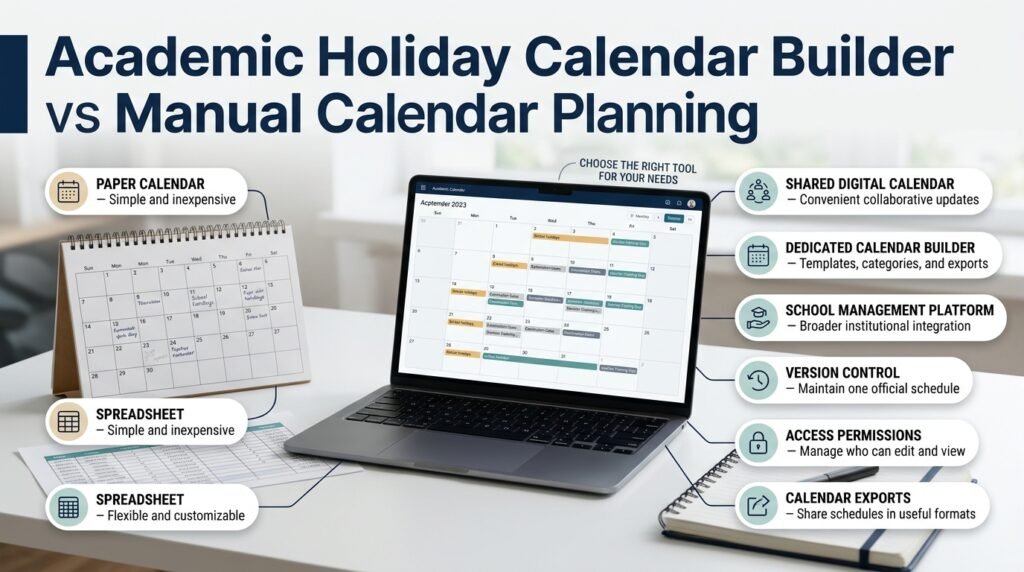
An academic holiday calendar builder can make scheduling easier, but it isn’t always necessary to purchase dedicated software.
The right method depends on how many events need to be managed and how frequently the schedule changes.
| Planning method | Advantages | Limitations | Best use |
|---|---|---|---|
| Paper calendar | Simple, visible, and inexpensive | Difficult to update and distribute | Noticeboards and small teams |
| Spreadsheet | Flexible, familiar, and customizable | Requires manual maintenance | Small schools and basic schedules |
| Shared digital calendar | Convenient access and updates | Requires user access management | Connected staff and families |
| Dedicated calendar builder | May provide templates, categories, and exports | Features and costs vary | Institutions with complex calendars |
| School management platform | May integrate calendars with other systems | Setup and training can be more demanding | Larger educational organizations |
When Is a Spreadsheet Enough?
A spreadsheet is often sufficient for a small school with one campus, a predictable academic year, and a limited number of events.
Administrators can create columns for the date, event name, category, attendance status, and confirmation status.
The main risk is version control. If several people edit separate copies, the institution may end up with conflicting schedules.
To prevent this, keep one official master file and establish who is allowed to update it.
When Is Dedicated Software Worth Considering?
A dedicated platform becomes more attractive when the schedule contains many overlapping events, several campuses, or multiple departments.
It may also be worthwhile when administrators spend substantial time distributing updates or correcting mistakes.
Before paying for a service, test the essential workflow: create an event, change a date, share the calendar, export it, and confirm that users can find the updated information.
Academic Planning and Scheduling Tools can serve as a relevant starting point when exploring the broader role of digital tools in educational planning.
How to Build an Academic Holiday Calendar Step by Step
A reliable calendar begins with verified information and follows a clear planning sequence. Working in the right order helps administrators avoid conflicts and reduces the need for major revisions after publication.
Step 1: Define the Academic Year
Start by confirming the institution’s official academic year.
Determine whether it follows a traditional school-year structure, a semester system, a trimester arrangement, or a year-round model.
Then identify the intended start date, end date, and major instructional periods.
Why it matters: Every other date depends on this framework. Adding holidays before defining the academic structure can result in inconsistent term lengths and insufficient teaching time.
Practical example: A school that operates from August through June should establish the dates of its main terms before assigning winter and spring breaks.
Professional advice: If different programs follow different schedules, decide early whether they need separate calendars or a shared calendar with clearly identified program-specific events.
Step 2: Collect Official Holiday Information
Create a list of holidays that may affect the academic year.
Check relevant government announcements, education authority requirements, and institutional policies. If the institution operates in different regions, verify which holidays apply to each location.
Separate confirmed dates from provisional dates.
For example:
| Event | Status | Action |
|---|---|---|
| Official public holiday | Confirmed | Add to the calendar |
| Approved winter break | Approved | Add to the calendar |
| Religious holiday awaiting official confirmation | Provisional | Mark for review |
| Possible weather closure | Not scheduled | Follow the emergency procedure if needed |
This prevents tentative information from being mistaken for a final decision.
Step 3: Add Terms, Semesters, and Teaching Periods
Once major holidays are identified, establish the instructional periods around them.
Enter term start dates, term end dates, registration periods, orientation sessions, and important curriculum milestones.
Check that each term provides enough teaching time to meet institutional requirements.
If undergraduate, postgraduate, and professional programs follow different schedules, make those differences visible rather than relying on users to infer them.
Step 4: Schedule Examinations and Assessment Deadlines
Examination periods should be considered before the calendar is finalized.
Review the amount of teaching time available before each assessment and consider whether students have sufficient revision time.
Also account for:
- Assignment submission deadlines.
- Practical and laboratory assessments.
- Teacher marking periods.
- Moderation and results processing.
- Supplementary examinations.
- Graduation and completion deadlines.
A holiday placed between teaching and examinations may be appropriate, but it can also create an unexpectedly compressed schedule.
Review the full sequence rather than judging each date independently.
Step 5: Add Staff Development and Administrative Events
Academic calendars should reflect the work required to support teaching.
Include teacher training, staff planning days, parent-teacher meetings, institutional events, and other important activities.
Label each event according to whether students are expected to attend.
For example, a teacher professional development day may mean the school is closed to students even though staff are working.
Clear labels prevent families from confusing an administrative day with a regular school holiday.
Step 6: Calculate Available Instructional Days
Count the scheduled teaching days and subtract non-instructional days that fall on those dates.
Check whether the resulting total meets institutional and applicable regulatory requirements.
Remember that weekends, scheduled closures, and overlapping holidays must be handled consistently to avoid double-counting.
Step 7: Review the Calendar for Conflicts
Before publishing, check the schedule for overlapping events, incorrect dates, and unrealistic timing.
Ask the following questions:
- Does a public holiday fall on a scheduled teaching day?
- Is an examination scheduled during a planned break?
- Does each term provide enough instructional time?
- Are opening and reopening dates clear?
- Do all campuses have the correct schedule?
- Are provisional dates identified?
- Have required approvals been obtained?
Review the calendar with representatives from administration, teaching staff, and other relevant departments. People who were not involved in building the schedule may notice errors that the original planner overlooked.
Step 8: Publish the Approved Calendar
Once the schedule is approved, distribute it in formats suitable for different users.
A school might publish a downloadable PDF for families, maintain a shared digital calendar for staff, and send a short announcement highlighting important dates.
The calendar should include its title, academic year, publication date, and version information.
Make sure people know where to find the official version.
Step 9: Maintain the Calendar Throughout the Year
Calendar management continues after publication.
If an official holiday changes or an emergency closure becomes necessary, update the approved schedule and notify the affected groups.
Keep a record of significant changes, including when the change was made and who authorized it.
This helps administrators explain revisions and identify outdated copies.
Quick Tip: Establish the approval and update procedure before the academic year begins. Decide who can authorize changes, who maintains the calendar, and how students, parents, and staff will be informed.
What Should an Academic Holiday Calendar Include?
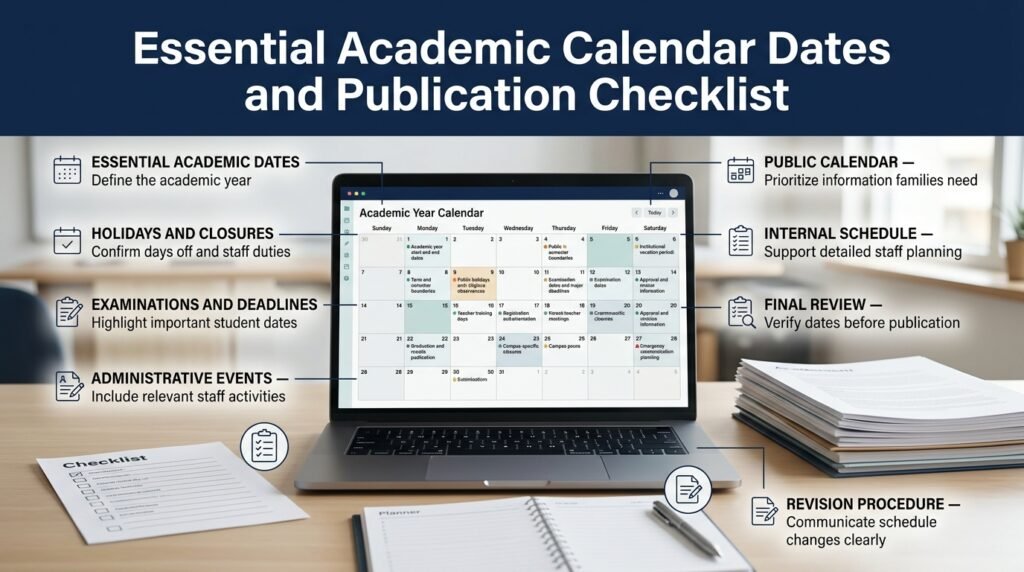
A complete academic calendar should contain the information required to understand the academic year and prepare for important events.
However, not every detail belongs in the public version. The most useful approach is to create a public calendar for general information and a more detailed internal schedule when administrators need additional planning information.
Essential Academic Dates
Include the start and end of the academic year, term boundaries, registration periods, orientation dates, examination periods, and major deadlines.
These dates establish the framework for teaching and learning.
Holidays and Institutional Closures
List applicable public holidays, religious observances, seasonal breaks, and institution-specific closures.
Clearly distinguish between a holiday for everyone and a day when students are off but staff are expected to work.
Assessment and Student Activities
Add examinations, assignment deadlines, results publication, graduation, and other events that significantly affect students.
The public calendar doesn’t necessarily need every classroom-level deadline. Those may be better managed through course schedules or learning management systems.
Administrative Events
Depending on the audience, the calendar may also include teacher training, parent meetings, staff planning days, and admission deadlines.
A public-facing version should prioritize information families need, while an internal version can contain more detailed administrative activities.
Calendar Publication Checklist
- Academic year start and end dates.
- Term or semester boundaries.
- Confirmed public holidays.
- Institutional vacation periods.
- Examination dates and major deadlines.
- Teacher training days.
- Orientation and registration periods.
- Parent-teacher meetings, where relevant.
- Graduation and results dates, where relevant.
- Campus-specific closures.
- Emergency communication procedure.
- Approval and revision information.
Use this checklist before publication and repeat the review whenever a major change affects the schedule.
How to Calculate Teaching Days Around Academic Holidays
One of the most important tasks in academic calendar planning is ensuring that holidays do not reduce instructional time below the institution’s requirements.
The basic calculation is:
Instructional days = Scheduled teaching days − Non-instructional days falling on scheduled teaching days.
This calculation assumes that the institution has already defined which days count as scheduled teaching days. It also requires care when holidays overlap with weekends, existing breaks, or other closures.
A Practical Teaching-Day Example
Suppose a school has 200 scheduled weekdays in an academic period.
During that period:
- 10 weekdays are public holidays.
- 10 weekdays are part of an approved school break.
- 5 weekdays are reserved for staff development without student attendance.
If these categories do not overlap, the calculation is:
200 − 10 − 10 − 5 = 175 student instructional days.
This example assumes that the institution counts weekdays as scheduled school days and that none of the listed closures has already been excluded from the initial total.
If the required instructional-day total is higher, administrators may need to adjust the term dates, reduce discretionary closures, or arrange additional teaching days, subject to applicable rules.
Why the Calculation Needs Care
A calendar may appear well balanced while providing insufficient classroom time.
The number of instructional days can influence curriculum delivery, student preparation, staff workloads, and regulatory compliance.
It’s also important to distinguish student attendance days from teacher working days, examination days, and institutional closure days. These may be counted differently under local policies.
For an accurate calculation, establish the counting rules before entering the dates and apply them consistently across every term.
How to Manage Religious Holidays and Changing Public Holidays
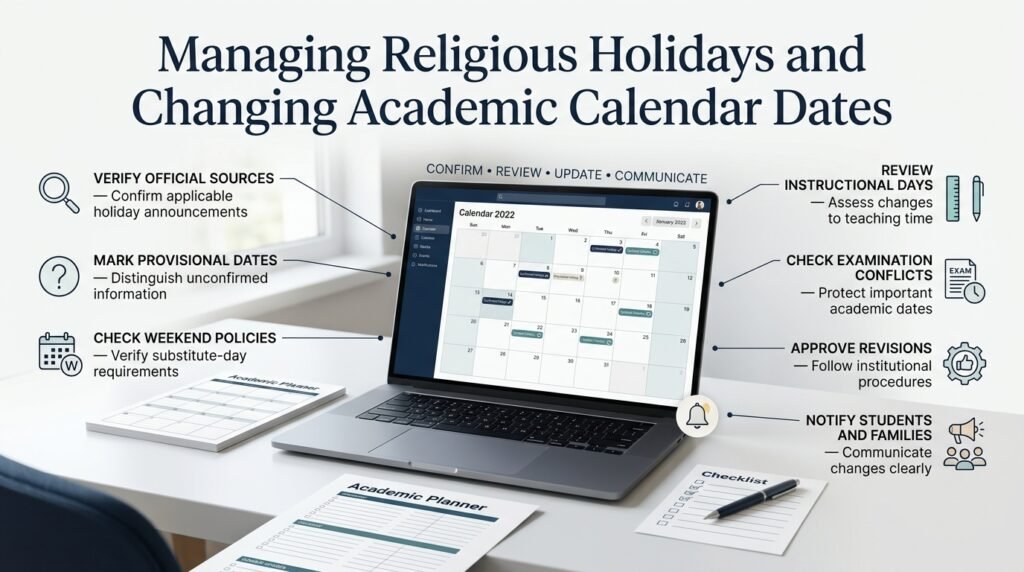
Some holiday dates are known well in advance, while others depend on official announcements or local observation. An academic calendar should reflect that difference rather than treating every date as equally certain.
Start by identifying the holidays that apply to the institution and checking the relevant official sources.
For dates that have not been confirmed, use a provisional label and establish a review deadline. Once an official announcement is available, update the calendar and communicate the confirmed date.
What If a Holiday Falls on a Weekend?
The institution should follow the applicable government rules and its own approved policy. Some holidays may have substitute days, while others may not affect the teaching schedule at all.
Don’t automatically move every weekend holiday to the following weekday. Verify whether a substitute day has officially been declared or whether institutional policy requires a different arrangement.
What If a Holiday Is Announced After Publication?
Treat the change as a formal calendar revision.
The administrator should confirm the announcement, assess its effect on instructional days and examinations, obtain approval where required, and update the official version.
If the change affects students or parents, issue a clear notification rather than assuming everyone will notice the revised calendar.
Common Academic Calendar Mistakes and How to Avoid Them
Even an attractive calendar can create problems if its dates are incorrect, its instructions are unclear, or the institution fails to maintain it.
Mistake 1: Using Unverified Dates
Why it happens: Administrators copy dates from last year’s calendar or rely on unofficial information.
Why it’s harmful: Public holidays and religious observances may change, and local rules may differ.
How to avoid it: Verify dates against the relevant official authority. Mark uncertain dates as provisional until they are confirmed.
Mistake 2: Ignoring Examination Preparation
Why it happens: The planner finalizes term dates and vacations before mapping assessments.
Why it’s harmful: Students may have insufficient revision time, and teachers may struggle to finish the syllabus.
How to avoid it: Add examination periods and curriculum milestones before approving the holiday schedule.
Mistake 3: Publishing Conflicting Calendar Versions
Why it happens: Different departments maintain separate copies without a clear owner.
Why it’s harmful: Students and parents may receive different reopening dates or examination schedules.
How to avoid it: Maintain one approved master calendar, identify the current version, and archive outdated copies.
Mistake 4: Confusing Holidays With Staff Training Days
Why it happens: Events are entered using vague labels such as “school closed.”
Why it’s harmful: Families may misunderstand whether students are expected to attend or whether staff are working.
How to avoid it: Use precise event names and explain attendance expectations wherever necessary.
Mistake 5: Forgetting to Communicate Changes
Why it happens: An administrator updates the calendar but doesn’t notify affected groups.
Why it’s harmful: Families may arrange transport incorrectly, and students may miss scheduled activities.
How to avoid it: Establish a standard change-notification process that identifies the revised date, the reason, and any action required.
Mistake 6: Choosing a Tool That Is Too Complicated
Why it happens: Institutions focus on advanced features instead of their actual needs.
Why it’s harmful: Staff may avoid using the system or rely on one person to maintain it.
How to avoid it: Test the tool with real users and choose the simplest system that meets the institution’s requirements.
Mistake 7: Making the Calendar Difficult to Read
Why it happens: Too many colors, abbreviations, or events are placed into a crowded layout.
Why it’s harmful: Users struggle to identify important dates quickly.
How to avoid it: Use clear labels, consistent categories, readable typography, and separate views where necessary.
Expert Advice for Building a More Reliable Academic Calendar
Professionals who manage academic schedules benefit from treating the calendar as an ongoing operational document rather than a one-time publication.
Work Backward From Fixed Deadlines
Begin with dates that are difficult to move, such as official examination periods, graduation requirements, and regulatory deadlines.
Then work backward to identify when teaching must begin, when the syllabus should be completed, and how much preparation time students need.
This method helps reveal conflicts before they affect the whole academic year.
Separate Fixed Dates From Flexible Dates
Some dates are determined by external authorities, while others can be adjusted by the institution.
Label these categories clearly. This makes it easier to understand which events can be moved when a conflict occurs and which must remain unchanged.
Use a Consistent Naming System
Choose clear event names and use them consistently.
For example, use “Winter Break” throughout the calendar rather than alternating between several labels for the same period.
Consistent naming improves searchability and reduces misunderstandings.
Review the Calendar Before Each Term
Schedule a short review before every new term.
Confirm upcoming holidays, check examination dates, verify any outstanding provisional events, and make sure the published information remains current.
This review should also confirm that any earlier revisions have been communicated to the appropriate groups.
Maintain a Change Log and Backup
Keep a secure copy of the approved calendar and record significant revisions.
A simple change log can include the date of the change, the event affected, the reason for the revision, and the person who approved it.
This record helps administrators resolve disputes about dates and recover from accidental edits.
Ask Users to Test the Calendar
Before publishing a new calendar format, ask a teacher, parent, or student representative to review it.
Can they find the reopening date quickly? Can they distinguish an examination from a holiday? Is the calendar readable on a phone?
A brief usability review can identify confusing labels and layout problems that administrators may overlook.
How to Evaluate Whether Your Academic Calendar Is Working
A calendar should be judged by how well it supports real scheduling needs, not simply by its appearance.
Institutions can evaluate the process using a few practical indicators.
Accuracy: How many corrections are required after publication? Frequent corrections may indicate weak verification or approval procedures.
Communication: Do students and parents receive updates promptly? Repeated questions about dates may suggest that announcements are unclear or difficult to find.
Consistency: Are staff using the approved master calendar, or are conflicting copies circulating?
Efficiency: How much time does the administration spend creating, updating, and distributing the schedule?
Usability: Can users find key dates without assistance?
Reviewing these indicators at the end of the academic year helps identify improvements for the next planning cycle.
For example, if families repeatedly confuse staff development days with school holidays, the solution may be clearer labels rather than a different software platform.
What Is the Best Academic Holiday Calendar Builder for Schools and Universities?
The best academic holiday calendar builder is one that makes it easy to organize school holidays, semester dates, examinations, and important academic events without creating additional administrative work. The right choice depends on the institution’s size, scheduling requirements, budget, and the number of people who need access to the calendar. A small school may manage its schedule effectively with a customizable spreadsheet, while a university with multiple departments may need a digital platform with shared calendars, access permissions, and export options.
Before choosing a tool, consider how administrators will update dates, how teachers and parents will access the information, and whether the calendar can accommodate changes during the academic year. A complicated platform isn’t necessarily better if staff find it difficult to maintain.
Important points to consider:
Choose a tool that supports your academic year, terms, semesters, and holiday categories.
Check whether it offers printable calendars and convenient digital sharing.
Look for straightforward editing and reliable update procedures.
Consider access permissions if several departments manage different schedules.
Test the tool with real users before committing to a paid plan.
How Do I Create an Academic Holiday Calendar for an Entire School Year?
Creating an academic holiday calendar starts with defining the academic year and identifying the dates that must remain fixed. These usually include official public holidays, approved term dates, examination periods, and important institutional deadlines. Once these dates are confirmed, administrators can add seasonal breaks, staff development days, orientation sessions, and other activities that affect the school schedule.
The next step is to calculate the available instructional days and review the calendar for conflicts. For example, if a planned winter break overlaps with an examination period, the administration may need to adjust the assessment schedule before publishing the final version. After the calendar has been checked and approved, it should be shared with students, parents, and teachers through an accessible format.
A practical calendar-building checklist:
Define the academic year’s opening and closing dates.
Add confirmed public holidays and institutionally approved breaks.
Schedule examinations, assessments, and registration deadlines.
Calculate instructional days and check for scheduling conflicts.
Obtain the required approval before publishing.
Assign someone to manage future updates and communicate changes.
How Can an Academic Holiday Calendar Builder Help Prevent Scheduling Conflicts?
An academic holiday calendar builder helps prevent scheduling conflicts by bringing important dates into one organized view. Instead of checking separate spreadsheets, emails, and departmental notices, administrators can review holidays, teaching periods, examinations, and staff activities together. This makes it easier to identify events that overlap or leave insufficient time for academic preparation.
For instance, a school might accidentally schedule teacher training on a day when students are expected to attend examinations. A properly reviewed calendar can reveal this conflict before the schedule is distributed. However, a calendar builder cannot prevent every mistake automatically. Administrators still need to verify dates, apply institutional policies, and review changes before they become official.
Best practices for avoiding conflicts:
Maintain one approved master calendar.
Check examination periods against holidays and teaching schedules.
Review dates with relevant academic departments before publication.
Clearly distinguish student holidays from staff working days.
Record approved changes and notify everyone affected.
Recheck the schedule before the beginning of each academic term.
How Do I Calculate School Days and Holidays When Building an Academic Calendar?
To calculate instructional days, begin with the scheduled teaching days in the academic period and subtract non-instructional days that fall on those dates. These may include public holidays, school vacation days, staff development days without student attendance, and other approved closures. The calculation must follow the institution’s definition of an instructional day and any applicable education authority requirements.
For example, suppose a school has 200 scheduled weekdays in a particular academic period. If 10 weekdays are public holidays, another 10 are school vacation days, and five are reserved for staff training without student attendance, the school has 175 instructional days, assuming none of these dates overlap or has already been excluded.
Calculation:
Instructional days = Scheduled teaching days − Non-instructional days falling on scheduled teaching days.
Points to remember:
Do not subtract weekends if they were never included in the original teaching-day total.
Avoid counting the same closure twice when holidays overlap with existing breaks.
Distinguish student attendance days from teacher working days.
Verify the required instructional-day total under applicable institutional or regulatory rules.
Review the final calculation whenever a holiday or examination date changes.
How Often Should an Academic Holiday Calendar Be Updated?
An academic holiday calendar should be reviewed before publication and maintained throughout the academic year. Even when most dates are confirmed in advance, public announcements, institutional decisions, weather-related closures, or examination changes may require revisions. Regular reviews help ensure that students, parents, and staff are working from the same accurate schedule.
For a school with a stable academic structure, reviewing the upcoming dates before each term may be sufficient, alongside immediate updates whenever a significant change occurs. Universities and institutions with multiple campuses may require more frequent checks because different departments can have different examination periods, registration deadlines, and operational requirements.
A reliable update routine should include:
Verify provisional holidays when official dates are announced.
Review upcoming events before every academic term.
Update the approved calendar as soon as a change is authorized.
Notify affected students, parents, and staff through established communication channels.
Keep a record of significant revisions and approval dates.
Archive outdated versions so users can identify the current official calendar.
The goal is to ensure that everyone can find the latest approved information without relying on old notices or conflicting calendar copies.
Conclusion
An academic holiday calendar builder is more than a simple scheduling tool; it is a practical way to organize the entire academic year with greater clarity, consistency, and confidence. By bringing term dates, public holidays, examination periods, staff development days, school closures, and important academic events into one structured calendar, schools and universities can reduce scheduling conflicts and make better decisions about instructional time. A well-planned calendar also helps teachers prepare lessons, administrators coordinate responsibilities, students manage their workload, and families arrange their schedules in advance.
The most effective approach begins with understanding institutional requirements, confirming official holidays, calculating available teaching days, and reviewing important academic deadlines before publishing the calendar. Schools should also consider regional regulations, religious observances, examination requirements, staff availability, and unexpected closures. Regular reviews and clear communication ensure that the calendar remains useful throughout the academic year rather than becoming an outdated document.
Institutions looking to improve their scheduling process can explore Academic Planning and Scheduling Tools to understand how structured planning resources can support more organized academic operations. Combining these tools with a consistent review process makes it easier to maintain accurate dates, identify potential conflicts, and communicate changes to everyone involved.
Ultimately, successful academic calendar planning depends on accuracy, flexibility, and collaboration. Whether an institution uses a spreadsheet, a digital platform, or a dedicated academic holiday calendar builder, the goal remains the same: create a reliable schedule that protects instructional time while allowing enough flexibility to respond to changing circumstances. With thoughtful preparation and regular updates, schools and universities can build an academic calendar that supports smoother operations, better communication, and a more predictable learning experience for the entire academic community.