

Introduction
Class timetable planning can become a major challenge when several classes share the same teachers, classrooms, and specialist facilities. A single scheduling mistake can leave a class without a teacher, create a laboratory booking conflict, or force administrators to reorganize an entire week’s lessons. The solution isn’t simply to fill empty periods; it’s to build a schedule around clear requirements, realistic workloads, and students’ learning needs.
Effective RTI Scheduler planning begins with understanding how subjects, teachers, rooms, and academic commitments fit together. Schools need a system that makes every lesson accountable, every resource available when required, and every timetable change manageable.
This comprehensive guide explains how to create a class timetable from scratch, distribute subjects across the week, manage teacher availability, avoid classroom conflicts, and decide when digital scheduling tools are worthwhile. It also covers common mistakes, practical examples, timetable validation, and the relationship between classroom scheduling and wider academic planning.
Whether you’re preparing a timetable for a primary school, secondary school, college, or multiple academic sections, the goal is the same: create a schedule that supports teaching, reduces administrative pressure, and remains practical throughout the academic term.
What Is Class Timetable Planning?
Class timetable planning is the process of organizing subjects, teachers, classrooms, lesson periods, and school activities into a structured daily or weekly schedule. It ensures that every class receives its required instructional time while teachers and facilities are allocated without scheduling conflicts.
A timetable must satisfy several requirements simultaneously. Students need an understandable learning routine, teachers need workable assignments, and administrators must ensure that rooms, equipment, and teaching hours meet institutional requirements.
For example, a secondary school might offer mathematics, English, science, computer studies, social studies, and physical education. Each subject has a particular weekly teaching requirement, but the school may have only one computer laboratory and a limited number of specialist teachers.
Class timetable planning brings these requirements together in a coordinated schedule.
Why Is Class Timetable Planning Important?
A well-organized timetable improves the daily operation of an educational institution by making responsibilities, lesson times, and resource allocations clear.
Its main benefits include:
- Consistent learning routines: Students know which subjects they will study and when.
- Better teacher coordination: Staff members can prepare lessons and manage their teaching responsibilities.
- Fewer scheduling conflicts: Classes, teachers, and rooms are less likely to be double-booked.
- Efficient resource utilization: Laboratories, computer rooms, libraries, and sports facilities can be allocated appropriately.
- Improved workload management: Administrators can identify uneven teaching assignments and unnecessary gaps.
- More predictable school operations: Changes to academic activities can be managed with less disruption.
A timetable is not simply an administrative document. It is an operational plan that connects curriculum delivery with the people and resources required to make it happen.
What Information Is Needed Before Creating a Class Timetable?
Before assigning lessons to specific periods, collect the information that determines which arrangements are possible. Starting with an empty timetable grid often leads to repeated revisions because important constraints are discovered too late.
1. List Every Class, Section, and Subject
Prepare a complete list of classes and sections, including their subjects and required weekly teaching periods.
For example, Grade 8-A and Grade 8-B may follow the same curriculum but require separate lessons because they have different teachers or classroom assignments.
Record the following for each class:
- Grade and section name.
- Subjects included in the curriculum.
- Required periods per subject per week.
- Required lesson duration.
- Practical or double-period requirements.
- Any shared lessons or special arrangements.
This information establishes the teaching requirements that the final timetable must satisfy.
2. Record Teacher Availability and Qualifications
A teacher’s availability is one of the most important scheduling constraints. Administrators must know which subjects each teacher can teach, which classes they support, and when they are available.
Consider a teacher who teaches mathematics to three grades. That teacher cannot be assigned to two of those classes during the same period, even if both classes have mathematics scheduled in their curriculum.
Teacher records should include:
- Subjects the teacher is qualified to teach.
- Assigned classes and sections.
- Maximum permitted teaching load.
- Approved unavailable periods.
- Part-time or fixed working hours.
- Administrative duties and other responsibilities.
Accurate records make it easier to distribute lessons fairly and avoid conflicts before the timetable is published.
3. Prepare a Classroom and Facility Inventory
Not every lesson can take place in an ordinary classroom. Practical subjects may require specialized equipment, additional space, or particular safety arrangements.
Prepare a list of available facilities and their capacities. Include ordinary classrooms, science laboratories, computer rooms, libraries, sports areas, and other shared spaces.
For each facility, record its seating capacity, available equipment, accessibility requirements, and periods when it cannot be used.
For example, if a science laboratory accommodates only one class at a time, all laboratory sessions must be assigned to different available periods. A timetable that ignores this limitation may appear complete but will fail during actual lessons.
4. Define the School Day
Establish the school’s working days, opening and closing times, lesson durations, and break arrangements.
A school might use seven teaching periods per day, while another may use fewer periods of longer duration. Some institutions also operate shortened days or different schedules for particular academic activities.
Confirm the following before scheduling begins:
- Start and end times for each teaching period.
- Morning, lunch, and afternoon breaks.
- Assembly and other fixed activities.
- Working days and any shortened days.
- Required teacher preparation periods.
- Institutional policies concerning maximum teaching loads.
Expert tip: Finalize the period structure before assigning subjects. Changing lesson duration or break times later can require extensive revisions across the entire timetable.
How Do You Create a Class Timetable Step by Step?

The most reliable approach is to establish requirements first, schedule the most restricted activities next, and fill flexible periods afterward. This reduces avoidable conflicts and helps administrators make better decisions.
Step 1: Establish the Scheduling Requirements
Create a requirement sheet showing the subjects, classes, teachers, facilities, and weekly teaching periods.
Separate mandatory requirements from preferences. For example, a teacher’s availability is a mandatory constraint, while a preference for teaching mathematics during an earlier period may be flexible.
Why it matters: Clear requirements prevent administrators from creating a timetable that looks organized but fails to meet the curriculum or staffing rules.
Step 2: Calculate Available Teaching Periods
Count the available periods for each class after removing breaks, assemblies, and other non-teaching activities.
Compare this capacity with the total number of periods required by the curriculum.
For example, if a class has 35 available weekly periods but its subject requirements total 38, the timetable cannot be completed as specified. Administrators must investigate the discrepancy before assigning individual lessons.
Professional advice: Perform this capacity check early. No scheduling method can solve a timetable that demands more teaching periods than the school actually has available.
Step 3: Schedule Fixed Activities
Place activities that cannot easily be moved, such as assemblies, shared events, designated breaks, and fixed institutional commitments.
These activities form the framework around which the remaining lessons must fit.
Why it matters: Scheduling flexible subjects first can leave insufficient space for activities that must occur at particular times.
Step 4: Allocate Specialist Teachers and Rooms
Schedule lessons that depend on limited resources, including science laboratories, computer rooms, sports facilities, and specialist teachers who serve several classes.
Suppose four classes need access to one computer laboratory. Assign their sessions only after checking the availability of the laboratory, the relevant teacher, and each class.
Common mistake: Booking the laboratory without checking the teacher’s availability. Every lesson requires all its essential resources to be available at the same time.
Step 5: Distribute the Remaining Subjects
Once restricted lessons have been placed, schedule the remaining subjects according to curriculum requirements, student learning needs, and teacher availability.
Spread frequently taught subjects across the week where appropriate. Avoid unnecessary clustering of demanding subjects and consider the relationship between lesson duration and the activity being taught.
For example, a practical science lesson may need a longer uninterrupted period, while a short language practice activity may fit comfortably into a standard period.
Step 6: Review Teacher Workloads
Examine each teacher’s complete weekly schedule. Count teaching periods, review consecutive lessons, and identify unnecessary gaps or uneven distributions.
A timetable can be conflict-free but still create an unreasonable workload for an individual teacher.
Adjust assignments where possible without violating subject requirements, teacher qualifications, or other essential constraints.
Step 7: Validate the Complete Schedule
Review the timetable from class-wise, teacher-wise, and room-wise perspectives.
Confirm that:
- Every class has the correct number of lessons.
- No teacher is scheduled in two places simultaneously.
- Shared rooms are not double-booked.
- Required teaching hours are satisfied.
- Breaks and fixed activities are included.
- Lesson arrangements are realistic.
Step 8: Publish and Maintain the Timetable
Once the schedule has been approved, share the relevant timetable with teachers, students, and other authorized stakeholders.
Explain when it takes effect and establish a process for communicating changes. Keep one official version so that printed copies and digital schedules do not contradict each other.
How Should Subjects Be Distributed Across the Week?
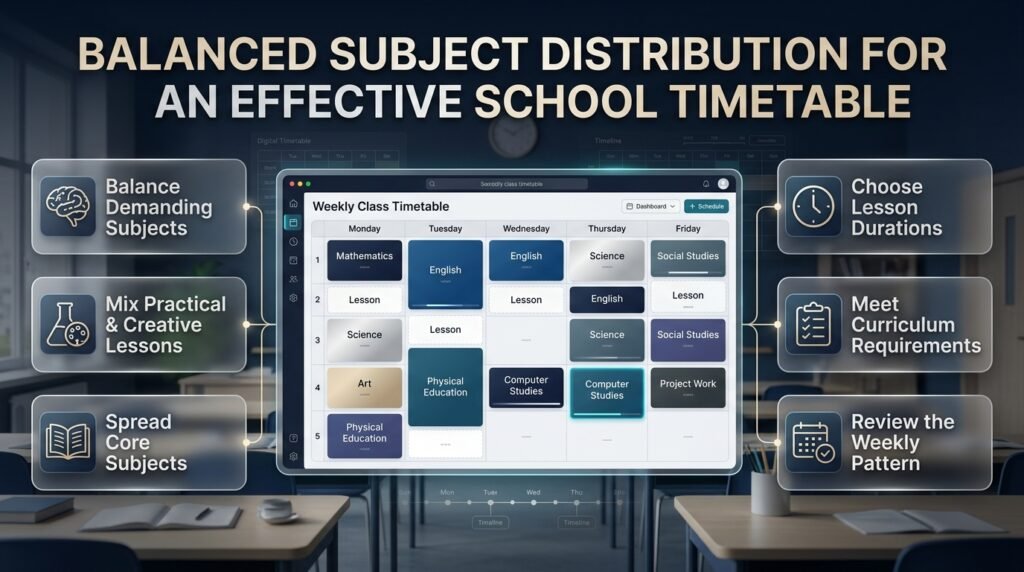
Subject distribution affects the rhythm of the school day, students’ preparation routines, and teachers’ ability to deliver lessons effectively. A good timetable considers frequency, lesson type, curriculum requirements, and the practical demands of each subject.
Balance Demanding and Practical Subjects
Mathematics, physics, advanced language lessons, and other demanding subjects may require sustained attention. Practical activities, creative lessons, and physical education offer different types of engagement.
A balanced schedule should consider these differences without applying rigid rules to every class.
For example, placing all demanding subjects on Monday and Tuesday may create an unnecessarily difficult start to the week. Distributing them more evenly can produce a more manageable routine.
Useful practices include:
- Spread frequently taught subjects across several days when appropriate.
- Avoid placing every demanding lesson consecutively.
- Allocate sufficient time for laboratory and project-based activities.
- Consider preparation and equipment requirements before assigning practical lessons.
- Review the entire week rather than optimizing one day in isolation.
Should Every Subject Be Taught Daily?
Not necessarily. Some subjects benefit from frequent short sessions, while others may require fewer, longer lessons.
The right arrangement depends on the curriculum, students’ ages, lesson objectives, and institutional requirements.
For example, a primary school may emphasize frequent literacy and numeracy activities, while a secondary school may schedule certain practical subjects in longer blocks.
The important consideration is whether the distribution supports learning and satisfies the required instructional time.
Example of a Weekly Subject Distribution
The following simplified example illustrates how subjects might be distributed for one class.
| Day | Earlier periods | Later periods |
|---|---|---|
| Monday | Mathematics, English | Science, Art |
| Tuesday | English, Mathematics | Social Studies, PE |
| Wednesday | Science, English | Mathematics, Computer Studies |
| Thursday | Mathematics, Social Studies | Science, PE |
| Friday | English, Mathematics | Computer Studies, Project Work |
This is an illustrative distribution, not a complete timetable. A real schedule must include all curriculum subjects, teachers, lesson times, and breaks.
Pro tip: Check whether the weekly pattern leaves one day unusually demanding or concentrates too many practical lessons into a single period block. Small adjustments can improve the overall experience.
How Can Schools Prevent Teacher and Classroom Conflicts?
Scheduling conflicts occur when two activities require the same resource at the same time. These conflicts may involve teachers, classes, rooms, equipment, or student groups.
The most reliable prevention method is to check every assignment against the full set of scheduling requirements.
Teacher Conflicts
A teacher conflict occurs when one teacher is assigned to two classes during the same period.
Prevent this by maintaining a teacher-wise timetable that shows every assigned lesson across all classes. Check availability before moving or adding a lesson.
Class Conflicts
A class conflict occurs when the same student group is assigned two lessons simultaneously.
Review every class timetable to ensure that each period has the correct lesson and that students are not expected to attend two activities at once.
Where students split into elective groups, check the individual group arrangements as well.
Room Conflicts
A room conflict occurs when two classes are assigned to the same facility during the same period.
Maintain a room-wise schedule for laboratories, libraries, computer rooms, and other shared spaces. Confirm that each booking fits the room’s capacity and equipment requirements.
Capacity and Equipment Conflicts
A classroom may be available but unsuitable for the assigned activity.
For example, a computer lesson may require enough functioning devices for the class, while a science experiment may need particular equipment and safety arrangements.
Administrators should confirm that the facility is appropriate, not merely available.
Use a Master Timetable
A master timetable combines the schedules of all classes, teachers, and rooms into one coordinated view.
This makes it easier to detect problems that might be hidden in an individual class schedule.
For example, Grade 9-A may appear to have a complete mathematics lesson, but the master timetable may reveal that its assigned teacher is already teaching Grade 10-B.
Expert tip: After changing one lesson, check all connected allocations. A correction that solves a teacher conflict may create a room conflict or leave another class without a required period.
How Can Administrators Balance Teacher Workloads?

Teacher workload management involves more than counting weekly lessons. Administrators must consider lesson preparation, consecutive teaching periods, practical responsibilities, administrative duties, and the distribution of work throughout the week.
Review Total Teaching Hours
Count each teacher’s assigned periods and compare the total with their permitted workload.
If a teacher is assigned to several grades, review the entire schedule rather than considering each class separately.
Reduce Unnecessary Gaps
Long gaps between lessons can make the working day less efficient. Where possible, group assignments sensibly while preserving preparation time and appropriate breaks.
However, removing every free period is not necessarily desirable. Teachers may need time for lesson preparation, marking, student support, or other responsibilities.
Distribute Work Fairly
Fairness does not always mean assigning every teacher the same number of periods. A teacher handling specialist practical lessons may have different preparation requirements from a teacher teaching a different subject.
Consider workload, role, availability, and approved arrangements when evaluating fairness.
Avoid Excessive Consecutive Lessons
Repeatedly scheduling a teacher for long sequences of lessons may reduce opportunities for preparation and recovery.
Where the timetable allows, distribute teaching periods more reasonably across the day and week.
The aim is to create a schedule that teachers can sustain while meeting the institution’s instructional requirements.
How Do Academic Calendars and School Events Affect Class Timetable Planning?
A class timetable operates within a larger academic schedule. Holidays, examinations, semester milestones, staff development days, and school events may change when ordinary lessons can take place.
Planning these commitments together helps prevent avoidable disruption.
Coordinate With Academic Calendar Planning
Academic calendar planning establishes the broader structure of the school year, including teaching periods, term dates, holidays, and important deadlines.
Class timetable planning works at a more detailed level by assigning subjects and teachers to the available periods within that structure.
For a broader view of coordinating these responsibilities, see Academic Calendar Planning.
Account for Holidays and Non-Teaching Days
School holidays and closures reduce the number of available teaching days. Administrators should account for these dates before deciding how to distribute lessons across a term.
The Academic Holiday Calendar Builder is a relevant resource for organizing holiday and non-teaching dates within the wider academic schedule.
Plan Semester Milestones Early
Examinations, assessment deadlines, project submissions, and other academic milestones may require changes to ordinary lesson arrangements.
The Semester Milestone Calendar can support the coordination of important academic dates alongside regular teaching plans.
Include School-Wide Events
Assemblies, parent meetings, sports days, cultural activities, and other school events may affect classrooms, teachers, and available teaching time.
The School Year Event Calendar can help organize these commitments so that administrators can identify potential disruptions before finalizing the timetable.
The key principle is to coordinate the broader calendar with the weekly timetable rather than treating each as an independent document.
What Is the Best Method for Class Timetable Planning?
The best method depends on the institution’s size, the number of classes, the complexity of teacher assignments, and the availability of scheduling resources.
| Method | Main advantage | Main limitation | Suitable situation |
|---|---|---|---|
| Paper timetable | Simple to prepare | Difficult to revise and validate | Very small or temporary schedules |
| Spreadsheet | Flexible and familiar | Requires deliberate conflict checks | Straightforward school schedules |
| Scheduling software | May automate allocation and conflict detection | Requires accurate setup and suitable features | Complex or frequently changing schedules |
| Hybrid approach | Combines digital checks with human judgment | Requires consistent version control | Institutions with varied requirements |
When Is a Spreadsheet Enough?
A spreadsheet can work well when the school has relatively few classes, stable teacher assignments, and limited shared facilities.
Create separate views for class timetables, teacher workloads, room bookings, and weekly subject requirements.
Use consistent identifiers for teachers, rooms, classes, and subjects. Where appropriate, formulas and conditional formatting can help highlight missing periods or duplicate assignments.
However, a spreadsheet does not automatically guarantee a valid timetable. Administrators must design and test the checks that identify conflicts.
When Should You Consider Scheduling Software?
Dedicated scheduling software may be worthwhile when many classes share teachers, specialist rooms are heavily used, or administrators frequently need to revise lesson allocations.
Depending on the product, features may include:
- Teacher and classroom availability management.
- Automated timetable generation.
- Conflict detection.
- Workload summaries.
- Multiple timetable views.
- Printing and digital distribution.
Before selecting a tool, confirm which constraints it can actually handle. Some products may check teacher conflicts but require separate verification of classroom availability or more complex arrangements.
The software should support the institution’s scheduling process rather than replace accurate data and professional judgment.
What Are the Most Common Class Timetable Planning Mistakes?

Most timetable problems arise when administrators focus on filling empty periods instead of validating the complete schedule.
Scheduling Flexible Lessons First
Why it happens: Ordinary classroom lessons appear easy to place.
Why it’s harmful: Specialist teachers and limited facilities may have no suitable periods left.
How to avoid it: Schedule restricted resources and fixed commitments first, then place flexible lessons around them.
Ignoring Teacher Workloads
Why it happens: Individual class timetables may look reasonable even when one teacher has an unmanageable weekly schedule.
Why it’s harmful: Teachers may face excessive consecutive lessons, unnecessary gaps, or uneven workloads.
How to avoid it: Review every teacher’s complete schedule before approval.
Forgetting Room Capacity
Why it happens: Administrators assume that any available classroom can accommodate any class.
Why it’s harmful: Students may lack suitable seating, equipment, or space for the planned lesson.
How to avoid it: Maintain an accurate room inventory and check enrollment against capacity.
Overloading Particular Days
Why it happens: Subjects are assigned according to convenience rather than the overall weekly pattern.
Why it’s harmful: Students may experience an unnecessarily demanding day or an uneven distribution of practical activities.
How to avoid it: Review the entire week and make adjustments while respecting curriculum requirements.
Failing to Validate Changes
Why it happens: A revised lesson is assumed to be correct because the original problem has been resolved.
Why it’s harmful: Moving one class may create another teacher, room, or student-group conflict.
How to avoid it: Recheck all affected assignments after every significant revision.
Publishing Multiple Conflicting Versions
Why it happens: Different staff members keep separate copies and make independent changes.
Why it’s harmful: Students and teachers may follow outdated information.
How to avoid it: Maintain one approved timetable, identify its effective date, and communicate revisions through established channels.
What Practical Strategies Help Improve an Existing Timetable?
Improving an existing timetable begins with identifying recurring problems rather than changing lessons without a clear reason.
Review Actual Scheduling Problems
Collect feedback from teachers and administrators. Identify repeated room conflicts, excessive gaps, uneven subject distribution, and lessons that regularly need to be moved.
Separate isolated incidents from recurring patterns. A one-time room closure may not justify a permanent change, while a repeated laboratory bottleneck may require a broader redesign.
Measure Resource Utilization
Review how frequently classrooms and specialist facilities are used during available periods.
Look for rooms that remain unnecessarily vacant while other facilities are overloaded. Adjust allocations where practical, but consider equipment, accessibility, capacity, and the distance between locations.
Protect Required Instructional Time
Check whether each subject receives the required number of periods. If a timetable change reduces the available teaching time, identify how the institution will address the shortfall.
Never improve convenience by silently removing required lessons.
Test Proposed Changes Before Approval
Before making a major change, compare the proposed arrangement with the existing timetable.
Check teacher availability, room bookings, student-group assignments, and subject-period totals. Review the change with relevant staff when it affects their responsibilities.
This controlled approach is more reliable than repeatedly editing the timetable until it looks satisfactory.
What Should Be Included in a Final Timetable Review?
Before publication, use a structured review to verify that the timetable is complete and practical.
- All classes and sections are included.
- Every subject receives its required weekly periods.
- Teacher qualifications and availability are confirmed.
- No teacher is assigned to overlapping lessons.
- Each class has one appropriate lesson per period.
- Rooms and specialist facilities are available.
- Room capacities match enrollment.
- Breaks and fixed activities are included.
- Teacher workloads have been reviewed.
- Subject distribution is reasonable across the week.
- Academic events and non-teaching days have been considered.
- The timetable has been approved and shared through the official process.
A final review should examine the schedule from the student, teacher, room, and administrative perspectives. A timetable that works in one view may still contain problems elsewhere.
Expert Recommendations for Better Class Timetable Planning
Professional timetable planning relies on consistent procedures, reliable information, and careful review.
Maintain one source of truth. Keep one approved master timetable and ensure that individual class and teacher schedules reflect the same allocations.
Separate essential requirements from preferences. Preventing double-bookings and meeting curriculum requirements must take priority over optional scheduling preferences.
Plan for foreseeable changes. Staff leave, room maintenance, enrollment changes, and examination periods may require adjustments. Establish a clear procedure for reviewing and communicating changes.
Keep a record of revisions. Record what changed, when the new arrangement takes effect, and which classes or teachers are affected. This makes later reviews easier.
Review the timetable after implementation. A schedule should be evaluated against actual classroom operations, not only its appearance on a screen or printed page.
Use technology where it adds real value. Automated checks can reduce repetitive work, but administrators remain responsible for verifying educational suitability and institutional compliance.
For schools coordinating teaching schedules with broader academic activities, RTI Scheduler provides a starting point for exploring academic scheduling and planning resources.
How Do You Create an Effective Class Timetable for a School?
Creating an effective class timetable starts with understanding the school’s curriculum, available teaching periods, teacher availability, and classroom requirements. Administrators should first determine how many periods each subject needs per week and identify any lessons that require specialist teachers, laboratories, or other shared facilities. Once these requirements are clear, lessons can be distributed across the week without creating unnecessary conflicts or overloading particular days.
A well-planned timetable should also consider students’ learning needs and teachers’ workloads. For example, scheduling several demanding subjects consecutively may make the school day unnecessarily challenging, while placing every practical lesson at the end of the day may create resource and supervision problems. Reviewing the complete weekly schedule helps administrators identify these issues before publishing the timetable.
Practical steps to follow:
List all classes, subjects, and required weekly teaching periods.
Confirm teacher availability and classroom capacity.
Schedule fixed activities and specialist lessons first.
Distribute the remaining subjects across the week.
Check for teacher, classroom, and class-group conflicts before approval.
What Is the Best Way to Prevent Teacher and Classroom Scheduling Conflicts?
The most reliable way to prevent scheduling conflicts is to maintain a master timetable that coordinates teachers, classes, classrooms, and specialist facilities in one system. A lesson should only be assigned when every required resource is available at the same time. Checking a class timetable alone is not enough because a lesson may appear correctly scheduled for students while its teacher or classroom is already assigned elsewhere.
For example, if two classes require the same science laboratory during the third period, the administrator must move one session to another suitable period. Before confirming the change, they should also check the science teacher’s availability and the affected class’s existing schedule. This prevents one correction from creating another problem.
Practical methods for avoiding conflicts:
Maintain separate class-wise, teacher-wise, and room-wise timetable views.
Check teacher availability before assigning or moving lessons.
Match room capacity and equipment with the needs of each class.
Use spreadsheet validation or scheduling software where appropriate.
Recheck connected assignments after every major timetable change.
How Can Schools Balance Subject Periods and Teacher Workloads Effectively?
Balancing subject periods and teacher workloads requires more than dividing available lessons equally across the week. Schools must meet curriculum requirements while considering lesson difficulty, practical activities, teacher qualifications, preparation time, and approved working hours. Subjects that require frequent practice may need regular sessions, while laboratory work or project-based activities may benefit from longer teaching blocks.
Teacher workloads should also be reviewed across the entire school week. Two teachers with the same number of periods may have different responsibilities because one handles practical lessons, several grade levels, or additional administrative duties. A fair timetable takes these differences into account without compromising required teaching hours.
Best practices for better workload management:
Confirm the required weekly periods for every subject.
Spread demanding subjects sensibly across the week.
Avoid excessive consecutive teaching periods where possible.
Allow suitable time for preparation and other assigned duties.
Review each teacher’s complete schedule before publishing the timetable.
Is Timetable Planning Software Better Than Using Excel or Manual Methods?
Timetable planning software can be more effective than manual scheduling when a school manages many classes, teachers, shared rooms, and complex availability requirements. Depending on the software, it may help automate lesson allocation, detect conflicts, calculate teaching loads, and generate class-wise or teacher-wise schedules. These features can reduce repetitive administrative work and make timetable revisions easier.
However, Excel can still be a practical choice for smaller institutions with straightforward scheduling needs. A spreadsheet allows administrators to organize lessons, count periods, and apply formatting rules to identify potential problems. Manual methods may also work for very small or temporary schedules, although they become harder to maintain as complexity increases.
How to choose the right method:
Manual timetable: Suitable for small schedules with few constraints.
Excel or spreadsheets: Useful for flexible schedules that require careful manual validation.
Dedicated software: Worth considering when multiple classes share teachers and specialist facilities.
Hybrid approach: Combines automated checks with professional review and institutional judgment.
The best option is the one that meets the school’s actual scheduling requirements, not simply the one with the most features.
How Often Should a School Review and Update Its Class Timetable?
A school should review its class timetable before each new term or semester and whenever significant changes affect teachers, student enrollment, classrooms, curriculum requirements, or school operations. Regular reviews help administrators identify recurring problems, confirm that required teaching periods remain accurate, and ensure that room allocations and teacher assignments are still practical.
Not every change requires a complete timetable redesign. For example, a temporary teacher absence may need only a short-term substitution arrangement. However, if a teacher leaves the school or several new classes are introduced, administrators may need to review a larger part of the schedule. Every change should be checked for its effect on other classes, teachers, and shared facilities before it is approved.
A practical timetable review checklist:
Review the schedule before each academic term or semester.
Check staffing changes and student enrollment updates.
Confirm that subject-period requirements are still satisfied.
Reassess room availability and specialist facility bookings.
Communicate approved changes through official school channels.
Maintain one updated master timetable to prevent confusion.
A regular review process keeps the timetable accurate, manageable, and aligned with the school’s changing academic needs.
Conclusion
Effective class timetable planning is essential for creating a well-organized learning environment where students can focus, teachers can manage their responsibilities, and school resources are used efficiently. A carefully designed timetable does more than assign subjects to periods. It balances academic priorities, teacher availability, classroom capacity, practical lessons, breaks, and the daily routines that keep school operations running smoothly.
Schools can improve timetable accuracy by reviewing teacher workloads, identifying scheduling conflicts early, distributing demanding subjects throughout the week, and allowing enough flexibility to manage unexpected changes. Involving teachers and school administrators in the planning process also helps ensure that the final schedule reflects real classroom needs rather than simply filling available time slots.
For a more structured approach, schools can combine timetable planning with broader academic scheduling practices, including calendar coordination, semester milestones, and school event management. Using the right planning methods or digital tools can reduce repetitive work, improve communication, and make timetable adjustments easier when circumstances change.
Ultimately, successful class timetable planning requires a balance between organization and flexibility. By reviewing schedules regularly, communicating changes clearly, and focusing on student learning and teacher well-being, schools can build a timetable that supports consistent instruction throughout the academic year. A practical, well-maintained schedule gives everyone a clearer understanding of their responsibilities and helps the entire school operate with greater confidence and efficiency.