
Introduction
Rotating School Day Calendar | Managing a school timetable becomes challenging when every day does not follow the same schedule. Teachers need to prepare for different lessons, students must remember changing class periods, and administrators have to coordinate classrooms, staff availability, examinations, holidays, and special activities. Without a clear system, even a carefully planned timetable can lead to confusion and missed instructional time.
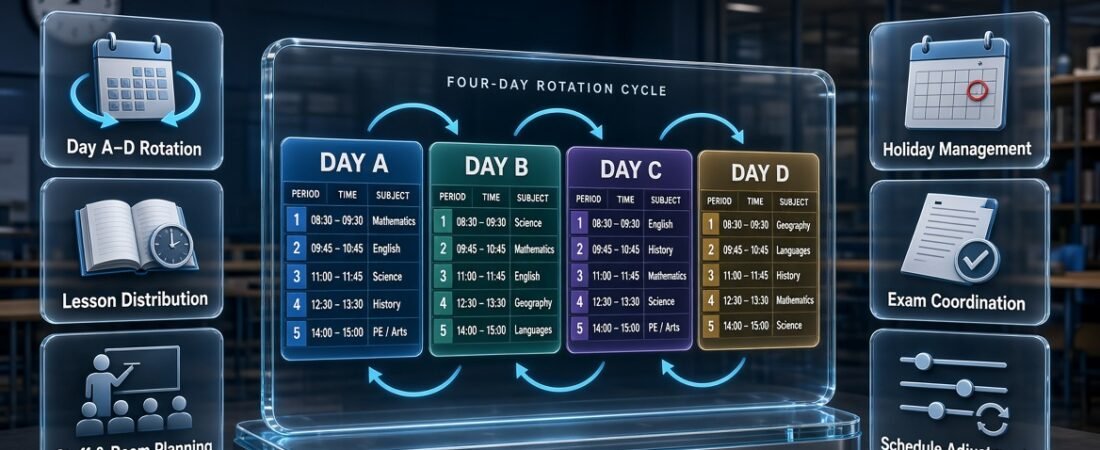
A rotating school day calendar helps schools manage these challenges by assigning different timetables to a repeating sequence of instructional days. Instead of following exactly the same class order every Monday through Friday, students and teachers follow a rotation such as Day A, Day B, Day C, and Day D. Each rotation day has its own planned lessons, periods, and activities.
This approach can help schools distribute subjects across different times of the day, coordinate specialist facilities, and create more flexible learning schedules. However, the system must be designed around the school’s curriculum, staff availability, academic calendar, and daily operational needs.
Schools looking to organize these responsibilities can explore the resources available through the RTI Scheduler, while developing a rotation system that fits their specific requirements.
In this guide, you’ll learn how a rotating school day calendar works, how to choose the right rotation pattern, how to build a practical schedule, and how to manage holidays and unexpected changes. You’ll also discover common mistakes, useful planning strategies, and ways to coordinate rotating schedules with other academic activities.
What Is a Rotating School Day Calendar?
A rotating school day calendar is a scheduling system that assigns different class timetables to a repeating sequence of school days. Rather than placing every subject in the same period each weekday, the school changes the order of lessons according to a predefined rotation.
For example, a school might use a five-day cycle. Day 1 could begin with mathematics, Day 2 with English, and Day 3 with science. After the fifth rotation day, the sequence returns to Day 1 according to the school’s established rules.
The main purpose is to organize instructional time more flexibly while keeping the overall school schedule predictable and manageable.
How does a rotating school day calendar work?
A rotating calendar connects three important elements: the rotation sequence, the daily timetable, and the academic calendar.
- Rotation sequence: Identifies the order of schedules, such as Day A through Day E.
- Daily timetable: Specifies the subjects, teachers, rooms, and periods for each rotation day.
- Academic calendar: Identifies the actual dates on which each rotation day takes place, including holidays, examinations, and special events.
These elements must work together. A timetable may be accurate on its own, but it can still cause problems if the calendar assigns the wrong rotation day to a particular date.
Consider a school that begins its rotation on Monday with Day A. If the school operates a continuous instructional-day rotation, the next day is Day B, followed by Day C. If a holiday occurs on Tuesday, the school needs a documented rule for determining which rotation day applies when classes resume.
This is why a rotating calendar should be treated as a complete scheduling system rather than simply a collection of daily timetables.
What makes a rotating calendar different from a weekly timetable?
A weekly timetable normally repeats the same pattern every Monday through Friday. A rotating calendar follows a separate sequence that may continue across several weeks.
For example, a fixed timetable might always place science in the second period on Monday. A rotating timetable could place science in the first period on Day A, the third period on Day B, and the second period on Day C.
This arrangement can change how subjects are distributed throughout the school day. It also requires stronger communication because the rotation day may not match the weekday.
How to Organize an A/B Day Schedule for Better School Timetabling
An A/B day scheduling system helps schools distribute lessons across two alternating school-day patterns, making it easier to manage subjects, classroom periods, and teacher assignments. In this system, students attend one set of classes on A days and a different set on B days, allowing schools to organize instructional time more flexibly. Administrators should assign subjects carefully, maintain consistent period timings, and check teacher availability to prevent overlapping lessons. They should also account for holidays, school events, and examination periods when maintaining the rotation. A clearly organized A/B schedule helps students understand their daily classes, supports teachers in managing lesson plans, and improves overall timetable coordination.
For easier alternating-day timetable planning, explore this resource 👉 A B Day Schedule Maker
This resource helps schools organize A/B day rotations, coordinate alternating class schedules, manage subject periods, and maintain a consistent academic timetable throughout the school term.
Why Do Schools Use a Rotating School Day Calendar?
Schools use rotating calendars when they need more flexibility than a fixed timetable can provide. These systems can help distribute subjects across different periods, coordinate shared facilities, and accommodate instructional activities that require specific scheduling arrangements.
The benefits depend on how well the rotation matches the school’s actual needs.
1. Distribute subjects across different periods
When a subject always takes place at the same time, students may repeatedly experience it during the earliest or latest part of the day. A rotation can move that subject through different periods over the course of the cycle.
For example, mathematics might take place during Period 1 on Day A, Period 3 on Day B, and Period 5 on Day C.
This creates more variety in the daily schedule without necessarily changing the total amount of instructional time.
Schools should still consider student concentration, subject requirements, and teacher preferences. Rotating a lesson does not automatically improve learning, but it can reduce the repeated disadvantages of a rigid timetable.
2. Coordinate specialist classrooms and facilities
Science laboratories, computer rooms, libraries, art studios, and sports facilities are often shared by several classes.
A rotating calendar gives administrators additional options for distributing these activities across different days and periods. This can be especially helpful when multiple grades need access to the same resources.
For example, three science classes might use a laboratory on different rotation days instead of competing for the same time slot.
The schedule must still account for room capacity, equipment availability, preparation time, and supervision requirements.
3. Support practical and project-based learning
Some activities need more time than a standard lesson period provides. Experiments, presentations, group projects, technical exercises, and practical assessments may require longer uninterrupted sessions.
A rotating schedule can accommodate these activities by assigning selected subjects to extended periods on particular rotation days.
However, longer lessons should be used where they support the learning objective. Schools should not extend every lesson simply because the rotation allows it.
4. Improve timetable flexibility
A rotating calendar can help administrators coordinate different curriculum requirements without changing the entire school structure.
Schools may use it to organize electives, intervention periods, enrichment activities, or specialist lessons that cannot easily fit into a fixed weekly timetable.
A flexible system can also help when teachers work across multiple grades or departments. The key is to plan the complete cycle before assigning individual lessons.
5. Make academic planning more consistent
A well-maintained rotation can provide a reliable framework for teachers and administrators. Everyone knows which timetable applies on each instructional date, and the school can plan lessons and activities around that structure.
This becomes particularly valuable when the rotation is coordinated with holidays, examinations, and school events.
For broader scheduling needs, the Academic Planning and Scheduling Tools resource can fit naturally into a school’s overall planning process.
What Are the Different Types of Rotating School Day Calendars?
Schools can use several rotation patterns. The right option depends on the number of timetable combinations needed, the complexity of the curriculum, and how easily staff and students can follow the schedule.
A-B-C-D rotation
An A-B-C-D rotation uses four different daily timetables. After Day D, the sequence returns to Day A.
A school might arrange its lessons as follows:
| Period | Day A | Day B | Day C | Day D |
|---|---|---|---|---|
| Period 1 | Mathematics | English | Science | History |
| Period 2 | English | Science | History | Mathematics |
| Period 3 | Science | History | Mathematics | English |
| Period 4 | History | Mathematics | English | Science |
This is a simplified example showing how subjects can change periods. A complete schedule must include all lessons, breaks, teacher assignments, rooms, and required instructional minutes.
Advantages:
- Easy to label and communicate.
- Provides several timetable patterns.
- Can work well in schools with relatively simple scheduling needs.
Limitations:
- May provide insufficient combinations for a complex curriculum.
- Requires consistent rotation tracking after holidays.
- Needs careful checking to avoid repeated resource conflicts.
Five-day rotating calendar
A five-day rotation includes five distinct timetables that repeat in sequence. The days may be labelled Day 1 through Day 5 or use another consistent naming system.
This model offers more scheduling combinations than a four-day cycle and may help schools distribute subjects across a wider range of periods.
It is important to distinguish a five-day rotation from an ordinary Monday-to-Friday timetable. The rotation should follow the school’s defined cycle rules rather than automatically restarting every Monday.
Six-day rotating calendar
A six-day rotation includes six different timetable patterns. It may be useful when a school needs additional combinations for subjects, teachers, specialist rooms, or extended learning activities.
For example, a school could assign laboratory sessions to specific rotation days while distributing academic subjects across the remaining periods.
The additional flexibility comes with a greater need for accurate calendar tracking. Students and teachers may find it harder to remember the sequence without clear digital or printed references.
Rotating block schedule
A rotating block schedule combines changing timetable patterns with longer instructional periods.
Instead of teaching every subject in short periods each day, the school may arrange selected subjects into extended blocks on particular rotation days.
This can support practical lessons, experiments, collaborative projects, and detailed assessments.
However, administrators should evaluate student attention, teacher workload, curriculum expectations, and total instructional time before adopting this structure.
Hybrid rotating schedule
A hybrid schedule keeps some parts of the school day fixed while allowing other subjects or activities to rotate.
For example, registration, lunch, and student support sessions may remain at consistent times, while academic subjects change positions throughout the cycle.
This model is useful when the school wants greater flexibility without changing every part of its daily routine.
Professional recommendation: Begin with the simplest rotation that solves the school’s scheduling problem. Add more complex patterns only when the curriculum, staffing structure, or resource requirements justify them.
How to Create a Rotating School Day Calendar Step by Step

Creating a reliable rotating calendar requires more than assigning different subjects to different days. Administrators need to understand instructional requirements, check resource availability, build the rotation templates, connect them to actual dates, and test the complete system before sharing it with the school community.
Following a consistent process makes the calendar easier to maintain throughout the academic year.
Step 1: Identify the school’s scheduling problems
Begin by identifying the specific problems the new calendar should solve.
Some schools want to distribute subjects more evenly across the school day. Others need to manage shared laboratories, coordinate teachers who work across multiple grades, or introduce longer practical lessons.
Write down the main objectives before selecting a rotation pattern.
For example, if the biggest problem is that three grades need the same science laboratory, a room-allocation plan may be more important than changing every subject period. If the main concern is repeated early-morning or late-afternoon placement, rotating subjects across periods may be more useful.
Why it matters: A clearly defined goal helps administrators choose a system that solves a real problem rather than adding unnecessary complexity.
Step 2: Choose the rotation length
Select a rotation length that matches the number of timetable patterns the school actually needs.
A four-day cycle may be sufficient for a smaller school, while a five-day or six-day rotation may provide more options for a complex curriculum.
Consider the following questions:
- How many subjects must be scheduled?
- How many teaching periods are available each day?
- Do teachers work across several grades?
- Which classrooms and specialist facilities are shared?
- How much schedule variation is necessary?
- Can students and teachers easily identify the current rotation day?
Do not choose a longer cycle simply because it offers more combinations. Every additional rotation day creates another timetable that must be created, checked, communicated, and maintained.
Step 3: Record subject and instructional-time requirements
Before assigning classes to periods, prepare a list of every subject and its instructional requirements.
Include the number of lessons required per cycle, the length of each lesson, teacher assignments, and any specialist-room requirements.
For example, a school might need mathematics five times per cycle, English four times, and science three times. These figures are illustrative; actual requirements should follow the school’s curriculum and local education rules.
A complete planning sheet should record:
- Subject name and grade level.
- Required lessons per cycle.
- Total instructional minutes.
- Assigned teacher or teaching team.
- Required classroom or equipment.
- Restrictions on lesson length or timing.
This information helps administrators identify scheduling gaps before they become operational problems.
Step 4: Check teacher and classroom availability
Create a resource map before finalizing the timetable.
Teachers may be assigned to multiple classes, while laboratories, libraries, and computer rooms may serve several grades. Each assignment must fit the available time and physical resources.
For example, a science teacher cannot supervise two classes at the same time if both require direct instruction. Likewise, a laboratory cannot host more students than its safe capacity permits.
A Subject Timetable Maker can be relevant when organizing subjects and their scheduling requirements, while a Class Timetable Grid Builder may help structure the resulting period-by-period timetable.
The essential requirement is to verify every teacher, room, and student-group assignment before publishing the schedule.
Step 5: Build a separate timetable for each rotation day
Create a complete timetable template for every day in the rotation.
Each template should specify the period, subject, start and finish times, teacher, classroom, and any special instructions.
A basic structure might look like this:
| Period | Day A | Day B | Day C |
|---|---|---|---|
| Period 1 | Mathematics | English | Science |
| Period 2 | English | Science | History |
| Period 3 | Science | History | Mathematics |
| Period 4 | History | Mathematics | English |
The example demonstrates the rotation principle rather than a finished school timetable. Add all remaining periods, breaks, lunch, specialist sessions, and teacher assignments before implementation.
Check the entire cycle to ensure that each subject appears the required number of times and that the schedule does not create avoidable conflicts.
Step 6: Connect rotation days to the academic calendar
Once the timetable templates are complete, assign the correct rotation label to every instructional date.
Suppose a school begins its cycle on Monday with Day A. Tuesday becomes Day B, and Wednesday becomes Day C if the school follows an instructional-day rotation and classes take place normally.
If Tuesday is a holiday, the next instructional day would follow the school’s documented holiday policy.
This process should be completed for the entire term or academic year, rather than relying on teachers to calculate rotation days manually.
The Academic Calendar Planning resource is relevant to coordinating instructional dates with the wider academic schedule.
Step 7: Add holidays, examinations, and special events
A rotating calendar must account for dates when the normal timetable changes.
Record school holidays, professional development days, examinations, assemblies, field trips, and other events that affect regular instruction.
For example, if a school closes for a public holiday on a scheduled science laboratory day, administrators must decide whether the lesson moves to another period, another date, or the next available rotation day.
The correct solution depends on curriculum requirements and school policy.
A School Year Event Calendar can complement the rotation by helping administrators coordinate major school activities with the academic calendar.
Step 8: Test the complete rotation
Before publishing the calendar, review the complete cycle for errors.
Check that:
- Every subject receives its required instructional time.
- Teachers are not assigned to simultaneous classes.
- Rooms and specialist equipment are available.
- Student groups can attend their assigned lessons.
- Breaks and lunch periods are correctly placed.
- Examinations do not create avoidable conflicts.
- The rotation continues correctly after holidays and closures.
Testing only the first day is not enough. A timetable may work on Day A but fail on Day D because a teacher or room is assigned to conflicting activities.
It is also useful to test unusual situations, such as a closure in the middle of the cycle or a school event that replaces several regular lessons.
Step 9: Publish the calendar clearly
After approval, provide the school community with a consistent version of the schedule.
Depending on the school’s needs, this may include a printed rotation chart, a digital calendar, classroom displays, a student-facing timetable, and a detailed staff schedule.
Every version should use the same rotation labels.
For example, if the master calendar identifies a date as Day C, classroom displays and teacher documents should use Day C rather than a different label that could cause confusion.
Students need to know which subjects they have that day. Teachers may also need room assignments and preparation details, while administrators need access to the complete schedule.
Step 10: Monitor and improve the system
After introducing the rotation, collect feedback from teachers, students, and administrators.
Look for repeated room conflicts, confusing rotation labels, missed lessons, uneven subject distribution, and difficulties communicating changes.
Record each issue and identify its cause before modifying the timetable.
A controlled review process is more effective than making informal adjustments that may create new problems elsewhere in the schedule.
How Should Holidays Affect a Rotating School Day Calendar?
Holidays should follow a consistent, documented policy so that everyone knows which rotation day comes next when school resumes.
There is no universal rule for every institution. The appropriate method depends on the school’s scheduling model, instructional requirements, and local policies.
Instructional-day rotation
Under an instructional-day rotation, the sequence advances when students attend school. Weekends, holidays, and other non-instructional days do not advance the cycle.
Consider this example:
| Day | School status | Rotation |
|---|---|---|
| Monday | Classes take place | Day A |
| Tuesday | School holiday | No instructional rotation |
| Wednesday | Classes resume | Day B |
| Thursday | Normal school day | Day C |
| Friday | Normal school day | Day D |
This model keeps the rotation tied to the sequence of instructional days.
Calendar-based rotation
A calendar-based rotation follows a defined calendar sequence rather than advancing exclusively on instructional days. Depending on the school’s rules, the rotation may advance through dates on which classes do not take place.
This can suit certain scheduling arrangements, but it requires particularly clear communication. Students and teachers need to know how the sequence behaves across weekends, holidays, and unexpected closures.
Schools should not adopt a calendar-based method without considering whether the resulting timetable remains practical for instruction.
How to Organize a Six-Day School Cycle for Better Academic Planning
Schools that operate on a six-day rotating schedule need a reliable system to manage subjects, teaching periods, classroom assignments, and student activities. Unlike a standard weekly timetable, a six-day cycle follows a continuous sequence of school days, meaning the next cycle day continues regardless of the weekday. Administrators should assign subjects to each cycle day, distribute instructional periods evenly, and check teacher availability to prevent scheduling conflicts. They should also establish a clear method for handling public holidays, unexpected school closures, and special academic events so the rotation remains consistent. A well-planned cycle helps teachers manage lesson delivery, allows students to follow their changing schedules, and improves overall academic coordination.
For easier six-day timetable planning, explore this resource 👉 Six Day School Cycle Planner
This resource helps schools organize six-day rotations, coordinate subject periods, manage classroom schedules, and maintain a structured academic cycle throughout the school term.
What happens when an unexpected closure interrupts the rotation?
Administrators should follow the established policy, update the master calendar, and communicate the next rotation day to affected staff and students.
If a closure affects an examination or a practical lesson, the school should also review the impact on instructional time, room availability, and assessment arrangements.
A Academic Holiday Calendar Builder can be considered as part of the broader process of organizing holiday dates and maintaining an accurate academic calendar.
Expert recommendation: Publish the holiday rule before the school year begins. Changing the rotation policy informally during the term makes the calendar harder to trust.
How Can Schools Coordinate Rotating Calendars With Lessons and Assessments?
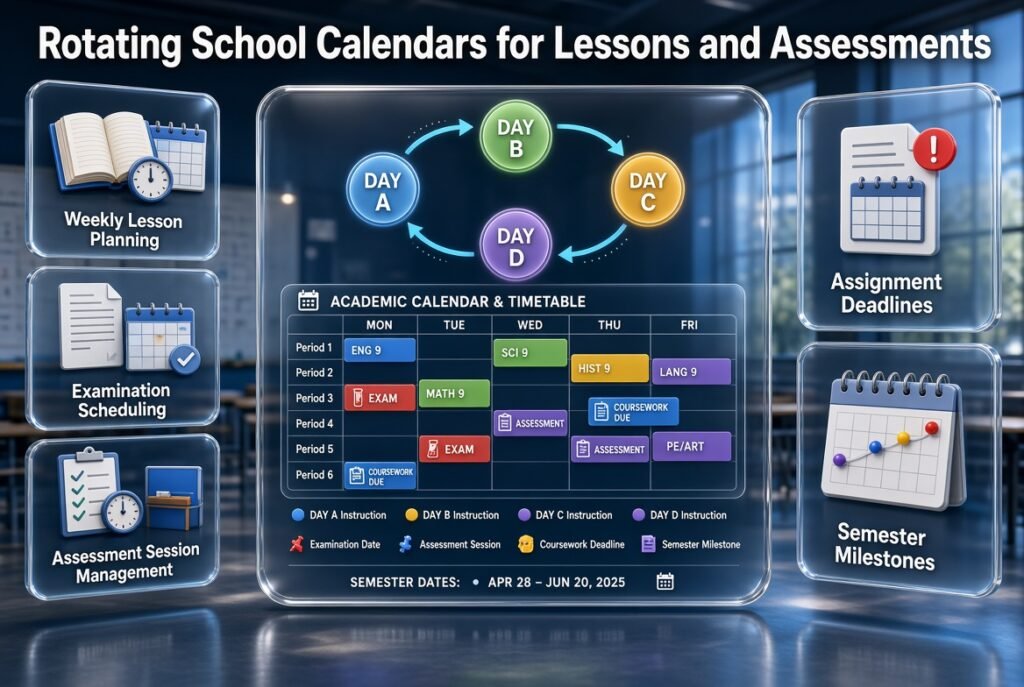
A rotating school day calendar determines which daily timetable applies, but schools must also manage lesson preparation, examinations, assignments, and academic deadlines.
Coordinating these activities reduces the risk of scheduling a major assessment on an unsuitable day or overlooking the instructional time needed to prepare students.
Coordinate weekly lessons with the rotation
Teachers should plan lessons around the actual rotation sequence rather than assuming that every subject appears on the same weekday.
For example, a science teacher may teach one group on Day A and another on Day C. Weekly lesson preparation should reflect the correct instructional dates for each group.
A Weekly Lesson Period Planner is relevant when organizing lesson periods, while a Student Class Period Organizer can help structure class-level scheduling information.
The goal is to connect lesson preparation with the correct rotation day without creating duplicate or conflicting records.
Coordinate examinations with instructional schedules
Examination planning should account for the rotating timetable, candidate groups, available rooms, and the time needed to complete each assessment.
A school may need to replace normal lessons with examinations on selected dates. If those changes are not reflected in the master calendar, teachers and students may prepare for the wrong schedule.
The following resources address related assessment-planning needs:
- Exam Schedule Generator for organizing examination dates and schedules.
- Test Date Timetable Planner for coordinating test dates with the broader school timetable.
- Exam Session Calendar Builder for planning examination sessions.
- Assessment Sitting Schedule for organizing individual assessment sittings and their operational requirements.
- Examination Timetable Organizer for arranging examination timetable information.
These planning activities serve different purposes. A school should choose the appropriate approach for its needs and verify that all assessment arrangements are consistent with the approved academic calendar.
Coordinate academic deadlines and assignments
Students may have assignments, coursework, projects, and assessments due throughout a rotating schedule. Teachers should consider the workload across the cycle rather than looking at individual classes in isolation.
For example, several teachers may independently schedule major submissions for the same week. Even when each deadline is reasonable, the combined workload may become difficult for students to manage.
Schools can coordinate these responsibilities through related planning resources:
- Academic Deadline Management for organizing important academic deadlines.
- Coursework Due Date Manager for coordinating coursework due dates.
- Assignment Submission Calendar for arranging submission dates.
- Academic Milestone Reminder Planner for tracking important academic milestones and reminders.
- School Deadline Overview Tool for reviewing deadlines across the school.
A rotation calendar and an academic deadline system should complement each other. The former identifies the correct daily timetable; the latter helps students and staff track work that must be completed by particular dates.
Coordinate semester milestones and school events
Schools should review major milestones before finalizing their rotating calendars.
These may include term openings, progress reviews, parent meetings, project presentations, assessment periods, and end-of-semester activities.
A Semester Milestone Calendar can be relevant when coordinating these milestones with the broader academic schedule.
The purpose is to make sure that important events do not unintentionally disrupt essential lessons or create avoidable scheduling pressure.
What Are the Most Common Rotating School Calendar Mistakes?
Even a well-designed rotation can create problems when the rules are unclear, the timetable is not tested, or changes are communicated inconsistently. Most scheduling difficulties can be reduced by identifying the risks before the calendar goes live.
Mistake 1: Confusing rotation days with weekdays
Why it happens: Administrators assume that Day A always falls on Monday and Day B always falls on Tuesday.
Why it causes problems: Holidays and closures can shift the relationship between the rotation and the weekday. Teachers may prepare the wrong lessons, and students may arrive expecting a different schedule.
How to avoid it: Display the actual date and rotation label together. Document how the sequence behaves across weekends, holidays, and unexpected closures.
Mistake 2: Assigning subjects before checking resources
Why it happens: The timetable is designed around the curriculum first, with room and teacher availability checked later.
Why it causes problems: A teacher may be assigned to two classes at once, or two groups may need the same specialist room.
How to avoid it: Map teachers, rooms, equipment, and student groups before approving the final timetable. Review every rotation day for conflicts.
Mistake 3: Ignoring total instructional time
Why it happens: Administrators focus on creating different daily schedules without checking how often each subject appears throughout the cycle.
Why it causes problems: Some subjects may receive fewer lessons or fewer instructional minutes than intended.
How to avoid it: Count lessons and instructional minutes across the entire rotation. Compare the totals with curriculum requirements and correct any gaps before implementation.
Mistake 4: Making changes without updating the master calendar
Why it happens: Staff members make informal adjustments to solve immediate problems but fail to update other schedule copies.
Why it causes problems: Teachers, students, and parents may receive conflicting information about the same date.
How to avoid it: Establish one official master calendar. Assign responsibility for approving changes, updating the schedule, and notifying affected users.
Mistake 5: Creating an unnecessarily complicated rotation
Why it happens: Schools introduce too many exceptions, labels, or timetable patterns in an attempt to accommodate every situation.
Why it causes problems: Students and staff find the system difficult to remember, and administrators spend more time resolving confusion than managing instruction.
How to avoid it: Use the simplest practical rotation. Introduce exceptions only when they solve a specific problem that cannot be handled through the standard timetable.
Mistake 6: Overlooking examinations and special events
Why it happens: Administrators finalize the daily rotation before reviewing major academic dates.
Why it causes problems: Examinations may displace important lessons, specialist rooms may be unavailable, and teachers may have insufficient time to prepare students.
How to avoid it: Compare the rotation with the academic calendar before publication. Recheck it whenever examination dates, closures, or major events change.
Mistake 7: Failing to explain the system to students
Why it happens: School leaders assume that publishing a timetable is enough.
Why it causes problems: Students may not understand which rotation day applies or how to find the correct schedule after a holiday.
How to avoid it: Explain the rotation during the first days of school, provide a simple reference chart, and display the current rotation day wherever students regularly check school information.
How Can Schools Make a Rotating Calendar Easier to Use?

A rotating calendar should make school operations more predictable, not force everyone to memorize a complicated sequence.
The most effective systems use clear labels, accessible information, and consistent communication.
Use one naming convention
Choose a naming system such as Day A through Day D, Rotation 1 through Rotation 5, or Cycle Day 1 through Cycle Day 6.
Use the same names in classroom displays, teacher documents, digital calendars, and school announcements. Avoid switching between multiple naming systems unless the relationship between them is clearly explained.
How to Build a Rotational Timetable Sequence for Schools
Creating a consistent rotational timetable requires careful planning to ensure that subjects, teaching periods, classrooms, and teacher assignments follow an organized sequence. Schools using rotating schedules should first identify the number of cycle days, available periods, and subjects that need to be distributed across the timetable. Administrators can then assign lessons to specific rotation days while checking teacher availability and classroom requirements to avoid overlapping activities. It is also important to establish clear rotation rules for weekends, holidays, and unexpected school closures so that students and teachers can follow the correct sequence without confusion. A well-designed rotational timetable improves lesson distribution, supports academic consistency, and makes daily school scheduling easier to manage.
For better rotation planning and timetable organization, explore this resource 👉 Rotational Timetable Sequence Builder
This resource helps schools organize rotating lesson sequences, coordinate subject periods, manage classroom assignments, and maintain a consistent academic timetable throughout the school term.
Display the date and rotation day together
A label such as “Day C” is not enough when students need to know which schedule applies on a particular date.
Instead, display the weekday, calendar date, and rotation label together. This makes the schedule easier to understand and reduces errors after holidays.
Maintain an accessible student timetable
Students generally need a simpler view than administrators.
A student-facing calendar should show:
- The current rotation day.
- Subjects and lesson periods.
- Classroom locations where relevant.
- The next scheduled rotation day.
- Important exceptions and announcements.
Teachers may need additional information, including room assignments, lesson preparation requirements, and assessment arrangements.
Communicate changes before they take effect
Whenever possible, publish schedule changes in advance. Give teachers time to prepare and students time to understand what has changed.
For urgent closures, use the school’s established communication channels and update the official calendar as soon as the decision is confirmed.
Review feedback regularly
Ask teachers whether the rotation creates scheduling conflicts or affects lesson preparation. Ask students whether the calendar is easy to follow.
Use this feedback to identify recurring problems rather than making changes based on isolated complaints.
A short review at the end of each term can help the school improve the system without repeatedly redesigning the timetable.
What Should Schools Consider Before Choosing a Rotating Calendar System?
The best rotation depends on the school’s size, curriculum, staffing structure, resources, and administrative capacity. Before committing to a system, evaluate whether it is practical to maintain throughout the academic year.
Consider the size and complexity of the school
A smaller school with a limited number of classes may be able to manage a simple rotation using a spreadsheet and a printed calendar.
A larger school with multiple grades, specialist teachers, shared facilities, and complex examination requirements may need more detailed scheduling processes.
The important question is not simply how many students attend the school. It is how many moving parts the timetable must coordinate.
Consider teacher workload
A rotation should not create unnecessary preparation or administrative burdens.
Teachers need enough notice to prepare lessons and understand when their classes meet. Administrators should also consider the workload involved in updating the calendar, checking conflicts, and communicating changes.
Consider student needs
Students benefit from schedules they can understand and follow independently. Younger students or learners who need additional organizational support may require more visible reminders and simpler timetable displays.
Schools should also consider whether longer periods or frequent changes suit the subjects being taught.
Consider the available technology
Manual calendars may be sufficient for straightforward arrangements. More complex schedules can benefit from digital planning tools, especially when the rotation must be coordinated with holidays, examinations, and school events.
The School Rotation Scheduling resource is relevant to exploring the broader scheduling process, while the School Rotation Schedule Generator is relevant to investigating rotation-schedule creation.
Before adopting any software, confirm its actual features, scheduling capabilities, export options, and compatibility with the school’s existing workflow.
For an overview of academic planning resources, schools can also visit the RTI Scheduler homepage. The goal should be to choose tools that make the approved scheduling process easier to manage, rather than introducing technology that adds unnecessary work.
Expert Advice for Managing a Rotating School Day Calendar
A successful rotating calendar depends on sound planning, clear ownership, and regular review. The following practices can help schools avoid common operational problems.
Start with a pilot schedule
Before changing the entire school timetable, test the rotation with a department, grade level, or manageable group of classes.
A pilot helps administrators identify practical issues such as confusing labels, unsuitable lesson lengths, and unexpected room conflicts.
Record what works, correct the problems, and use the findings to improve the final schedule.
Audit the complete rotation cycle
Review every day in the rotation rather than assuming that a successful first day means the whole schedule is correct.
Check subject frequency, instructional minutes, teacher availability, room allocation, and specialist-resource requirements across the entire cycle.
This review should also include the way the cycle resumes after holidays and closures.
Keep a clear record of decisions
Document the chosen rotation length, holiday rules, timetable approval process, and method for handling unexpected changes.
This record helps new staff understand the system and prevents administrators from repeatedly making the same decisions.
It also provides a reference when the school reviews or updates the calendar for a new academic year.
Make changes in a controlled way
When a teacher becomes unavailable or a room cannot be used, identify all affected classes before changing the timetable.
Update the official calendar, check for new conflicts, and communicate the change to the relevant people.
A quick adjustment may solve one problem while creating another. Reviewing the wider schedule helps prevent that outcome.
Measure whether the rotation is achieving its purpose
A rotation should be evaluated against the goals that justified introducing it.
For example, if the objective was to distribute subjects more evenly, review how often each subject occurs in each period. If the objective was to improve access to specialist rooms, review room conflicts and availability.
Useful indicators include:
- Number of timetable conflicts.
- Subject distribution across periods.
- Compliance with required instructional time.
- Frequency of last-minute changes.
- Teacher and student feedback.
- Accuracy of the published calendar.
These measures help administrators decide whether the current rotation is working or requires adjustment.
Rotating School Day Calendar: Final Planning Checklist
Before publishing a rotating school day calendar, use this checklist to confirm that the system is ready for everyday use.
- The rotation length has been selected.
- Each rotation day has a complete timetable.
- Subject frequency and instructional minutes have been verified.
- Teacher availability and classroom assignments have been checked.
- Holidays and closures follow a documented rule.
- Examinations and school events have been coordinated.
- Every instructional date has the correct rotation label.
- Teachers and students can access the schedule.
- One authoritative master calendar is maintained.
- Staff understand how changes are approved and communicated.
- The complete cycle has been tested.
- A review process is in place for identifying and correcting problems.
A school that completes these checks before launch is better prepared to manage its rotation consistently and reduce avoidable confusion during the academic year.
What Is a Rotating School Day Calendar, and How Does It Work?
A rotating school day calendar is a scheduling system that changes the order of classes according to a repeating cycle. Instead of following the same timetable every Monday through Friday, students follow designated rotation days, such as Day A, Day B, Day C, and Day D. Each day has its own planned subjects, periods, teachers, and classroom assignments.
For example, mathematics might take place during the first period on Day A but move to the third period on Day B. This allows schools to distribute subjects across different times of the day while maintaining a structured academic schedule. The rotation continues according to the school’s established rules, including its policy for weekends, holidays, and unexpected closures.
Key points to consider:
Choose a rotation pattern that matches the school’s curriculum and scheduling needs.
Display the rotation day alongside the actual date to prevent confusion.
Establish clear rules for holidays and school closures.
Review the complete cycle to ensure every subject receives its required instructional time.
What Is the Best Rotating School Day Schedule for Schools?
The best rotating school day schedule depends on the school’s size, teaching requirements, available facilities, and the level of flexibility needed. A four-day rotation may work well for a school with a straightforward timetable, while a five-day or six-day cycle may provide more options for institutions with several grades, specialist teachers, and shared classrooms.
For example, a school that wants to distribute mathematics, English, science, and history across different periods might find a four-day rotation sufficient. A larger school with laboratory sessions, electives, and different teaching groups may need a longer cycle to accommodate its requirements.
The goal is to create a manageable timetable that supports learning without making daily scheduling unnecessarily complicated.
Key points to consider:
Four-day rotation: Suitable when a smaller number of timetable patterns can meet the school’s needs.
Five-day rotation: Offers additional scheduling combinations while remaining relatively straightforward.
Six-day rotation: Can accommodate more complex timetables but requires careful tracking.
Hybrid rotation: Keeps selected activities fixed while allowing academic subjects to rotate.
Before choosing a pattern, review teacher availability, classroom capacity, subject frequency, and instructional minutes. Test the proposed schedule before introducing it across the entire school.
How Do Schools Manage Holidays and Unexpected Closures in a Rotating Calendar?
Schools manage holidays and unexpected closures by following a clearly documented rotation policy. The most important decision is whether the rotation advances only on instructional days or follows a calendar-based sequence. Once this rule is established, administrators can determine which timetable applies when students return after a holiday or closure.
For example, suppose Monday is Day A and Tuesday is a school holiday. Under an instructional-day rotation, Wednesday would normally become Day B because the cycle advances when students attend school. However, schools using a different rotation method must follow their own established rules rather than assuming the sequence remains unchanged.
Administrators should also consider examinations, practical lessons, and other activities that may be affected by a missed school day.
Key points to consider:
Document the holiday and closure policy before the academic year begins.
Update the master calendar whenever an instructional date changes.
Notify teachers and students of the next applicable rotation day.
Review the effect of closures on examinations and required subject hours.
Keep classroom displays and digital calendars consistent with the approved schedule.
A reliable process prevents confusion and helps schools resume normal instruction without unnecessary timetable changes.
How Can Schools Create and Manage a Rotating School Day Calendar Efficiently?
Schools can create an effective rotating calendar by defining their scheduling requirements, selecting a rotation length, building timetable templates, and connecting those templates to actual instructional dates. The process should account for subjects, teachers, classrooms, specialist facilities, holidays, and examinations before the calendar is published.
Start by listing the subjects and the number of lessons each requires during the rotation cycle. Next, check teacher availability and room capacity. Build a separate timetable for each rotation day, then test the complete sequence for double-bookings and missing instructional periods.
Once the calendar is approved, maintain one authoritative version so that teachers, students, and administrators can access consistent information.
Key points to consider:
Record subject requirements and instructional minutes.
Check teacher assignments and classroom availability before finalizing the timetable.
Use consistent rotation labels across printed and digital calendars.
Coordinate school events, examinations, and holidays with the rotation.
Review the schedule regularly and communicate approved changes promptly.
Schools can also explore School Rotation Scheduling and the School Rotation Schedule Generator as relevant resources when planning their scheduling workflow. Before adopting any tool, verify that its available features meet the school’s specific requirements.
What Are the Main Benefits of a Rotating School Day Calendar for Teachers and Students?
A rotating school day calendar can make school scheduling more flexible by distributing subjects across different periods, coordinating shared facilities, and creating opportunities for practical lessons or extended instructional sessions. It can also reduce the tendency for certain subjects to remain permanently assigned to the same time of day.
For teachers, a well-planned rotation provides a predictable framework for preparing lessons and organizing classroom resources. For students, it creates a structured schedule that can offer more variety in daily learning activities. Administrators can use the system to coordinate teaching assignments, room availability, and academic events more systematically.
However, these benefits depend on accurate planning and consistent communication. A confusing or poorly maintained rotation may increase administrative work rather than reduce it.
Key points to consider:
Distribute subjects across different periods where appropriate.
Coordinate laboratories, libraries, and other shared facilities.
Use longer periods when practical lessons genuinely require them.
Provide teachers and students with clear, up-to-date timetables.
Monitor scheduling conflicts and collect feedback to identify improvements.
Ultimately, the value of a rotating school day calendar should be measured by how effectively it supports
Conclusion
A rotating school day calendar is an effective way to organize changing school schedules, distribute subjects across different days, and maintain consistency throughout the academic year. When planned carefully, it helps school administrators coordinate teacher availability, classroom resources, lesson periods, examinations, holidays, and important academic deadlines without creating unnecessary confusion for students or staff.
The key to a successful rotating calendar is to establish clear rotation rules, communicate schedule changes in advance, and review the calendar regularly. Schools should also prepare for unexpected closures, examination periods, special events, and changes in staffing to ensure that the rotation remains practical and reliable. Using a structured school rotation scheduling approach alongside a school rotation schedule generator can make the planning process easier to manage and maintain.
Ultimately, a well-organized rotating school day calendar does more than display dates and lesson periods. It creates a dependable framework that helps teachers prepare effectively, enables students to understand their routines, and allows administrators to manage academic responsibilities with greater confidence. By combining thoughtful planning, accurate scheduling, and consistent communication, schools can build a flexible calendar that supports better coordination and keeps learning on track throughout the school year.