
Introduction
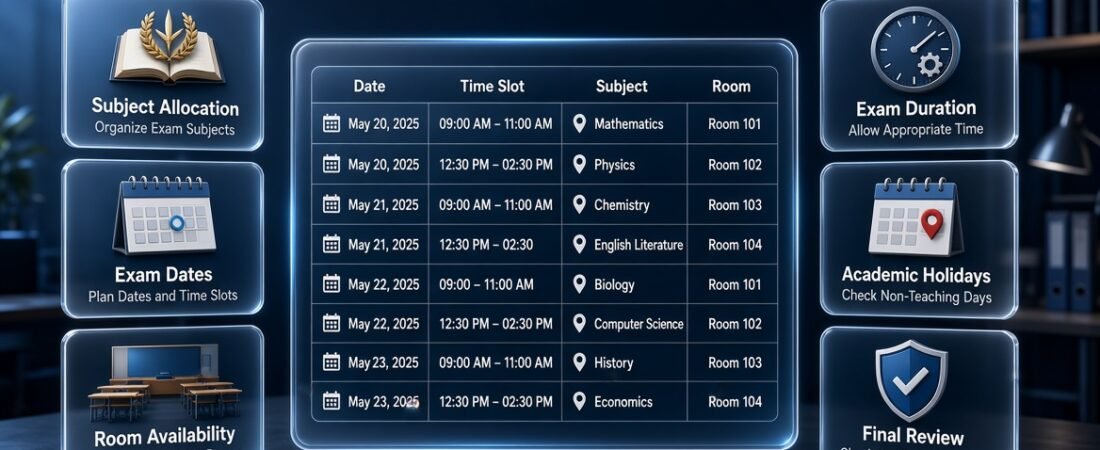
Exam Schedule Generator | An examination period can become difficult to manage when students have several subjects to prepare for, teachers need time to organize assessments, and administrators must coordinate dates, rooms, and invigilators. Even a small scheduling mistake can create overlapping examinations, insufficient preparation time, or confusion about when and where students should attend.
An exam schedule generator helps schools, colleges, universities, and educational institutions organize examinations into a structured timetable. Instead of arranging every examination manually, administrators can use a consistent scheduling process to assign dates, time slots, subjects, and other essential details while reducing avoidable errors.
For institutions looking to improve their academic organization, the RTI Scheduler homepage provides a starting point for exploring related academic planning resources.
However, creating an effective examination schedule involves more than placing subjects into empty calendar slots. A reliable timetable must consider student enrollment, examination duration, room availability, academic holidays, preparation time, and institutional requirements.
This guide explains how an exam schedule generator works, what information you need before using one, how to create a practical examination timetable, which scheduling mistakes to avoid, and how to review the final schedule before sharing it with students and staff.
What Is an Exam Schedule Generator?
An exam schedule generator is a digital tool or structured planning system used to arrange examinations according to dates, times, subjects, and student groups. Depending on its features, it may also help users allocate rooms, check overlapping examinations, manage examination durations, and prepare a timetable for distribution.
A basic generator may produce a schedule from a list of subjects and available dates. A more advanced system may consider student enrollment, room capacity, staff availability, and other restrictions before suggesting examination times.
For example, a secondary school planning examinations for eight subjects across one week can use a generator to organize those subjects into suitable sessions. Administrators can then review the proposed timetable and confirm that students are not required to attend two examinations simultaneously.
The tool does not replace academic decision-making. Instead, it makes the planning process more structured and helps administrators identify problems before the timetable is published.
Who Should Use an Exam Schedule Generator?
Different educational institutions have different scheduling requirements, but most can benefit from having a clear and consistent examination plan.
Schools can organize tests across multiple grades while ensuring that students and teachers understand the examination dates.
Colleges can coordinate departmental examinations, practical assessments, and written papers that require different rooms or resources.
Universities can use structured scheduling workflows to manage examinations across departments, courses, and student groups.
Teachers can prepare class tests, monthly assessments, mock examinations, and end-of-term papers without repeatedly creating separate schedules from scratch.
Tutoring centers can arrange assessments for different student groups and communicate examination dates to learners and parents.
Academic administrators can coordinate examination sessions, room assignments, staff availability, and publication deadlines.
A small institution may need only a basic timetable with dates and subjects. A larger institution may require more advanced conflict detection and resource management. The most suitable solution is the one that matches the institution’s actual needs.
Why Is an Exam Schedule Generator Important?
An examination timetable affects students, teachers, administrators, and the institution’s daily operations. Poor planning can cause unnecessary pressure, while a well-organized schedule makes expectations clearer and helps everyone prepare.
1. It Reduces Scheduling Conflicts
One of the most important purposes of an exam schedule generator is to help prevent examinations from overlapping for the same students.
This issue is particularly common in universities and colleges, where students may enroll in different combinations of courses. Two examinations can have different subject names and still involve the same student group.
A reliable scheduling process compares examination assignments with the relevant enrollment or class information. If two examinations require the same students at the same time, the organizer can identify the conflict and move one assessment to a suitable alternative slot.
For smaller schools, class-level information may be sufficient. For institutions with elective subjects, combined courses, or multiple departments, more detailed enrollment data may be necessary.
2. It Helps Students Prepare More Effectively
Students need enough time to review course material, practice questions, complete assignments, and prepare for examinations.
When several demanding subjects are scheduled too close together, students may struggle to distribute their preparation time effectively. A balanced examination timetable can reduce unnecessary pressure by spreading assessments across the available examination period.
For example, a student who has Mathematics, Physics, English, and History examinations may benefit from a timetable that distributes demanding assessments sensibly instead of placing every difficult paper on consecutive sessions.
The ideal interval depends on the subject, examination level, academic calendar, and institutional rules. The goal is not to create identical gaps between every examination but to make the overall workload reasonable.
3. It Saves Administrative Time
Manual examination planning often involves repeatedly checking dates, subjects, student groups, room bookings, and staff assignments.
When one examination changes, several related entries may need to be reviewed. A structured generator can reduce repetitive work by keeping the schedule organized and making adjustments easier to manage.
For institutions that conduct examinations several times a year, a consistent scheduling process can also improve future planning. Previous schedules may help administrators understand typical examination durations, resource requirements, and common constraints.
However, previous schedules should be reviewed rather than copied without changes because student enrollment, academic calendars, and institutional requirements can vary between examination periods.
4. It Improves Communication
Students and staff need clear information about examination arrangements. A timetable should make it easy to identify the date, subject, time, and relevant student group without requiring readers to interpret complicated instructions.
A well-formatted schedule reduces confusion and provides a common reference for students, parents, teachers, and administrators.
It should include all information necessary for the intended audience while avoiding unnecessary administrative details that make the document difficult to read.
5. It Supports Better Resource Management
Examinations require suitable rooms, sufficient seating, and appropriate supervision. Some assessments may also require computers, laboratory equipment, specialist facilities, or accessibility arrangements.
Planning these requirements alongside the examination timetable helps administrators identify resource shortages before examination day.
For example, scheduling two large examinations in the same room at overlapping times is not workable, even if the student groups themselves do not overlap. Similarly, a practical examination cannot proceed successfully if the required equipment is unavailable.
A generator may support these checks directly, or administrators may need to maintain a separate resource schedule.
How to Create and Manage an Organized Examination Timetable
Schools, colleges, and universities need an organized examination timetable to coordinate subjects, exam dates, session timings, classrooms, and student groups. Start by listing all required examinations, assigning suitable dates, and distributing subjects across available examination periods. Make sure students have enough preparation time between papers and avoid scheduling multiple examinations for the same group at overlapping times. Administrators should also consider room availability, invigilator responsibilities, and examination duration when preparing the final timetable. A well-planned examination schedule reduces confusion, improves coordination among teachers, and helps students prepare for assessments more effectively. For easier examination management, explore the resource below:
👉 Examination Timetable Organizer
This tool helps organize examination dates, coordinate subject-wise schedules, manage exam sessions, and maintain a clear timetable throughout the academic term.
How to Build and Organize an Effective Exam Session Calendar
Schools, colleges, and universities need a well-organized exam calendar to coordinate examination dates, session timings, subjects, and student groups. Start by identifying all scheduled examinations, assigning suitable dates, and ensuring that students have sufficient preparation time between sessions. Administrators should also consider classroom availability, invigilator assignments, and potential scheduling conflicts when preparing the examination calendar. A structured approach makes it easier for teachers to manage exam sessions and helps students stay informed about their upcoming assessments. For better examination planning, use the resource below:
👉 Exam Session Calendar Builder
This tool helps organize exam dates, manage session schedules, and maintain a clear examination calendar throughout the academic term.
What Information Do You Need Before Generating an Exam Schedule?
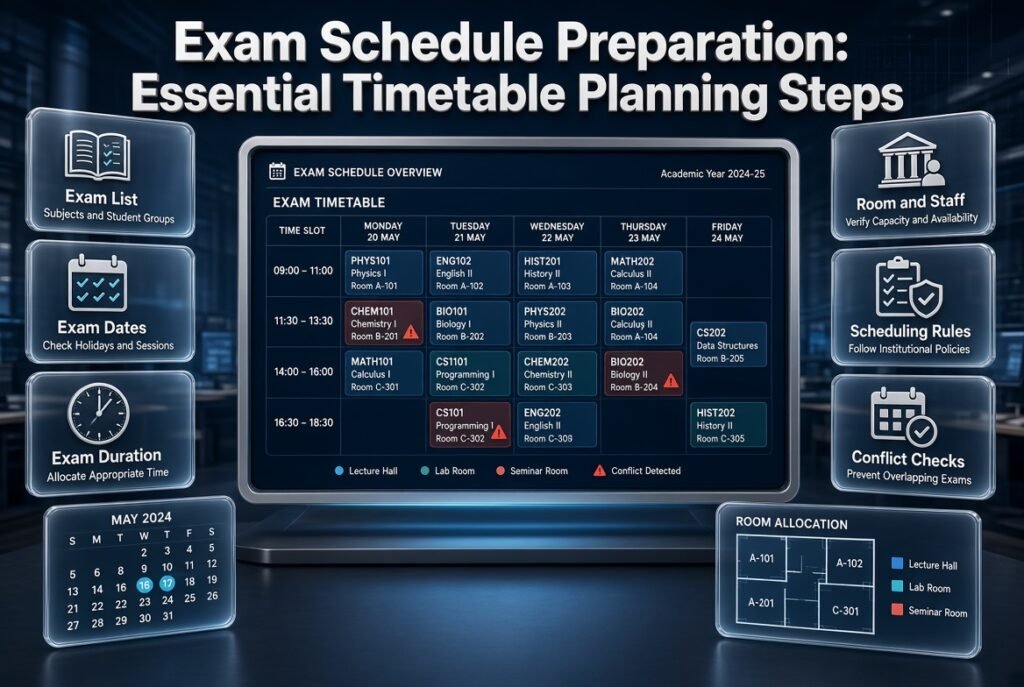
The quality of a generated timetable depends heavily on the accuracy of the information entered into the system. Before assigning examinations to dates and time slots, prepare a complete list of subjects, student groups, examination durations, and relevant restrictions.
Create a Complete Examination List
Start by identifying every examination that must be scheduled.
For each examination, record:
- Subject or course name
- Class, grade, or student group
- Course code, where applicable
- Expected examination duration
- Preferred or restricted dates
- Examination format
- Required room or equipment
- Relevant supervision requirements
For example, Grade 9 Mathematics and Grade 10 Mathematics should be entered as separate examinations. Although they share a subject name, they involve different student groups and may require different arrangements.
Use consistent naming conventions so that the same subject is not accidentally entered under several slightly different names.
Identify Available Examination Dates
Determine the first and last dates available for examinations. Then identify which sessions can be used on each day.
A school might allow morning and afternoon examinations from Monday through Friday. Another institution might permit only one examination session per day because of room capacity or supervision requirements.
Do not assume that every calendar day is available. Holidays, institutional closures, staff commitments, and other academic activities may restrict the examination period.
Record Examination Durations
Different subjects may require different amounts of time. A short assessment might take 45 minutes, while a comprehensive paper could require two or three hours.
Enter the approved duration for each examination and allow for practical arrangements such as student entry, instructions, room transitions, and the preparation of facilities.
A timetable that places examinations too close together may create operational problems even when the listed start times do not overlap.
Check Room and Staff Availability
If the institution uses designated examination rooms, prepare a list of their capacities and restrictions.
Record whether each room supports the relevant examination format. A computer-based assessment may require equipment that a standard classroom does not provide.
Also identify available invigilators and any restrictions affecting their assignments. Room and staff availability should be verified before the timetable is finalized.
Establish the Scheduling Rules
Write down the rules that every acceptable timetable must follow.
Typical requirements include:
- Students cannot attend overlapping examinations.
- Examination durations must fit within the assigned sessions.
- Room capacity must accommodate the assigned candidates.
- Required breaks must be respected.
- Specialist examinations must use suitable facilities.
- Invigilators must be available for their assigned sessions.
- Approved accessibility arrangements must be supported.
- Examination dates must follow institutional policies.
These rules help determine which scheduling method is appropriate. A simple timetable may be sufficient when there are few restrictions, while a more complex institution may need automated conflict detection.
How to Organize an Effective Assessment Sitting Schedule
Schools, colleges, and universities need a structured assessment sitting schedule to manage examination sessions, student groups, assigned rooms, and invigilation responsibilities. Start by identifying the assessments that need to be conducted, assigning suitable dates and time slots, and organizing students according to their classes or examination groups. Administrators should also consider room capacity, invigilator availability, assessment duration, and possible scheduling conflicts. A properly organized sitting schedule helps examination staff manage responsibilities, keeps students informed, and ensures that assessments run smoothly. For better examination coordination, use the resource below:
This tool helps organize assessment sessions, coordinate student groups, manage examination arrangements, and maintain a clear schedule throughout the academic term.
User Guide: How to Create and Manage an Effective Test Date Timetable
Creating an organized test timetable helps schools, teachers, and students manage assessments without unnecessary confusion. Start by identifying the subjects that require testing, setting suitable examination dates, and allowing enough preparation time between different assessments. Teachers should also consider classroom availability, academic calendars, and other school activities to prevent overlapping schedules. A well-structured timetable makes it easier for students to prepare, helps teachers coordinate assessments, and allows administrators to monitor upcoming tests efficiently.
For a more organized approach to assessment planning, use the resource below:
This planner helps organize test dates, coordinate subject-wise assessments, and maintain a clear academic testing schedule throughout the school term.
How to Create an Exam Schedule Using a Generator
A step-by-step process makes examination planning easier to manage and review. The following workflow can be adapted to schools, colleges, universities, and smaller educational organizations.
Step 1: Enter Subjects and Student Groups
Begin by adding every examination to the generator or planning spreadsheet. Assign each examination to the correct class, grade, course, or student group.
Do not rely on subject names alone. Include enough information to distinguish between different classes taking the same subject.
Why this matters: Incorrect group information can create conflicts that are difficult to detect later.
Professional advice: Compare the examination list with current course and enrollment records before scheduling begins.
Example: If Grade 9 has Mathematics on its examination list, confirm that the entry refers to Grade 9 rather than a combined Mathematics entry covering several grades.
Step 2: Define the Examination Period
Enter the permitted start and end dates. Identify available examination days and the sessions that can be used.
For example, a school might allow two sessions per day over five weekdays. This creates ten potential time slots, although the actual number of usable slots depends on examination durations, room availability, and student conflicts.
It is not always necessary to use every available session. Leaving some flexibility may make it easier to accommodate long papers or practical assessments.
Common mistake: Choosing the shortest possible examination period before checking whether all subjects can fit into it.
Better approach: Determine the realistic capacity of the examination period first, then decide whether the available dates are sufficient.
Step 3: Add Examination Durations
Enter the approved duration for each subject and assessment type.
If a paper lasts 90 minutes, make sure its assigned slot provides the full 90 minutes. Consider additional time needed for students to enter the room, receive instructions, and leave the venue.
Where required, include transition periods between examinations.
Why this matters: Incorrect duration estimates can lead to overlapping room bookings, rushed transitions, and confusion among staff.
Step 4: Schedule Examinations With the Most Restrictions First
Begin with examinations that are difficult to place.
These may include assessments with large student groups, specialist room requirements, fixed dates, or limited equipment availability.
Once these examinations have suitable slots, arrange the more flexible assessments around them.
This approach is generally more efficient than scheduling subjects in alphabetical order or simply following the order in which they appear on a list.
Example: If a laboratory examination can take place only on two available mornings, allocate it first. A standard written paper that can use several rooms and dates can be scheduled afterward.
Step 5: Review Student Conflicts
Check whether any student or student group is assigned two examinations at the same time.
For schools that examine entire classes together, class-level checks may be enough. Colleges and universities may need course enrollment data because students often take different combinations of subjects.
A conflict check should also consider examination durations. Two papers may begin at different times but still overlap if the first examination has not finished before the second begins.
Professional advice: Check the full examination interval rather than comparing start times alone.
Step 6: Assign Rooms and Invigilators
Once suitable examination slots have been identified, allocate the necessary rooms and staff.
Confirm that each room has adequate seating, suitable equipment, and appropriate accessibility. Verify that assigned invigilators can supervise the entire session and that staff workloads follow institutional requirements.
If the generator does not support room or staff allocation, use a separate resource sheet and compare it against the master examination timetable.
Step 7: Review the Student Workload
Look at the timetable from the students’ perspective.
Check how many examinations each student group has on each day, whether demanding papers are unnecessarily concentrated, and whether adequate preparation intervals are available.
Consider the practical effects of multiple examinations in one day, including breaks, travel between buildings, and the length of the overall examination day.
A schedule can satisfy basic conflict rules and still create an unnecessarily difficult experience for students. A workload review helps identify these issues.
Step 8: Validate the Complete Timetable
Before approval, verify the following:
- Every required examination appears on the schedule.
- Subject names and student groups are correct.
- Dates and days of the week match.
- Start times and durations are accurate.
- Student conflicts have been checked.
- Room capacity and availability have been confirmed.
- Invigilator assignments are workable.
- Holidays and institutional restrictions have been considered.
- Approved accommodations are supported.
- The timetable is understandable to its intended audience.
A second person should review the schedule where possible. Independent review often catches mistakes that the original organizer has overlooked.
Step 9: Publish the Approved Schedule
Once the timetable has been checked and approved, distribute it through the institution’s official communication channels.
A PDF is useful for printing and sharing a consistent version. A spreadsheet may be more appropriate for administrative editing, while an online calendar can help users view dates electronically.
Include a publication date or version identifier. If the timetable changes, clearly identify the updated version and notify the affected students and staff.
What Does a Good Exam Timetable Look Like?
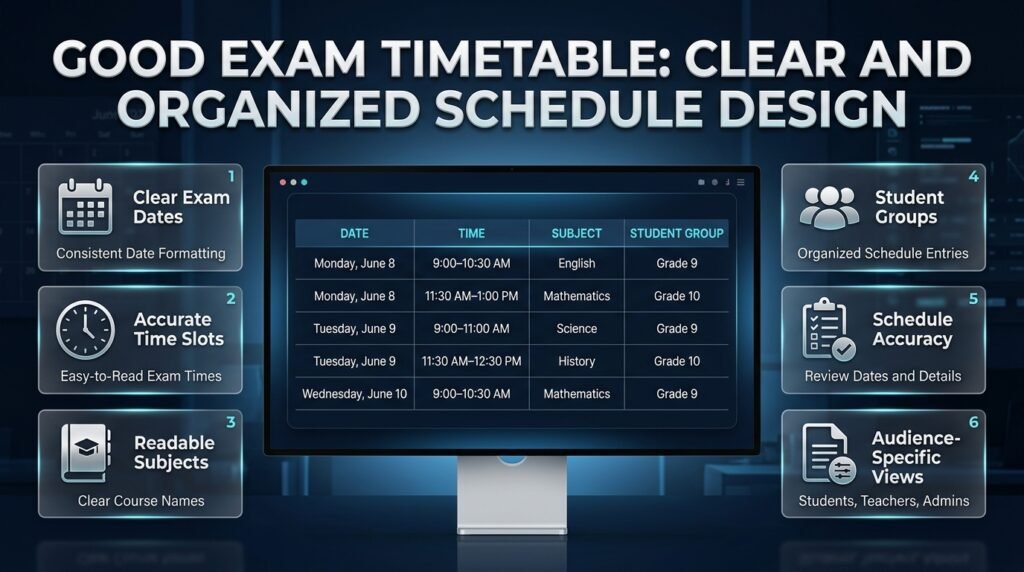
A good examination timetable is clear, accurate, practical, and easy to follow. It provides the information students need while helping administrators coordinate the resources required for each examination.
The following example demonstrates a basic format.
| Date | Time | Subject | Student group |
|---|---|---|---|
| Monday, June 8 | 9:00–10:30 AM | English | Grade 9 |
| Monday, June 8 | 11:30 AM–1:00 PM | Mathematics | Grade 10 |
| Tuesday, June 9 | 9:00–11:00 AM | Science | Grade 9 |
| Tuesday, June 9 | 11:30 AM–12:30 PM | History | Grade 10 |
| Wednesday, June 10 | 9:00–10:30 AM | Mathematics | Grade 9 |
This is an illustrative example rather than a recommended timetable for every institution. Actual dates, examination durations, and breaks should follow the relevant academic calendar and examination policies.
A complete institutional schedule may also need room numbers, course codes, invigilator assignments, or special instructions. Include these details when they help users understand or manage the examination arrangements.
How Can You Make the Timetable Easier to Read?
Use a consistent format throughout the document.
Display dates and times in a familiar style, keep subject names clear, and group examinations logically by date or student group. Avoid abbreviations that students may not understand.
If the institution needs different views for different audiences, maintain one approved master timetable and create filtered versions for students, teachers, or administrators. Ensure that all versions are based on the same approved information.
How Can You Create a Fair Examination Schedule?
A fair timetable considers the practical demands placed on students rather than focusing only on administrative convenience.
Balance Demanding Subjects
Where possible, avoid placing every demanding examination within a very short period.
Consult teachers about the nature of the assessments and consider whether students have a reasonable opportunity to prepare. Subjects that involve extensive problem-solving, detailed reading, or practical work may place different demands on students.
Equal gaps between all examinations are not always necessary. The objective is to create a reasonable distribution of workload within the available dates.
Avoid Unnecessarily Long Examination Days
Multiple examinations on the same day may be unavoidable, but their overall impact should be reviewed.
Consider the number of papers students must complete, the length of each session, available breaks, and any travel between examination rooms.
Where possible, avoid schedules that require students to remain on campus for excessive periods simply because the sessions were arranged without considering the student experience.
Support Approved Accessibility Arrangements
Some students may require additional time, accessible rooms, assistive technology, or other approved accommodations.
These arrangements should be considered during the planning stage. Waiting until after publication may create avoidable disruption and make it harder to deliver the required support.
Handle accommodation information confidentially. Public timetables should communicate necessary arrangements without exposing private student information.
Consider Different Examination Formats
Written papers, practical assessments, oral examinations, and computer-based tests may require different scheduling arrangements.
For example, a practical examination may need a limited number of workstations, while an oral examination may require several individual appointment slots.
Treat these assessments according to their actual requirements rather than forcing every examination into the same session structure.
Common Exam Schedule Generator Mistakes and How to Avoid Them
Even a useful scheduling tool cannot compensate for incomplete data or poor planning decisions. Recognizing common mistakes helps improve the timetable before it is shared.
Mistake 1: Using an Incomplete Subject List
Why it happens: The organizer uses an outdated course list or forgets to include a class.
Why it causes problems: Students may be left without an assigned examination, and the timetable may need to be revised after publication.
How to avoid it: Compare the examination list against current academic records. Confirm that every required assessment has a clear name and student group.
Mistake 2: Ignoring Enrollment Conflicts
Why it happens: Examinations are scheduled by department without checking which students take each course.
Why it causes problems: A student enrolled in multiple courses may receive overlapping examination assignments.
How to avoid it: Use enrollment or class-group data to identify shared students. Run conflict checks before approving the schedule.
Mistake 3: Assigning Rooms Without Checking Capacity
Why it happens: A room appears available, so the organizer assumes it is suitable.
Why it causes problems: The room may not have enough approved seating or may lack equipment required for the assessment.
How to avoid it: Confirm room capacity, availability, equipment, and accessibility before making final assignments.
Mistake 4: Scheduling Every Examination as Early as Possible
Why it happens: Administrators want to finish examinations quickly and return to ordinary academic activities.
Why it causes problems: Students may face several demanding papers in rapid succession, and staff may have difficulty managing examination operations.
How to avoid it: Balance the total examination period with student workload, resource availability, and institutional rules. A shorter schedule is not automatically a better schedule.
Mistake 5: Forgetting Holidays and Academic Events
Why it happens: Dates are selected without reviewing the full academic calendar.
Why it causes problems: Examinations may coincide with closures, institutional events, or unavailable facilities.
How to avoid it: Check the calendar before assigning dates and review it again before publication.
For longer-term coordination, Academic Calendar Planning helps frame examination periods within the academic year. The Academic Holiday Calendar Builder is relevant when identifying non-teaching days and institutional closures.
The Semester Milestone Calendar can help planners consider important academic deadlines, while the School Year Event Calendar is useful for identifying wider school commitments that may affect examination dates.
Mistake 6: Publishing Changes Without Clear Communication
Why it happens: An administrator updates a timetable but forgets to notify everyone affected.
Why it causes problems: Students and teachers may continue using different versions.
How to avoid it: Maintain one approved master schedule, identify revised versions clearly, and communicate changes through official channels.
Mistake 7: Trusting Generated Results Without Reviewing Them
Why it happens: Users assume that software-generated schedules are automatically correct.
Why it causes problems: The tool may not understand every institutional rule or may have received incomplete information.
How to avoid it: Review the generated timetable manually, verify critical constraints, and obtain the necessary approval before publication.
Exam Schedule Generator vs. Manual Scheduling
Both digital and manual methods can produce a workable examination timetable. The right choice depends on the size of the institution, the number of restrictions, and the amount of coordination required.
| Factor | Manual scheduling | Digital generator |
|---|---|---|
| Initial setup | Often straightforward | May require data entry and configuration |
| Small examination groups | Usually manageable | Can improve consistency |
| Large examination groups | Can become time-consuming | Often easier to coordinate |
| Conflict checking | Requires careful manual review | May automate supported checks |
| Schedule changes | Can require repeated edits | May simplify revisions |
| Room and staff planning | Often managed separately | Available in some tools |
| Final review | Essential | Still essential |
Manual scheduling can work well for a small tutoring center or a school with a limited number of examinations. Digital tools become more valuable when multiple student groups, rooms, and restrictions must be coordinated.
However, automation should not be treated as a substitute for sound academic judgment. A generator can only check the rules and information it has been designed to handle.
Can You Create an Exam Schedule in a Spreadsheet?
Yes. A spreadsheet can be a practical solution for a small institution that does not require specialized scheduling software.
Create columns for the examination date, start time, end time, subject, student group, room, and invigilator. Use consistent formats and sort the timetable chronologically.
You can improve the workflow by using dropdown lists for standardized subject names, filters for viewing individual classes, and conditional formatting to highlight possible duplicate assignments.
Maintain separate reference lists for room capacity and staff availability where needed. Save an approved copy before making major changes so that the institution has a clear record of the published schedule.
One important limitation is that identifying duplicate dates does not automatically reveal every conflict. Two examinations can take place simultaneously without a problem if they involve different students, while differently named courses may conflict if the same students attend both.
As a result, spreadsheets work best when the scheduling rules are simple enough to check reliably or when a person can review the relevant enrollment information.
How Do Class and Subject Timetables Support Exam Planning?
Examination planning is connected to everyday academic organization. Schools and colleges already maintain subject schedules, lesson periods, and class timetables that identify when students attend particular courses.
Reviewing these schedules can help administrators understand student groups, teaching commitments, and the wider academic structure before assigning examination dates.
The Subject Timetable Maker is a related resource for organizing subject-based schedules. It addresses a different planning need from an examination timetable, but the same attention to clear subject assignments and time slots is useful.
Similarly, the Class Timetable Grid Builder is relevant to arranging class schedules in a structured grid. Understanding these arrangements can help administrators coordinate examinations without overlooking existing academic commitments.
For student-facing organization, the Student Class Period Organizer offers a related approach to presenting class and period information clearly.
These resources should support the wider planning process rather than be treated as interchangeable examination systems. A regular class timetable organizes teaching activities, while an exam schedule assigns specific assessments to approved examination sessions.
How Can Weekly Lesson Planning Support Examination Preparation?
Teachers often need to complete course content before examinations begin. A realistic examination schedule should therefore be considered alongside the teaching timetable and the remaining curriculum.
The Weekly Lesson Period Planner is relevant when organizing teaching periods and understanding how instructional time is distributed across the week.
Teachers can use their regular lesson plans to identify which topics must be covered before an examination, while administrators can use the approved examination dates to establish reasonable preparation deadlines.
For example, if a science examination is planned for the end of a term, teachers should review whether the relevant units can be completed before the assessment. If the teaching schedule leaves insufficient time, the institution may need to adjust the examination date or revise the teaching plan in accordance with its policies.
This coordination helps avoid a situation in which an examination is scheduled before students have had a reasonable opportunity to study the required material.
Expert Tips for Creating a Reliable Examination Timetable

A dependable timetable usually results from early preparation, clear rules, and careful review rather than last-minute adjustments.
Schedule Restricted Examinations First
Identify assessments with limited availability before arranging flexible subjects.
These may include laboratory examinations, large examinations requiring multiple rooms, and papers that must occur within a specific window.
Placing these examinations first reduces the risk that a flexible subject will occupy a slot needed for a more restricted assessment.
Keep Some Flexibility Where Possible
Unexpected closures, staff absences, or other operational problems may require changes.
Where institutional rules permit, avoid filling every possible session without considering alternatives. A realistic plan should provide a manageable way to respond when circumstances change.
Flexibility does not mean publishing an incomplete timetable. It means considering suitable alternatives during the planning stage.
Separate Schedule Creation From Approval
The person creating the timetable should not be the only person checking it.
An independent reviewer can identify missing subjects, incorrect times, confusing instructions, and resource conflicts. A separate review is particularly useful when the timetable covers many classes or departments.
Maintain a Clear Record of Changes
Record significant changes to examination dates, times, and locations. Keep the approved timetable identifiable and make sure staff know which version is current.
A simple change log can record the date of the revision, the affected examination, the reason for the change, and who approved it. This makes it easier to explain adjustments and avoid confusion.
Coordinate Examination Planning With Academic Milestones
Examinations should fit within the wider academic year rather than being planned in isolation.
Consider term dates, curriculum completion, holidays, school events, and institutional deadlines before finalizing the timetable. Related planning resources available through Academic Planning and Scheduling Tools can help organize the broader academic workflow.
The RTI Scheduler homepage is also available as a central starting point for reviewing related academic planning resources.
Use Technology According to Your Actual Needs
A simple timetable may be sufficient when the institution has few examinations and limited scheduling restrictions. A larger institution may need enrollment-based conflict checks, room allocation, and staff scheduling.
Before adopting a generator, test it with a representative set of examinations. Confirm that it handles the constraints that matter most to your institution, and determine which checks still require human review.
The purpose of technology is to make planning more reliable and manageable, not to introduce unnecessary complexity.
Final Checklist Before Publishing an Exam Schedule
Use this checklist before releasing the timetable to students and staff.
- All required subjects and examinations are included.
- Student groups and course details are accurate.
- Examination dates match the approved academic calendar.
- Start times and examination durations are correct.
- Overlapping student examinations have been checked.
- Rooms have suitable capacity and equipment.
- Invigilator assignments have been confirmed.
- Student preparation time has been considered.
- Approved accessibility arrangements are supported.
- The timetable has received the required approval.
- The published document is readable and easy to follow.
- A clear process exists for communicating future changes.
Completing these checks helps reduce avoidable errors and provides greater confidence that the timetable is practical for the people who must use it.
How can an exam schedule generator create a conflict-free examination timetable?
An exam schedule generator helps organize examinations by assigning subjects to suitable dates and time slots while checking relevant scheduling restrictions. To create a genuinely conflict-free timetable, the system needs accurate information about student enrollment, examination durations, available rooms, and any fixed examination dates. Simply assigning different subjects to different time slots is not enough, especially when students take courses across multiple classes or departments.
For example, a university student enrolled in Biology and Chemistry must not be assigned both examinations at the same time. The timetable should also account for examination durations so that one paper does not overlap with another assessment the student must attend.
Important points to consider:
Enter accurate student group or course enrollment information.
Check both overlapping start times and examination durations.
Verify room capacity and staff availability.
Review the generated timetable manually before approval.
The most reliable approach combines automated conflict detection with a final administrative review. This helps identify scheduling problems before students receive the official timetable.
What information is required to generate an accurate exam timetable?
An accurate examination timetable begins with complete and well-organized data. Before generating the schedule, administrators should collect the examination subjects, student groups, approved dates, examination durations, and any restrictions that affect when or where each assessment can take place. Missing information can lead to timetable conflicts, incorrect room assignments, or examinations being left out entirely.
For schools, a class-wise subject list may be sufficient for basic scheduling. Colleges and universities often need more detailed enrollment information because students may take different combinations of courses. Institutions conducting practical or computer-based examinations must also consider specialist rooms, equipment, and technical requirements.
Prepare these details before scheduling:
Subject names, course codes, and student groups.
Examination dates, session times, and durations.
Academic holidays and unavailable dates.
Room capacity, equipment, and accessibility requirements.
Invigilator availability and supervision rules.
Once the information is verified, enter it into the generator or planning spreadsheet. Checking the source data first is usually much easier than correcting several errors after the timetable has been created.
How far in advance should a school or college prepare its examination timetable?
An examination timetable should be prepared early enough to allow data verification, conflict checking, room allocation, and communication with students. The exact timeline depends on the size of the institution, the number of examinations, and whether external examination dates must be followed. Larger institutions generally need more time because changes can affect several departments and student groups.
A practical approach is to prepare the initial schedule several weeks before examinations begin, review it with the relevant staff, and publish the approved version early enough for students to plan their revision.
Recommended planning steps:
Confirm examination dates and academic calendar restrictions first.
Prepare the subject list and identify scheduling conflicts.
Allocate rooms and invigilators before final approval.
Publish the timetable with clear instructions and a revision process.
The important point is to leave sufficient time for checking and corrections rather than publishing a timetable that has not been properly reviewed.
How can an exam schedule generator balance student workload and examination requirements?
A well-planned examination timetable must satisfy institutional requirements without creating unnecessary pressure for students. This means considering more than whether two examinations occur simultaneously. Administrators should also review the number of examinations assigned to each student per day, the spacing between demanding subjects, and the time available for preparation.
For instance, a timetable may contain no direct conflicts but still require students to complete three demanding examinations within a short period. When alternative arrangements are possible, distributing these assessments more sensibly can improve the overall examination experience.
Best practices for balancing workload:
Avoid concentrating several demanding examinations on one day when practical.
Provide reasonable preparation intervals between major assessments.
Consider examination duration and required breaks.
Review the timetable from the perspective of different student groups.
Follow institutional policies for accessibility and approved accommodations.
A balanced schedule does not require every student to have identical gaps between examinations. It requires administrators to consider workload fairly while working within genuine academic and resource constraints.
What should you check before publishing a generated exam timetable?
Before publishing an examination timetable, verify that all examinations are included, dates and times are correct, student conflicts have been resolved, and room assignments meet the institution’s requirements. The final review should also confirm that the schedule follows the academic calendar and includes any necessary arrangements for practical assessments or approved accommodations.
This review is important because a generated timetable can appear complete while still containing errors caused by outdated information or unsupported scheduling rules.
Final publication checklist:
Confirm every subject and student group.
Verify examination dates, start times, and durations.
Check student, room, and invigilator conflicts.
Confirm room capacity and required equipment.
Review holidays and institutional restrictions.
Obtain approval from the responsible administrator.
Publish one clearly identified version and communicate any changes.
A careful final review helps ensure that students and staff receive a timetable they can rely on throughout the examination period.
Conclusion
An exam schedule generator can make examination planning more organized, accurate, and manageable for schools, colleges, universities, and other educational institutions. Instead of preparing every examination date manually, administrators can use a structured planning process to organize subjects, allocate examination periods, identify potential conflicts, and create a timetable that meets the needs of students and staff. However, generating a schedule is only one part of effective examination management. The final timetable must also account for student availability, room capacity, teacher responsibilities, examination duration, academic deadlines, and institutional policies.
A reliable examination timetable should provide enough preparation time, distribute demanding subjects thoughtfully, and communicate essential information clearly. Before publishing the schedule, administrators should review every date, time, subject, room assignment, and examination requirement to reduce avoidable mistakes. They should also establish a clear process for communicating changes so students and staff can prepare without unnecessary confusion.
For a more coordinated approach to academic organization, explore the planning resources available at RTI Scheduler. Combining exam scheduling with academic calendar planning, semester milestones, holiday management, and regular timetable organization can help institutions maintain a more consistent academic routine. Ultimately, an effective exam schedule generator is not simply a tool for assigning dates; it supports better preparation, clearer communication, and a smoother examination process for everyone involved.