
Introduction
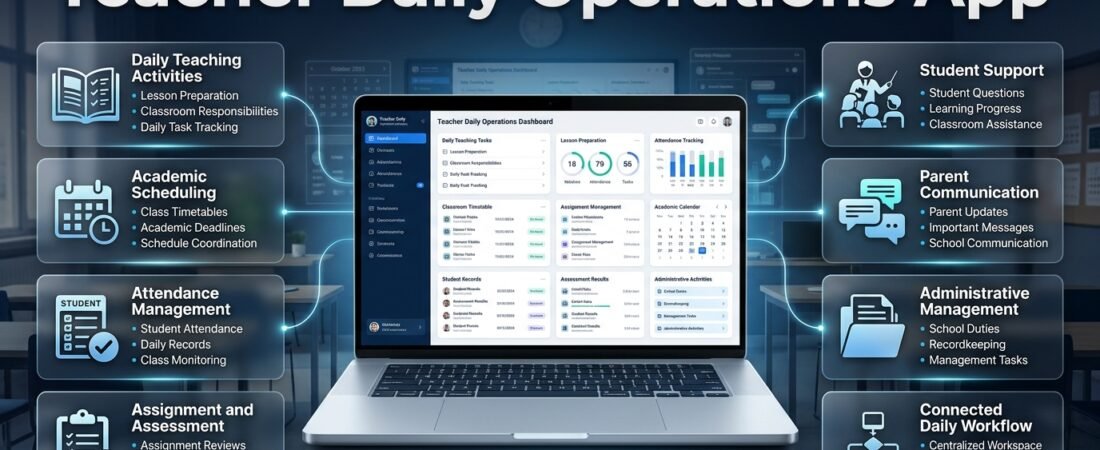
Teacher Daily Operations App | Teaching involves much more than delivering lessons in front of a classroom. Every school day brings a combination of academic responsibilities, administrative activities, student support, communication, recordkeeping, and planning. Teachers prepare lessons, follow timetables, mark attendance, review assignments, record assessment results, respond to student questions, communicate with parents, and complete tasks assigned by school management. When these responsibilities are managed through separate notebooks, spreadsheets, paper registers, and messaging applications, even a well-organized teacher can struggle to maintain a consistent routine.
A teacher daily operations app helps bring these responsibilities into a more organized digital workspace. Instead of depending on several disconnected tools, teachers can use a structured system to manage daily teaching activities, monitor upcoming tasks, organize academic schedules, and keep important classroom information accessible. The purpose is not to replace professional judgment or make teaching mechanical. It is to reduce avoidable administrative effort so teachers can give more attention to instruction, student progress, and classroom support.
The need for an organized teaching workflow is especially important when educators handle multiple classes, different subjects, changing timetables, assessment deadlines, and additional school duties. A missed deadline or an outdated schedule can affect several connected activities. For example, a change in an examination date may require adjustments to lesson preparation, revision sessions, assignment deadlines, and student communication. A central daily operations system makes these connections easier to track.
Teachers looking for a more structured way to manage academic responsibilities can explore the planning approach offered by RTI Scheduler. A well-organized scheduling environment can help educators connect daily classroom tasks with broader academic plans instead of treating every responsibility as a separate activity.
This guide explains what a teacher daily operations app is, which features matter most, how it supports everyday classroom work, and how educators can introduce it into their routines. It also examines the needs of different teaching environments, practical implementation methods, common mistakes, and ways to evaluate whether a digital workflow is genuinely improving daily operations.
What Is a Teacher Daily Operations App?
A teacher daily operations app is a digital tool or organized platform designed to help educators manage the recurring responsibilities involved in teaching. These responsibilities may include lesson preparation, class schedules, attendance records, assignment tracking, assessment planning, academic reminders, communication, and personal task organization.
Unlike a simple digital calendar that only records dates and appointments, a daily operations system focuses on the relationship between different teaching activities. It helps teachers understand what needs to be completed, when it should happen, which class or subject it relates to, and whether any follow-up action is required.
For example, a teacher may have to complete the following activities during one working day:
- Prepare a lesson for a morning science class.
- Review homework submitted by two sections.
- Mark attendance for assigned periods.
- Complete an assessment for a particular topic.
- Record students who need additional support.
- Prepare teaching materials for the following day.
- Submit an academic progress update.
- Check the timetable for a room or period change.
Without a structured system, these activities may be recorded in different places. A daily operations app provides a central method for organizing them and checking their progress.
How It Differs From a Basic To-Do List
A basic to-do list records tasks, but it may not provide enough academic context. Writing “prepare lesson” does not explain which subject, class, topic, learning objective, or teaching date the task belongs to.
A teaching-focused system can organize the same task with additional details:
- Subject: Mathematics
- Class: Grade 8
- Topic: Linear equations
- Teaching date: Thursday
- Preparation deadline: Wednesday afternoon
- Required resources: Textbook, board examples, practice worksheet
- Follow-up: Review student responses after the lesson
This additional context makes the task more useful because teachers can connect preparation with classroom delivery and later assessment.
Daily Operations Versus Complete School Management
A school management system may cover admissions, fees, payroll, transport, institutional reporting, and other administrative functions. A teacher daily operations app has a more focused purpose: helping educators organize the work they personally need to complete.
Some platforms combine teacher tools with wider institutional features. Others focus on lesson planning, personal schedules, classroom records, and productivity. The right approach depends on whether the school needs an institution-wide platform or an individual teacher workspace.
The most useful system is not necessarily the one with the largest number of features. It is the one that supports the actual responsibilities of its intended users without making routine work unnecessarily complicated.
Why Teachers Need a Structured Daily Operations System
Teaching responsibilities are interconnected. A change in one area can influence several other tasks, and the consequences of disorganization are not always visible immediately. A teacher may complete a lesson successfully but later discover that the assessment record was not updated or that students did not receive the revised homework instructions.
A structured system helps reduce these gaps.
1. Managing Multiple Responsibilities
Teachers often move between instructional and administrative work throughout the day. They may teach one class, supervise an activity, check assignments, attend a staff meeting, and prepare resources for another subject.
Switching between these activities without a clear task record can make it difficult to remember unfinished work.
A daily operations system allows teachers to divide responsibilities into manageable categories, such as:
- Classroom teaching
- Lesson preparation
- Student assessment
- Attendance and records
- Communication
- Administrative duties
- Professional development
This structure helps teachers identify the type of work that needs attention and avoid treating every task as equally urgent.
2. Maintaining Consistent Lesson Preparation
Lesson preparation is more effective when it follows a predictable process. Teachers need to consider learning objectives, available teaching time, student readiness, materials, and assessment methods.
A digital workflow can help educators prepare lessons in advance and connect each lesson to the relevant class schedule. It can also provide a place to record whether the lesson was completed, adjusted, or postponed.
Teachers who need a more detailed approach to organizing academic schedules can review Academic Planning and Scheduling Tools. These planning methods help connect individual teaching activities with the wider academic structure.
3. Reducing Missed Deadlines
Schools operate through academic dates and recurring responsibilities. Teachers may have to submit marks, complete syllabus sections, prepare examination materials, attend meetings, and finalize progress reports by specific deadlines.
A central reminder system makes upcoming responsibilities easier to review. Rather than relying on memory, teachers can check a weekly or monthly overview and prepare for important dates before they become urgent.
4. Improving Classroom Continuity
Classroom continuity means that teaching activities remain organized even when the usual routine changes. A teacher may be absent, a class may be rescheduled, or a lesson may take longer than expected.
When lesson notes, schedules, and task records are maintained consistently, it becomes easier to understand what has already been covered and what needs to happen next.
5. Supporting Better Workload Management
A teacher’s workload is not determined only by the number of lessons taught. Marking, preparation, communication, documentation, and school responsibilities also require time.
A daily operations app can help make these activities visible. Teachers can then distribute work more evenly rather than allowing several large tasks to accumulate at the end of the week.
Essential Features of a Teacher Daily Operations App
Not every educator needs an advanced platform. However, a useful daily operations app should support the core activities that make up a teacher’s working routine.
1. Daily Task Dashboard
The dashboard should provide a clear overview of the day’s responsibilities. Teachers should be able to identify important activities without opening several separate sections.
A practical dashboard may display:
- Today’s classes and teaching periods
- Lessons that require preparation
- Attendance or recordkeeping tasks
- Assignments awaiting review
- Upcoming deadlines
- Pending administrative responsibilities
- Reminders for meetings and school activities
The dashboard should prioritize clarity. Too many alerts, charts, and unnecessary notifications can make the experience more distracting rather than more productive.
2. Lesson Planning and Preparation
Lesson planning is one of the most important responsibilities in teaching. A useful app should allow teachers to organize lesson topics, learning objectives, resources, activities, and assessment methods.
A structured lesson record may include:
| Planning element | Information to record |
|---|---|
| Subject | The subject being taught |
| Class | Grade, section, or student group |
| Topic | The lesson’s main subject |
| Objective | What students should understand or demonstrate |
| Resources | Textbooks, worksheets, presentations, or equipment |
| Activities | Explanation, discussion, practice, or group work |
| Assessment | Questions, exercises, or other evidence of learning |
| Follow-up | Homework, revision, or additional support |
Teachers should be able to revisit previous lesson records and adapt them when teaching the same topic again. This reduces repetitive preparation while allowing lessons to improve through experience.
3. Timetable Management
A timetable is the foundation of a teacher’s daily schedule. It identifies when classes take place, which subjects are taught, and where teachers need to be.
A useful scheduling feature should make it easy to view daily and weekly teaching periods. It should also help users identify changes, substitutions, and scheduling conflicts.
For example, if a teacher is assigned to two classes during the same period, the system should make the conflict visible before the schedule is finalized. When a period changes, the updated information should be easy to review.
A Subject Timetable Maker can support the organization of subject-based teaching periods, while a Class Timetable Grid Builder can help present class schedules in a clear visual format.
4. Attendance and Classroom Records
Attendance is a recurring responsibility that requires accuracy and consistency. Teachers may need to record attendance at the beginning of the day or during individual periods, depending on school policy.
A digital attendance workflow should make it straightforward to record present, absent, and late students. It should also provide a reliable way to review earlier records and correct genuine mistakes according to the school’s procedures.
Classroom records may also include:
- Lesson completion notes
- Homework information
- Student participation observations
- Assessment completion
- Follow-up requirements
- Relevant classroom incidents
Teachers should record only information that is necessary for educational or institutional purposes. Sensitive student information should be handled through approved and appropriately protected systems.
5. Assignment and Homework Tracking
Assignment management involves more than recording a due date. Teachers need to know which class received the work, what instructions were provided, when submissions are expected, and which work still requires review.
A practical workflow can include:
- Create the assignment.
- Select the relevant class or group.
- Add instructions and the submission deadline.
- Record the expected format or resources.
- Review submitted work.
- Mark completion or provide feedback.
- Identify students who need follow-up.
A clear assignment record reduces confusion when several classes receive different tasks during the same week.
6. Assessment and Mark Management
Assessment activities need careful organization because they influence teaching decisions and student progress records.
A daily operations system can help teachers plan quizzes, classroom tests, practical assessments, projects, and examination-related tasks. It may also provide a structured place to record marks or assessment completion, depending on the platform and school policy.
The system should distinguish between a planned assessment, an assessment that has been conducted, and one that has been reviewed. These stages should not be treated as the same activity.
7. Calendar and Academic Reminders
A calendar helps teachers understand how daily responsibilities fit into the wider academic year.
Important calendar entries may include:
- Teaching days
- Public and school holidays
- Examination periods
- Assignment deadlines
- Parent-teacher meetings
- Staff meetings
- Training sessions
- Academic reporting dates
- School events
Teachers can use Academic Calendar Planning to understand how academic dates can be organized into a more coherent schedule. A dedicated Academic Holiday Calendar Builder can also help distinguish instructional days from holidays and other non-teaching dates.
8. Notifications and Reminders
Notifications are useful when they highlight something that requires action. However, a system that sends alerts for every minor activity can interrupt teaching and reduce concentration.
Teachers should be able to prioritize reminders according to urgency and relevance. A deadline due tomorrow may need a stronger reminder than a routine task scheduled for the following week.
A good notification system should communicate the task, its deadline, and the action required. It should avoid unnecessary repetition.
9. Progress and Task Tracking
Task tracking helps teachers see which responsibilities are complete, in progress, or waiting for attention.
For example, a weekly task list might show that lesson preparation is complete, two assignments are awaiting review, and an assessment report is due on Friday.
This simple visibility makes it easier to plan the next working session and prevents unfinished tasks from disappearing from view.
10. Search and Organized Records
Teachers may need to revisit an earlier lesson, locate a timetable change, check an assignment instruction, or review a previous academic record.
A useful app should make important information searchable and organize records by subject, class, date, or task type.
The aim is to reduce time spent looking for information. A system that stores everything but makes records difficult to retrieve does not provide a strong daily workflow.
How a Teacher Daily Operations App Supports the Working Day
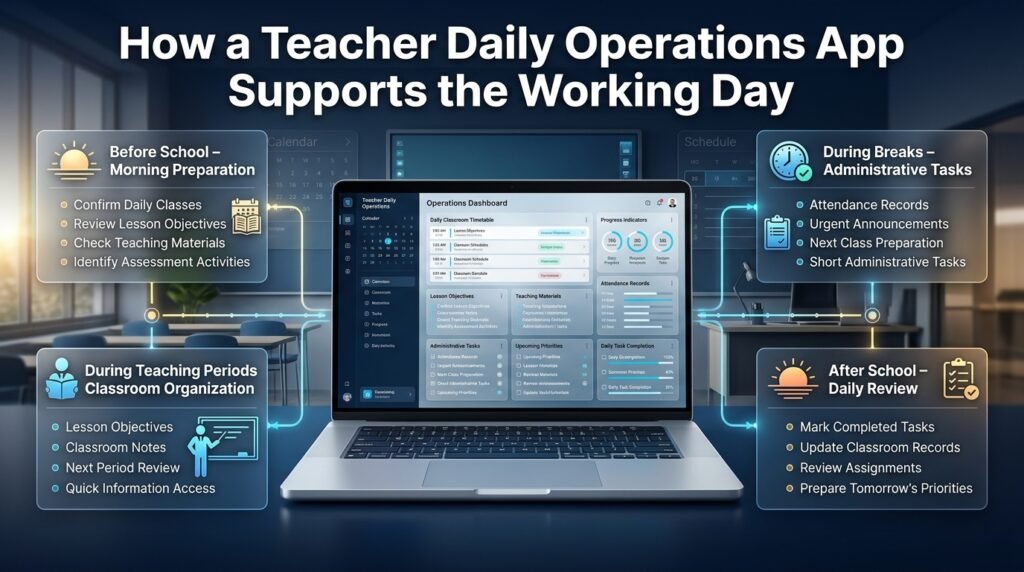
A useful system should fit naturally into the school day. It should not require teachers to spend more time managing the app than completing their responsibilities.
Before School: Preparing for the Day
The first review can take place before classes begin. Teachers can check the timetable, identify preparation requirements, and review any changes made since the previous working day.
A short preparation routine may include:
- Confirming the day’s classes and periods
- Reviewing lesson objectives
- Checking required teaching materials
- Identifying assessment activities
- Reviewing important announcements
- Noting any timetable changes
- Checking tasks that must be completed before leaving school
This preparation reduces uncertainty and helps teachers begin the day with a clear plan.
During Teaching Periods: Keeping Classroom Work Organized
During lessons, the system should support quick access to relevant information rather than create additional distractions.
Teachers may need to check a lesson objective, confirm an activity, record a short classroom note, or review the next period. These actions should be simple and should not interrupt direct interaction with students.
The app should support teaching, not compete with it. Teachers should avoid unnecessary device use during explanations, discussions, and activities where student attention is important.
During Breaks: Completing Short Administrative Tasks
Break periods are often limited. Teachers may use them to record attendance, check an urgent notice, or prepare for the next class.
A daily operations app can help identify which small tasks can be completed quickly and which require a longer period of focused work.
It is important not to fill every break with administration. Teachers also need time to rest, prepare mentally, and respond to unexpected classroom needs.
After School: Reviewing and Closing the Day
At the end of the day, teachers can review completed lessons and identify unfinished responsibilities.
A short closing routine may involve:
- Marking completed tasks.
- Recording lessons that were postponed or adjusted.
- Updating necessary classroom records.
- Listing assignments that require review.
- Checking tomorrow’s timetable.
- Preparing priority tasks for the next day.
This process creates a clear transition between the current working day and the next one.
Organizing Weekly and Monthly Teaching Responsibilities
Daily planning is important, but many teaching responsibilities cannot be managed effectively through a single-day view. Teachers also need weekly and monthly planning methods.
Weekly Planning
A weekly overview helps teachers distribute work across several days. It can show teaching periods, lesson preparation, assessment activities, meetings, and submission deadlines.
For example, a teacher may reserve Monday for reviewing the week’s lesson objectives, Tuesday for preparing resources, Wednesday for checking assignments, Thursday for assessment follow-up, and Friday for reviewing progress.
This does not mean every week must follow an identical pattern. The purpose is to create a flexible structure that can be adjusted when school activities change.
A Weekly Lesson Period Planner can help teachers arrange instructional periods and understand how lessons are distributed throughout the week.
Monthly Planning
Monthly planning provides a wider view of academic responsibilities. It helps teachers prepare for examinations, projects, school events, reporting dates, and curriculum milestones.
A monthly review can answer several important questions:
- Which major topics should be completed this month?
- Are any assessments scheduled during the same week?
- Do students have several large assignments due together?
- Are school events likely to reduce teaching time?
- Which records must be submitted before the month ends?
- Does the current pace support the academic plan?
A Semester Milestone Calendar can help connect monthly activities with broader semester goals.
Annual Planning
Annual planning helps teachers understand the complete academic cycle. It includes term dates, holidays, examinations, major school events, curriculum targets, and reporting periods.
Teachers should not attempt to manage every annual detail through daily reminders. Instead, important annual dates should be recorded in a central calendar, with relevant tasks added to weekly and daily plans as they become closer.
A School Year Event Calendar can help organize important events and dates across the school year.
Supporting Different Teaching Environments
A daily operations app should reflect the environment in which a teacher works. The responsibilities of a primary school teacher may differ significantly from those of a secondary school subject specialist or a university instructor.
Primary School Teachers
Primary teachers may spend much of the day with one class or a small group of classes. Their responsibilities can include multiple subjects, classroom routines, student observations, parent communication, and regular learning activities.
Useful features include:
- Simple daily lesson planning
- Class-based attendance records
- Homework and activity tracking
- Student progress notes
- Parent communication records
- Visual reminders for classroom routines
The system should be easy to use and should not require excessive data entry for ordinary classroom activities.
Secondary School Teachers
Secondary teachers may teach several classes across different sections. They often need to manage subject-specific lesson plans, examination preparation, assignments, and assessment records.
Useful features include:
- Subject-based timetable views
- Separate class records
- Assessment calendars
- Assignment deadlines
- Syllabus progress tracking
- Revision and examination planning
For these teachers, the ability to switch between classes and subjects without losing context is particularly important.
College and University Instructors
College and university instructors may manage lectures, seminars, laboratory sessions, research supervision, office hours, marking, and academic administration.
Their daily operations may require:
- Course and section schedules
- Lecture preparation records
- Assignment and project tracking
- Examination and grading deadlines
- Student consultation appointments
- Research or departmental task lists
- Academic meeting reminders
The app should allow flexibility because university schedules and teaching responsibilities can vary across departments and semesters.
Substitute and Part-Time Teachers
Substitute and part-time teachers may work with changing schedules or different groups of students. They need access to relevant lesson information and clear instructions about assigned periods.
A useful system should make the current schedule easy to review and help teachers identify changes without relying on informal messages alone.
Part-time educators may also benefit from personal task views that distinguish their teaching responsibilities from unrelated institutional activities.
Managing Changes, Substitutions, and Unexpected Events
A teacher’s daily schedule rarely remains completely unchanged throughout the academic year. Teachers may be absent, school events may interrupt normal periods, rooms may become unavailable, or classes may need to be combined.
A daily operations system should make it easier to manage these changes without losing the original academic record.
Handling Timetable Changes
When a timetable changes, teachers should be able to identify:
- Which period has changed
- Which class is affected
- Whether the subject or room has changed
- Whether a replacement teacher is assigned
- Whether students need updated instructions
The revised schedule should be clear and accessible to the people affected by it.
Planning Substitute Lessons
A substitute teacher may need to continue a lesson that another teacher has already started. Clear lesson notes can support this transition.
Useful information may include the current topic, completed activities, remaining work, required resources, and any relevant classroom instructions.
These records should be factual and professional. They should contain only information that the substitute teacher needs to carry out the assigned lesson.
Responding to Unexpected Workload
Unexpected responsibilities can disrupt even a carefully planned day. A teacher may be asked to attend a meeting, supervise an activity, or support a student who needs additional attention.
A flexible operations system should allow tasks to be moved without making the entire schedule difficult to understand.
Teachers should be able to identify what must be completed today, what can reasonably be rescheduled, and what requires communication with school management.
Improving Academic Coordination Through Connected Planning
Daily teaching responsibilities are connected to wider academic processes. A teacher may complete a lesson plan, but that lesson also needs to fit within the subject timetable, curriculum sequence, academic calendar, and examination schedule.
A connected planning approach helps reduce conflicts between these activities.
Coordinating Lessons With the Academic Calendar
Teachers should consider holidays, school events, examination periods, and other interruptions when planning lesson delivery.
For example, if a school has a three-day event during a particular week, teachers may need to adjust lesson coverage or move an assessment. A calendar-based workflow makes these changes easier to identify before they affect several classes.
Connecting Timetables With Curriculum Progress
A timetable shows when teaching takes place, while curriculum tracking shows what should be taught. These two elements should support each other.
If a class loses a teaching period, the teacher may need to adjust the lesson sequence. If a topic requires more time than expected, the teacher may need to revise the next week’s plan.
A Student Class Period Organizer can support the organization of class periods, while a structured timetable helps teachers understand how instructional time is allocated.
Coordinating Examination Preparation
Examination periods create additional responsibilities. Teachers may need to complete syllabus coverage, prepare revision materials, create question papers, check examination dates, and submit marks.
A clear examination plan helps teachers avoid leaving all preparation until the final days.
Exam Schedule Planning can support the organization of examination-related dates and responsibilities. Teachers should also make sure that revision activities and assessment deadlines remain realistic for students.
Managing Academic Deadlines
Academic deadlines may include lesson plan submissions, assignment reviews, mark entry, report completion, and departmental documentation.
Academic Deadline Management can help educators understand how important academic tasks can be tracked across a schedule.
The key is to record deadlines with enough context to make them actionable. A reminder saying “submit report” is less useful than one identifying the report, class, submission date, and required next step.
Teacher Daily Operations App vs. Separate Productivity Tools
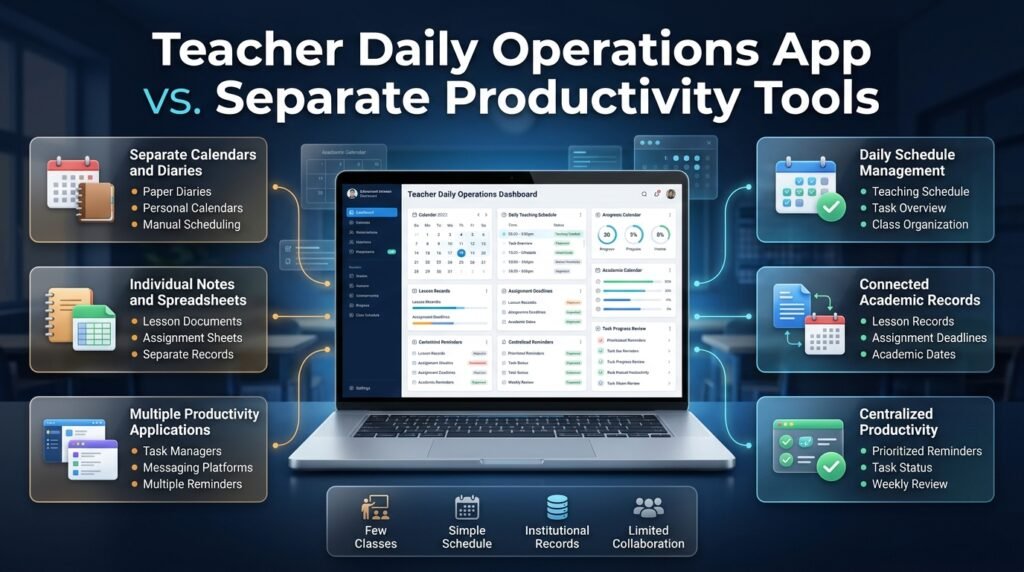
Teachers can organize their work using several separate applications, such as calendars, note-taking tools, spreadsheets, task managers, and messaging platforms. This approach may work for some educators, but it can create fragmentation when information is spread across too many places.
A more integrated workflow can make routine management easier.
| Work area | Separate-tool approach | Connected operations approach |
|---|---|---|
| Daily schedule | Calendar or paper diary | Teaching schedule and task overview |
| Lesson preparation | Individual notes or documents | Lesson records linked to classes and dates |
| Assignments | Separate spreadsheet or notebook | Assignment list with deadlines and progress |
| Academic dates | Personal calendar | Shared academic calendar |
| Reminders | Multiple notification sources | Centralized, prioritized reminders |
| Progress review | Manual checking | Clear task status and weekly review |
A connected system is not automatically better in every situation. Some teachers prefer specialized tools for particular tasks, and some schools already have approved systems that must be used.
The important consideration is whether the tools work together without creating unnecessary duplication.
When Separate Tools May Be Enough
A teacher with a small number of classes and a relatively simple schedule may manage effectively with a calendar, a notebook, and a basic task list.
This approach can be appropriate when:
- The teacher has few recurring administrative duties.
- The school already provides a reliable timetable.
- Student records are managed through an institutional system.
- There is little need for collaboration across departments.
- The teacher can maintain records consistently.
When a Dedicated Operations App Becomes More Useful
A dedicated system becomes more valuable when teachers handle several classes, subjects, deadlines, and recurring responsibilities.
It may be especially helpful when:
- Timetables change frequently.
- Teachers need to coordinate with several departments.
- Assessment activities occur throughout the term.
- Multiple records must be maintained.
- Important tasks are regularly missed or delayed.
- Teachers spend too much time searching for information.
The goal should be to simplify the workflow, not to add another application without a clear purpose.
How to Choose the Right Teacher Daily Operations App
Selecting an app requires more than comparing feature lists. Teachers should consider their working environment, institutional requirements, technical access, and the amount of time they can reasonably spend maintaining the system.
1. Identify Your Actual Daily Responsibilities
Start by listing the activities that take the most time or create the most difficulty.
For one teacher, the main challenge may be lesson preparation. For another, it may be managing several class timetables or completing assessment records.
A useful selection process begins with real needs rather than marketing claims.
2. Check the Scheduling Features
The app should make daily and weekly schedules easy to understand. Teachers should be able to view classes, periods, and important changes without navigating through complicated menus.
If the school uses rotating schedules or different timetables for particular days, check whether the platform can support those arrangements.
3. Evaluate Task and Deadline Management
A task feature should allow teachers to create responsibilities, set deadlines, assign categories, and review progress.
It should also support recurring tasks where appropriate, such as weekly planning or regular assessment reviews.
4. Consider Lesson Planning Support
Teachers should be able to record lesson topics, objectives, resources, and follow-up activities in a format that matches their teaching approach.
Avoid choosing a system that forces every teacher into an unnecessarily rigid template.
5. Review Ease of Use
A platform may offer many advanced features but still be unsuitable if routine tasks take too long to complete.
Teachers should test common actions, including:
- Opening the daily schedule
- Adding a lesson task
- Recording a deadline
- Finding a previous lesson
- Updating a task status
- Reviewing the weekly calendar
If these actions are confusing, the system may create more work than it removes.
6. Check Device Compatibility
Teachers may use desktop computers at school, laptops at home, or mobile devices while moving between classrooms.
A suitable app should work reliably on the devices the teacher actually uses. It should also be accessible under the school’s network and technology conditions.
7. Understand Privacy and Data Protection
Teaching records may contain personal student information, assessment results, attendance details, or confidential school documents.
Before adopting an app, teachers and school leaders should understand:
- What information the app stores
- Who can access the records
- Whether permissions can be limited
- How information is backed up
- How data can be exported
- What happens when an account is closed
- Whether the platform meets institutional privacy requirements
Teachers should not upload sensitive student records to an unapproved service simply because it offers convenient features.
8. Check Collaboration Requirements
Some teaching responsibilities involve coordination with other teachers, department heads, or school administrators.
If collaboration is important, the system should provide appropriate sharing and permission controls. A personal planning app may be sufficient for individual tasks but may not support institution-wide coordination.
9. Consider Reliability and Support
A daily operations system becomes part of a teacher’s routine. Frequent downtime, confusing updates, or unreliable synchronization can disrupt that routine.
Check whether the provider explains how technical support works and whether the app has a clear process for handling problems.
10. Compare Cost With Practical Value
A free app may be enough for an individual teacher, while a school may need paid features for collaboration, administration, or additional users.
Compare the total cost with the actual benefits. Do not pay for advanced features that teachers are unlikely to use.
Building an Effective Teacher Workflow With an Operations App
Choosing an app is only the first step. The real value comes from building a consistent workflow around it.
A workflow should explain how teachers prepare, complete, review, and follow up on recurring responsibilities.
Step 1: Create a Central Teaching Schedule
Begin by recording the regular teaching timetable. Include subjects, classes, periods, and any recurring duties that affect availability.
If the timetable is already maintained by the school, use the approved version rather than creating an independent schedule that may become outdated.
Step 2: Organize Classes and Subjects
Create a clear structure for the classes and subjects you teach. Use consistent names so that lesson records, assignments, and assessment tasks can be located easily.
For example, avoid creating several different labels for the same class. Consistent naming improves search and reduces confusion.
Step 3: Add Recurring Responsibilities
Identify tasks that happen regularly, such as weekly lesson preparation, assignment review, or progress updates.
Recurring tasks should be scheduled at realistic times. Do not place every responsibility on the same day simply because it is convenient to enter them together.
Step 4: Add Important Academic Dates
Record major examination dates, school events, holidays, meetings, and reporting deadlines.
Where possible, use the institution’s official calendar as the source of truth. Personal reminders should support the official schedule rather than replace it.
Step 5: Connect Lessons With Preparation Tasks
For each important lesson, identify what needs to be prepared in advance.
A lesson task may include selecting resources, preparing examples, reviewing previous student work, or creating a short assessment.
This helps teachers avoid treating lesson preparation as a vague activity without a clear completion point.
Step 6: Use Task Status Consistently
Choose a small set of task statuses, such as:
- Not started
- In progress
- Completed
- Waiting for information
- Rescheduled
A simple status system is easier to maintain than a complicated set of labels.
Step 7: Review the Workflow Regularly
At the end of each week, review which tasks were completed, which were delayed, and why.
If the same task is repeatedly postponed, the problem may be unrealistic scheduling rather than poor discipline. Adjust the workflow instead of adding more reminders.
Practical Example: A Teacher’s Organized Daily Routine
Consider a secondary school teacher who teaches mathematics to three classes and has additional assessment and reporting responsibilities.
The teacher begins the day by reviewing the timetable and confirming that the first lesson is scheduled as planned. The lesson record includes the topic, objectives, examples, and practice activity.
After the first class, the teacher records attendance and makes a brief note about the topic covered. During a break, the teacher checks whether any urgent timetable updates have been issued.
Later, the teacher teaches another section and assigns practice questions. The assignment is recorded with the correct class and due date so that it can be reviewed during the planned marking period.
After school, the teacher checks the task list. One assessment has been completed, but the marks still need to be entered. The teacher schedules that work for the next available preparation period rather than leaving it as an untracked responsibility.
Before closing the day, the teacher reviews tomorrow’s classes and identifies the materials needed for the first lesson.
This example demonstrates how a daily operations app can support continuity. It does not eliminate teaching work. It makes responsibilities more visible and gives the teacher a reliable way to decide what should happen next.
Using Teacher Workflow and Productivity Tools Together
A daily operations app may be part of a wider digital teaching environment. Some educators need additional tools for curriculum planning, personal productivity, student organization, and classroom workflow.
The important thing is to understand the role of each tool and avoid unnecessary overlap.
Educational Productivity Apps can help educators explore the wider category of digital tools used in learning environments. Student Productivity Apps focus on organizing student responsibilities, while teacher-focused systems are designed around the planning and administrative work educators complete.
A Teacher Workflow Apps approach can help teachers understand how separate responsibilities fit into a more consistent process. Meanwhile, a Teacher Workflow Management App can be considered when the priority is organizing the sequence of tasks, tracking progress, and maintaining a reliable routine.
These categories may overlap, but they are not identical. A student productivity tool may help learners manage their own assignments, while a teacher workflow system may help educators plan lessons, review work, maintain records, and coordinate academic responsibilities.
Common Mistakes Teachers Should Avoid
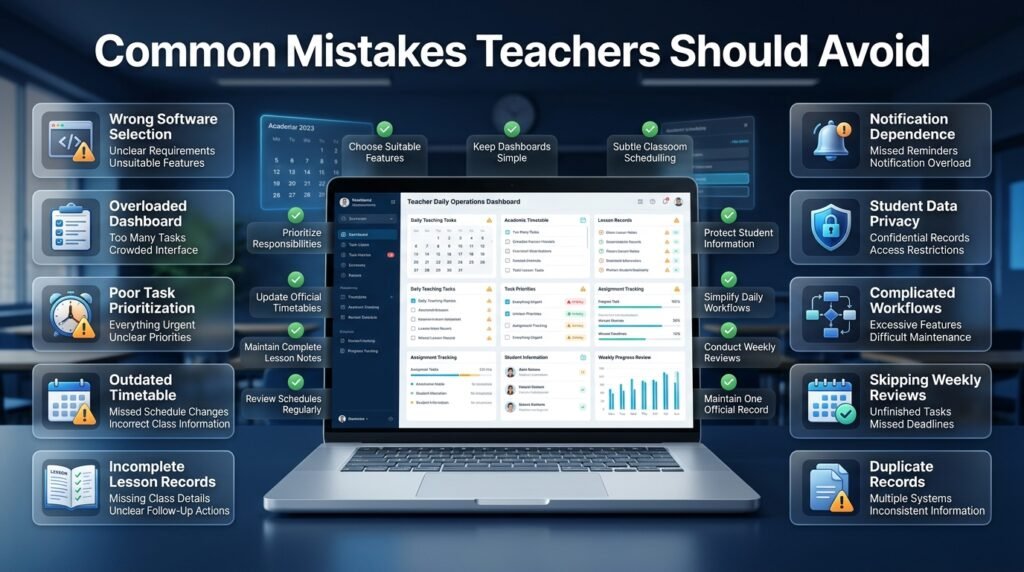
Choosing and using workflow software incorrectly can create additional work instead of reducing it. Understanding common mistakes helps teachers build a more effective system.
1. Choosing an Application Without Identifying Requirements
Why it happens: Teachers select software based on popularity, recommendations, or attractive feature lists without examining their own responsibilities.
Why it is harmful: The application may not support the activities that consume most of their time. A teacher who needs timetable organization may gain little from a platform focused mainly on note-taking.
How to avoid it: Identify your main organizational challenges before comparing different solutions. Select features according to practical needs rather than the number of tools advertised.
2. Adding Too Many Tasks to the Dashboard
Why it happens: Teachers try to record every small action in the system.
Why it is harmful: The dashboard becomes crowded, important deadlines lose visibility, and users may stop checking the task list.
How to avoid it: Record tasks that require planning, follow-up, or a deadline. Keep routine actions simple and use categories to separate important responsibilities from minor reminders.
3. Treating Every Task as Urgent
Why it happens: Teachers may feel that all school responsibilities need immediate attention.
Why it is harmful: When everything is marked as urgent, the system cannot help users identify genuine priorities.
How to avoid it: Distinguish between tasks that must be completed today, tasks that can be scheduled later, and tasks that depend on another person or event.
4. Failing to Update Timetable Changes
Why it happens: Teachers may continue using an old schedule after a period or room has changed.
Why it is harmful: Outdated information can lead to missed classes, confusion, and unnecessary communication.
How to avoid it: Follow the school’s official timetable update process. Review changes before the teaching day begins and avoid maintaining conflicting personal copies.
5. Entering Incomplete Lesson Information
Why it happens: Teachers may create lesson records quickly without adding the details needed for later review.
Why it is harmful: A record containing only a topic title may not explain what students completed or what should happen next.
How to avoid it: Include the essential information: class, subject, topic, objective, teaching date, and follow-up action. Keep notes concise but meaningful.
6. Depending Entirely on Notifications
Why it happens: Teachers expect reminders to manage every responsibility automatically.
Why it is harmful: Notifications can be missed, disabled, delayed, or ignored when too many appear.
How to avoid it: Use reminders as support, not as the only planning method. Review the daily and weekly schedule directly.
7. Ignoring Student Data Privacy
Why it happens: Users may upload class lists, assessment records, or personal information without checking the app’s privacy practices.
Why it is harmful: Student information may be exposed to people who do not have a legitimate reason to access it.
How to avoid it: Follow institutional policies, use approved platforms, apply appropriate access controls, and avoid storing unnecessary personal details.
8. Making the Workflow Too Complicated
Why it happens: Teachers attempt to build a highly detailed productivity system immediately.
Why it is harmful: Maintaining the system becomes another administrative responsibility.
How to avoid it: Start with a small number of essential features. Add complexity only when a real need becomes clear.
9. Failing to Review Completed Work
Why it happens: Teachers focus on entering tasks but do not regularly check their progress.
Why it is harmful: Unfinished work can remain hidden, and recurring problems may continue without being identified.
How to avoid it: Set aside a short weekly review to check completed tasks, postponed work, and upcoming deadlines.
10. Using Multiple Systems for the Same Record
Why it happens: Teachers may record attendance, assignments, or lesson progress in several different places.
Why it is harmful: Duplicate records can become inconsistent and take additional time to maintain.
How to avoid it: Decide which system is the official record for each activity. Use other tools only when they provide a clear additional benefit.
Expert Recommendations for Creating a Sustainable Teaching Workflow
An effective workflow should remain useful throughout the academic year, including periods when responsibilities increase. The following recommendations focus on sustainable organizational habits rather than complicated productivity systems.
1. Build the Workflow Around Teaching Priorities
Start with the activities that directly support classroom learning. Lesson preparation, instructional materials, student assessment, and feedback should receive appropriate attention.
Administrative tasks are important, but they should not automatically consume every available preparation period. Organize the week so that essential teaching activities have protected time.
2. Plan Ahead Without Overloading the Schedule
Planning ahead reduces last-minute pressure, but a schedule should still allow room for unexpected events.
Avoid filling every available period with a task. Leave reasonable space for student questions, additional explanations, meetings, and other responsibilities that cannot always be predicted.
3. Keep Lesson Records Useful and Concise
Lesson records should help teachers understand what was planned, what was delivered, and what needs to happen next.
Long descriptions are not always necessary. A short, accurate note may be more useful than a detailed record that is difficult to maintain.
4. Review Deadlines Before They Become Urgent
Do not wait until the final day to check examination preparation, report submissions, or assessment tasks.
Review upcoming deadlines during weekly planning and divide large responsibilities into smaller steps. This makes it easier to identify delays while there is still time to respond.
5. Separate Personal Planning From Official Records
Teachers may use a personal task list to manage their work, but official attendance, marks, and institutional records should remain in the systems approved by the school.
This distinction protects record accuracy and helps prevent confusion about which information is authoritative.
6. Use Shared Calendars Carefully
A shared calendar can improve coordination, but it should be maintained according to clear responsibilities.
School leaders or designated staff should manage official academic dates. Teachers can add personal preparation reminders without changing institutional events.
7. Make the System Easy to Maintain
A workflow should be simple enough to use on a busy day. If updating a task requires too many steps, teachers may stop maintaining it consistently.
Use templates, recurring tasks, clear categories, and simple status labels where they genuinely reduce effort.
8. Protect Time for Student Interaction
Digital organization should create more space for meaningful teaching, not encourage constant screen use.
Teachers should prioritize classroom discussion, feedback, individual support, and active learning. The app should be used before or after teaching periods whenever possible.
9. Adapt the Workflow During Busy Academic Periods
Examination weeks, reporting periods, and school events may require a different routine from an ordinary teaching week.
During these periods, identify the most important deadlines and temporarily reduce non-essential tasks. A flexible system is more sustainable than one that assumes every week will be identical.
10. Measure Whether the System Is Actually Helping
A teacher should be able to identify practical improvements after using a daily operations app.
Consider whether it has reduced missed deadlines, improved timetable awareness, made lesson records easier to find, or reduced repeated planning work.
If the system creates more administration without improving organization, simplify it or reconsider whether it is the right solution.
How Schools Can Introduce a Teacher Daily Operations App
Individual teachers can organize their own workflows, but school-wide adoption requires a more coordinated approach. Administrators should consider staff needs, existing systems, training, data protection, and implementation time.
Start With a Small Pilot
Instead of introducing every feature to every teacher at once, begin with a limited group or a small number of activities.
For example, a school might initially use the system for timetable access and lesson preparation. Once teachers are comfortable with those features, the school can consider adding assignment tracking or other approved workflows.
A pilot helps identify practical difficulties before wider implementation.
Involve Teachers in the Selection Process
Teachers understand the daily work that a system is expected to support. Their feedback can reveal whether a feature is genuinely useful or simply adds another step.
Invite teachers from different grades, departments, and experience levels to test the proposed workflow.
Provide Practical Training
Training should focus on real tasks rather than a long presentation of every feature.
Teachers should learn how to access their schedules, create lesson records, update tasks, find important information, and get help when something goes wrong.
Short demonstrations and written instructions can make adoption easier.
Establish Clear Responsibilities
Schools should explain who is responsible for updating official schedules, maintaining academic dates, managing user access, and resolving technical issues.
Without clear ownership, records may become outdated or inconsistent.
Review Feedback After Implementation
After the initial period, collect feedback about usability, reliability, and workload.
Ask whether teachers can complete routine tasks efficiently and whether the system has improved coordination. Use the findings to adjust training and configuration.
Measuring the Effectiveness of a Teacher Daily Operations App
The success of a digital workflow should be evaluated through practical outcomes rather than the number of features used.
Task Completion
Review whether important responsibilities are being completed on time. If missed deadlines become less frequent, the system may be helping teachers maintain better visibility.
Preparation Consistency
Check whether teachers are preparing lessons more regularly and whether lesson records are easier to retrieve.
The aim is not to measure teaching quality through the number of digital entries. It is to understand whether planning has become more manageable.
Schedule Awareness
Consider whether teachers receive and understand timetable changes more reliably. Confusion about periods, rooms, and substitutions may indicate that the scheduling process needs improvement.
Record Accuracy
Review whether attendance, assignment, and assessment records are maintained consistently according to school policy.
Digital tools should support accuracy, but they do not guarantee it. Teachers still need appropriate procedures and careful review.
Workload Experience
Ask teachers whether routine organization feels easier or whether the app has introduced additional administrative pressure.
Staff feedback is important because a system may appear efficient from an administrative perspective while creating extra work for classroom teachers.
Student Support and Follow-Up
A well-organized workflow can make it easier to identify unfinished feedback, missed assignments, and students who need additional attention.
However, student progress should be evaluated through appropriate educational evidence rather than task completion statistics alone.
Limitations of Teacher Daily Operations Apps
Digital tools can improve organization, but they cannot solve every challenge in education.
They Cannot Replace Professional Judgment
An app can remind a teacher about an assessment, but it cannot fully understand every student’s learning needs or determine the best teaching response in every situation.
Teachers must continue to make decisions based on classroom evidence, professional knowledge, and student context.
They Cannot Remove Workload Problems by Themselves
If a school assigns unrealistic deadlines or too many administrative responsibilities, a scheduling app will not remove the underlying workload problem.
Digital organization can make responsibilities more visible, but school leaders may still need to review policies, staffing, and expectations.
They Depend on Accurate Information
A system is only as useful as the information entered into it. An outdated timetable, incorrect deadline, or incomplete class record can create confusion.
Schools need clear procedures for updating official information.
They May Require Reliable Technology
Internet access, device availability, account access, and technical support can affect daily use.
Schools should consider local conditions and provide practical alternatives when digital access is interrupted.
They Need Consistent Use
A platform cannot maintain an organized workflow if users update it irregularly or continue keeping conflicting records elsewhere.
The system should be simple, relevant, and supported by clear routines.
Future of Teacher Daily Operations Apps
Teacher productivity tools are likely to continue developing as educational institutions adopt more connected digital systems. Future platforms may provide more flexible planning, better integration between academic calendars and classroom tasks, and improved ways to summarize routine information.
Artificial intelligence may assist with drafting lesson outlines, suggesting task schedules, organizing notes, or preparing initial versions of teaching resources. These features can save time when used carefully, but teachers should review generated material for accuracy, age suitability, curriculum alignment, and classroom relevance.
Integration is another important direction. Teachers may benefit when timetables, lesson plans, assessment dates, and academic reminders can work together without requiring duplicate data entry.
Accessibility will also remain important. A useful system should be understandable to teachers with different levels of digital experience and should work on the devices available in their schools.
The most valuable future development will not simply be adding more automation. It will be creating tools that reduce unnecessary administration while preserving teacher control, professional judgment, and meaningful interaction with students.
Key Takeaways
A teacher daily operations app can help educators manage recurring responsibilities through a more organized digital workflow. Its value depends on how well it supports the real demands of teaching.
The most important points to remember are:
- A daily operations app should organize teaching responsibilities, not replace professional judgment.
- Lesson planning, timetables, attendance, assignments, assessments, and deadlines are important areas to manage.
- Daily planning should connect with weekly, monthly, and annual academic schedules.
- Teachers should choose tools based on their actual workload and institutional requirements.
- Privacy, access controls, and official recordkeeping procedures must be considered before using a platform.
- A simple and consistent workflow is usually more sustainable than a complicated system.
- Schools should involve teachers in selection, testing, training, and review.
- The effectiveness of an app should be judged by practical improvements in organization and workload, not by the number of features it offers.
What Is the Best Teacher Daily Operations App for Managing Everyday Teaching Responsibilities?
The best teacher daily operations app is one that helps educators manage their daily teaching responsibilities without making their workflow more complicated. Teachers should look for a platform that brings essential activities such as lesson planning, timetable management, assignment tracking, academic reminders, and task organization into one accessible workspace.
The right choice depends on the teacher’s workload, teaching environment, and institutional requirements. A primary school teacher may need simple classroom planning and student activity records, while a secondary school teacher may require more advanced subject scheduling, assessment tracking, and deadline management.
Before choosing an application, evaluate whether it can support your regular responsibilities and remain easy to use throughout the academic year.
Important features to consider:
Daily and weekly teaching schedules.
Lesson planning and preparation tools.
Assignment and assessment tracking.
Academic calendars and deadline reminders.
Organized classroom records.
Reliable access across commonly used devices.
Appropriate privacy and data protection controls.
How Can Teachers Organize Their Daily Tasks and Lesson Plans More Effectively?
Teachers can organize daily tasks and lesson plans more effectively by connecting preparation activities with their actual teaching schedules. Instead of creating separate lists for every responsibility, they should maintain a structured workflow that identifies what needs to be completed, when it is required, and which class or subject it relates to.
A practical approach is to review the next day’s timetable before leaving school. Teachers can then prepare lesson materials, check unfinished assignments, organize assessment activities, and identify any important deadlines. This preparation reduces last-minute pressure and makes it easier to begin the next working day with clear priorities.
A daily operations system can support this process by keeping lesson details and administrative responsibilities organized.
Recommended daily organization practices:
Review the next day’s teaching timetable.
Prepare lesson objectives and required materials in advance.
Divide larger responsibilities into smaller tasks.
Set realistic deadlines for marking and assessment.
Prioritize urgent academic responsibilities.
Review unfinished tasks before ending the day.
Keep lesson notes organized by subject and class.
Can a Teacher Daily Operations App Help Manage Multiple Classes, Subjects, and Timetables?
Managing multiple classes and subjects can become challenging when teachers have different lesson topics, teaching periods, assignment deadlines, and assessment requirements throughout the week. A teacher daily operations app can make this process easier by organizing responsibilities according to class, subject, date, and priority.
For example, a mathematics teacher handling three different sections may need to teach separate topics, distribute different assignments, and review student progress at different times. A structured digital workspace helps keep these responsibilities separate while providing an overall view of the teacher’s weekly workload.
This organization is particularly useful when timetable changes occur or when teachers need to coordinate their responsibilities with other departments.
Useful management practices include:
Maintain separate records for each class and subject.
Use a clear weekly timetable to review teaching periods.
Record assignments with the correct class and submission date.
Keep assessment deadlines visible.
Review timetable changes before the start of each school day.
Use consistent naming for classes, sections, and subjects.
How Do Teacher Daily Operations Apps Improve Productivity and Reduce Administrative Workload?
Teacher daily operations apps can improve productivity by reducing the time spent managing scattered information and remembering repetitive responsibilities. Teachers frequently move between lesson preparation, classroom activities, marking, meetings, student communication, and administrative work. Without a consistent organizational method, these activities can become difficult to track.
A structured app provides a central place to review tasks, schedules, and important academic dates. It can also help teachers identify unfinished responsibilities before they become urgent. Reusable lesson records and recurring task reminders may reduce repetitive planning work.
However, productivity does not mean completing more administrative tasks every day. It means organizing responsibilities efficiently so teachers can protect more time for instruction and student support.
Ways these apps can support productivity:
Reduce repeated searching for lesson information.
Make upcoming deadlines easier to identify.
Improve consistency in lesson preparation.
Organize assignment and assessment responsibilities.
Reduce confusion caused by outdated schedules.
Support better weekly workload distribution.
Make unfinished tasks easier to review and prioritize.
What Features Should Schools Look for Before Adopting a Teacher Daily Operations App?
Schools should evaluate a teacher daily operations app according to their academic structure, staff requirements, scheduling needs, and data protection responsibilities. A platform that works well for one teacher may not be suitable for an entire institution with several departments, grade levels, and administrative procedures.
Before adopting a system, school leaders should examine its usability, timetable management capabilities, lesson planning features, collaboration options, and ability to protect sensitive educational information. Staff training and technical support should also be considered because even a capable platform may fail to deliver value if teachers find it difficult to use.
A gradual implementation process can help schools identify problems and improve the system before introducing it across the institution.
Essential factors schools should evaluate:
Scheduling capabilities: Support for classes, subjects, periods, and timetable changes.
Lesson planning: Flexible tools for organizing teaching objectives and classroom activities.
Task management: Clear deadlines, reminders, and progress tracking.
Collaboration: Appropriate access for teachers, department heads, and administrators.
Data protection: Suitable permissions and secure handling of student information.
Ease of use: A straightforward interface that does not create unnecessary administrative work.
Training and support: Clear guidance and assistance for staff during implementation.
Scalability: The ability to support the institution as its academic requirements grow.
Conclusion
A teacher daily operations app can make everyday teaching responsibilities more organized, manageable, and consistent. From lesson preparation and timetable management to assignment tracking, attendance, assessments, and academic deadlines, a structured digital system helps educators keep important activities under control. Instead of relying on scattered notes and disconnected tools, teachers can follow a clear workflow that makes daily priorities easier to understand and manage.
The real value of these applications is not simply the ability to store information or send reminders. It is their potential to reduce unnecessary administrative effort, improve planning consistency, and help teachers manage multiple responsibilities without losing sight of classroom priorities. When daily tasks are connected with weekly schedules and broader academic plans, educators can prepare more effectively and respond to changes with greater confidence.
However, choosing the right app requires careful consideration. Teachers and schools should prioritize practical features, ease of use, reliable scheduling, appropriate data protection, and compatibility with existing academic procedures. A complicated platform with unnecessary features may create additional work rather than improve productivity.
Ultimately, an effective teacher daily operations app should support educators, not replace their professional judgment. By combining thoughtful planning with a simple and consistent digital workflow, teachers can spend less time managing scattered responsibilities and more time focusing on lesson delivery, student progress, and meaningful classroom experiences.