

Introduction
School Deadline Overview Tool | Schools manage more deadlines than most people realize. Teachers need to finish lesson plans, students must submit assignments, administrators have to prepare examinations, and school leaders need to coordinate academic events throughout the year. When these responsibilities are tracked separately, important dates can easily be overlooked. A missed deadline may lead to late submissions, rushed preparation, scheduling conflicts, and unnecessary pressure on students and staff.
A School Deadline Overview Tool helps bring these responsibilities into one organized view. Instead of checking multiple notebooks, spreadsheets, emails, and calendars, users can review upcoming academic deadlines, identify priorities, and prepare for important dates before they become urgent.
For schools looking to improve academic organization, RTI Scheduler provides a relevant starting point for exploring academic planning and scheduling resources. The broader goal is to make school deadlines easier to understand, manage, communicate, and review.
This guide explains how a school deadline overview works, who can benefit from it, which features matter most, how to build an effective deadline management process, and how to avoid common planning mistakes. It also explores the relationship between deadlines, academic calendars, assignments, examinations, school events, and milestone reminders.
Whether you are a teacher coordinating classroom activities, an administrator managing school-wide schedules, or a student trying to stay on top of coursework, the right approach can make academic responsibilities more predictable and manageable.
What Is a School Deadline Overview Tool?
A School Deadline Overview Tool is a planning resource that helps users collect, organize, monitor, and review important academic dates in one accessible place. It provides a structured view of upcoming responsibilities, submission dates, examination periods, administrative tasks, and school milestones.
Rather than treating every deadline as an isolated event, the tool helps users understand how different dates relate to one another. For example, a project submission deadline may depend on an earlier research milestone, while an examination date may influence revision schedules and classroom lesson planning.
The tool can take the form of a digital calendar, a spreadsheet, a school scheduling platform, or a dedicated planning application. Its value comes from the way information is organized and used, not simply from the software itself.
What Information Should a School Deadline Overview Include?
A useful overview records enough information to make each deadline understandable and actionable.
| Information | Why it matters |
|---|---|
| Deadline title | Identifies the task or event |
| Due date and time | Clarifies when the task must be completed |
| Responsible person | Establishes ownership |
| Class, grade, or department | Shows who is affected |
| Task category | Separates assignments, examinations, events, and administration |
| Current status | Shows whether the task is upcoming, in progress, completed, or overdue |
| Priority level | Helps users decide what needs attention first |
| Preparation milestones | Breaks larger responsibilities into manageable steps |
| Reminder dates | Encourages preparation before the final deadline |
| Relevant notes | Records requirements, dependencies, or approval details |
Not every task needs every field. A routine classroom worksheet may require only a title, class, and due date. A school-wide examination schedule may need additional information about rooms, supervision, student groups, and approval.
The main principle is simple: every deadline should tell users what needs to happen, who is responsible, when it must happen, and what preparation is required.
Why Do Schools Need a Deadline Overview System?
School responsibilities often overlap. A teacher may need to finish marking assignments while preparing a lesson, attending a departmental meeting, and submitting assessment results. Students may have several assignments due during the same week that examinations begin.
Without a shared overview, people may know their individual responsibilities but fail to recognize the pressure created by competing deadlines.
Preventing Missed Academic Deadlines
One of the most immediate benefits is improved visibility. When deadlines are recorded in a consistent system, users do not have to rely entirely on memory or search through old messages to find important dates.
For example, a student who has a science report due on Thursday and a mathematics test on Friday can see both responsibilities together. The student can begin the report earlier and reserve enough time for revision.
A school administrator can use the same principle to identify deadlines for report cards, examination preparation, staff submissions, and academic meetings.
Reducing Last-Minute Pressure
A deadline overview makes it easier to distinguish between work that is urgent and work that requires early preparation. A task due in two weeks may not be urgent today, but it may still require several stages of work.
The system becomes more useful when it includes preparation milestones instead of displaying only final due dates.
For example, a research project might include:
- Topic approval: October 5
- Research completed: October 10
- First draft: October 15
- Teacher feedback: October 18
- Final submission: October 22
These dates turn one large responsibility into a sequence of smaller tasks. They also make delays easier to identify before the final submission is affected.
Improving Communication Between Teachers and Students
Deadline confusion often develops when information is shared through different channels. A teacher may announce a date in class, another may post it in a learning platform, and a third may send a message to parents.
A central overview helps establish a consistent reference point. However, it only works when the school clearly explains where official dates are published and who is responsible for updating them.
Expert tip: Treat the overview as the recognized planning reference, while maintaining appropriate school policies for official notices, approvals, and changes.
Who Can Benefit From a School Deadline Overview Tool?
A well-designed deadline overview can support different users without requiring everyone to manage the same information in the same way.
Students
Students can track homework, projects, quizzes, examination dates, presentations, and revision milestones. A weekly view helps them estimate their workload and avoid leaving several tasks until the last minute.
The tool is especially useful when different subjects have separate submission requirements. Students can identify heavy workload periods and divide their preparation into realistic sessions.
Teachers
Teachers manage classroom deadlines as well as professional responsibilities. They may need to plan assessments, finish grading, submit results, prepare learning materials, and coordinate with colleagues.
An overview helps teachers see these commitments together. It also makes it easier to avoid assigning several major assessments to the same class within a short period.
For lesson timing and classroom organization, a related resource is the Weekly Lesson Period Planner, which addresses the organization of lessons across the school week.
School Administrators
Administrators oversee school-wide responsibilities such as examination schedules, report submission periods, parent meetings, enrollment activities, staff deadlines, and annual planning.
They benefit from a broader view that highlights deadlines affecting multiple departments. This makes conflicts easier to detect and helps administrators coordinate responsibilities before announcing final schedules.
Department Heads and Academic Coordinators
Department heads need to monitor curriculum milestones, assessment plans, moderation deadlines, departmental meetings, and staff submissions.
A shared overview can reveal whether one department is facing an unusually concentrated workload or whether an important academic milestone depends on work that has not yet been completed.
Parents and Guardians
Parents can use a clearly communicated school deadline calendar to understand upcoming projects, examinations, permission-form deadlines, and school activities.
Access should be designed carefully. Parents should see information relevant to their children without receiving confidential staff information or unnecessary details about other students.
Essential Features of an Effective School Deadline Overview
Not every school needs an advanced scheduling platform. The most appropriate solution depends on school size, administrative complexity, existing systems, and the number of people who need access.
Nevertheless, several features make a deadline overview more useful.
1. A Clear Calendar and List View
A calendar displays deadlines according to dates, while a list view makes it easier to scan tasks in chronological order.
Both views serve different purposes. The calendar reveals crowded weeks and overlapping events. The list makes individual tasks easier to sort, review, and update.
A monthly view is helpful for long-term planning, while a weekly view supports immediate action. A daily view may be valuable during examination periods or when several administrative tasks must be completed.
2. Categories for Different Types of Deadlines
Deadlines should be categorized so users can distinguish between assignments, examinations, academic milestones, school events, and administrative responsibilities.
Categories reduce confusion, especially when a school manages hundreds of dates. They also allow users to filter information according to their responsibilities.
For example, a mathematics teacher may need to view assessment deadlines for one grade, while an administrator may need to review all examination-related deadlines across the school.
3. Reminders Before Due Dates
A reminder should arrive early enough to support action. A notification delivered five minutes before a major project deadline may be accurate but not particularly useful.
Different tasks need different reminder schedules. A routine worksheet may require one reminder the day before submission, while a major research project may need reminders at several preparation milestones.
A practical reminder system should also avoid sending too many notifications. When users receive constant low-value alerts, they may begin ignoring important messages.
4. Task Ownership and Status Tracking
Each significant deadline should have a clearly identified owner. Depending on the task, this may be a student, teacher, department head, or administrator.
Useful status labels include:
- Upcoming
- Not started
- In progress
- Awaiting review
- Completed
- Overdue
- Rescheduled
These labels provide more information than a date alone. They help users understand whether work is progressing and whether additional support is needed.
5. Priority and Workload Visibility
A deadline due tomorrow may require immediate attention, but an important task due next month may need to be started today.
A useful overview distinguishes urgency from importance. It can also highlight weeks with multiple assessments or major school events.
Priority labels should be meaningful rather than excessive. If every task is marked urgent, the priority system stops helping users make decisions.
6. Flexible Updates and Change Records
School schedules change because of holidays, unexpected closures, staff availability, or changes in academic requirements.
The overview should allow authorized users to update dates and communicate those changes clearly. Where appropriate, it should also preserve a record of the original date, revised date, reason for the change, and person who approved it.
This is particularly important when changes affect students across several classes or departments.
7. Access Control and Privacy
Not every user should be able to edit every deadline. A student might be permitted to manage personal study tasks but not alter an official examination date.
Similarly, teachers may need editing access for their classes, while school administrators manage institution-wide deadlines.
Choose a system that supports appropriate permissions, secure access, and the school’s data protection requirements. Avoid storing sensitive student information in public spreadsheets or shared documents without suitable safeguards.
How to Set Up a School Deadline Overview Step by Step
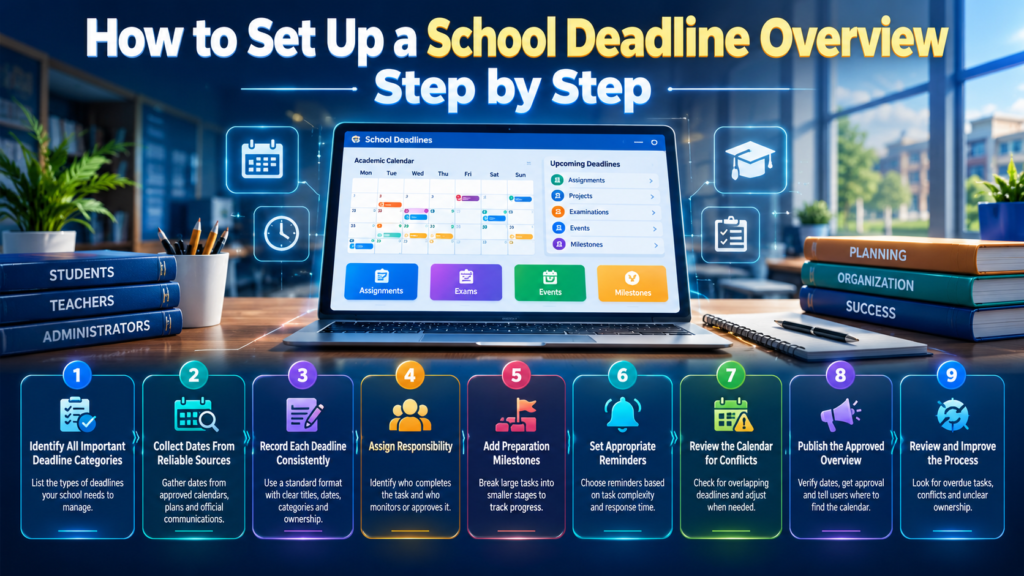
A successful deadline overview begins with a clear process. Purchasing software or creating a spreadsheet is not enough if deadlines are incomplete, responsibilities are unclear, or updates are inconsistent.
Step 1: Identify All Important Deadline Categories
Start by listing the types of deadlines your school needs to manage.
Common categories include:
- Homework and coursework
- Projects and presentations
- Tests and examinations
- Lesson planning and curriculum milestones
- Report cards and assessment results
- Academic meetings
- School events and activities
- Holiday-related schedule changes
- Administrative submissions
- Parent communication and permission forms
Avoid adding every small activity immediately. Begin with deadlines that have clear consequences if missed or that affect several people.
Step 2: Collect Dates From Reliable Sources
Gather existing dates from approved academic calendars, department plans, examination schedules, assessment policies, and official school communications.
Before entering information, verify that the date is current and that the person providing it has the authority to confirm it.
If two documents contain different dates, do not choose one arbitrarily. Ask the responsible teacher or administrator to confirm the correct date.
Step 3: Record Each Deadline Consistently
Use a standard format for titles, dates, categories, and ownership.
For example, instead of entering a vague title such as “Science,” use “Grade 8 Science Project — Final Submission.”
A detailed title helps users understand the responsibility without opening additional notes. Include the class, relevant subject, and required action when necessary.
Also establish whether dates include a specific submission time. “Due Friday” can create confusion if students interpret it differently.
Step 4: Assign Responsibility
Identify who must complete the task and who is responsible for monitoring it.
For a student assignment, the student completes the work and the teacher may monitor submissions. For an examination timetable, the academic coordinator may prepare the draft while the principal or authorized committee approves it.
Separating task ownership from approval prevents confusion about who can make changes.
Step 5: Add Preparation Milestones
Large tasks should be divided into smaller stages.
For example, preparing an examination timetable may involve collecting subject requirements, confirming examination durations, checking room capacity, reviewing student conflicts, obtaining approval, and publishing the final schedule.
These milestones make progress visible before the final deadline approaches.
Step 6: Set Appropriate Reminders
Choose reminders based on task complexity and the time required to respond.
A routine administrative submission may need a reminder several days beforehand. A major assessment project may require reminders for the first draft, feedback, and final submission.
Test the reminder process with a small group before introducing it across the school. Confirm that notifications arrive correctly and that users understand what action they need to take.
Step 7: Review the Calendar for Conflicts
Once the deadlines have been entered, review the calendar for overlapping responsibilities.
Check whether students have several major assessments on the same day, whether examination periods conflict with school events, and whether teachers have unrealistic marking workloads.
Not every overlap can be eliminated, but identifying it early creates an opportunity to adjust dates or allocate additional support.
Step 8: Publish the Approved Overview
Before sharing the calendar, verify that the dates are accurate and that the appropriate person has approved any institution-wide schedule.
Tell users where to find the overview, how often it is updated, and how they will be informed of changes.
A calendar is only useful when people know which version to trust.
Step 9: Review and Improve the Process
Review the overview weekly during normal school operations and more frequently during busy examination periods.
Look for overdue tasks, repeated scheduling conflicts, unclear ownership, and reminders that arrive too late.
Use these findings to improve the process rather than simply adding more notifications or more administrative steps.
Practical Example: A School Deadline Overview in Action
Imagine a secondary school preparing for the final month of a term. Students have several coursework submissions, teachers need to complete assessments, and administrators must finalize examination arrangements.
Without a central overview, each department may organize its own dates independently. Students could discover that a major project and a test are scheduled on the same day, while teachers may have insufficient time to mark assignments before report cards are due.
A shared deadline overview can make these dependencies visible.
| Date | Deadline | Responsible person | Preparation or action |
|---|---|---|---|
| November 2 | Project topics approved | Subject teachers | Confirm project requirements |
| November 6 | Research milestone | Students | Complete research notes |
| November 10 | First project draft | Students | Submit draft for feedback |
| November 13 | Draft review completed | Teachers | Return comments |
| November 17 | Final project submission | Students | Submit revised work |
| November 19 | Examination timetable approved | Academic coordinator | Resolve scheduling conflicts |
| November 23 | Examination timetable published | School administration | Communicate approved dates |
| November 30 | Examination period begins | Teachers and students | Follow the final schedule |
The example illustrates the relationship between deadlines. The final submission is not an isolated event; it depends on earlier preparation and feedback.
The school can also review the examination dates against the project schedule. If students need additional preparation time, the school can make a decision before the final timetable is published.
Quick tip: Use real school dates when building an overview. Sample schedules are useful for testing the process, but they should never be mistaken for confirmed academic dates.
Choosing Between a Spreadsheet, Calendar, and Dedicated Tool
Schools can manage deadlines in different ways. The best choice is the one that fits the institution’s actual needs and can be maintained consistently.
| Planning method | Advantages | Limitations | Best suited to |
|---|---|---|---|
| Paper planner | Simple and easy to start | Difficult to share and update centrally | Individual students or small teams |
| Spreadsheet | Flexible fields and easy sorting | Reminders and permissions may require extra setup | Small schools and simple deadline lists |
| Digital calendar | Convenient date-based views and notifications | Complex tasks may need additional tracking | Teachers, students, and school teams |
| Dedicated planning tool | May combine deadlines, categories, reminders, and workflows | Requires setup, training, and appropriate permissions | Schools managing interconnected schedules |
A spreadsheet may be sufficient for a small school with a limited number of deadlines. A larger institution may need more advanced permissions, notification controls, and shared views.
Do not choose a system solely because it has the largest number of features. Consider how easily staff can update information, whether students can access relevant dates, and whether the system fits existing school processes.
What Should Schools Check Before Choosing a Tool?
Evaluate the following questions:
- Can users see upcoming deadlines in a clear chronological view?
- Can tasks be filtered by class, subject, department, or category?
- Can authorized users update dates without creating conflicting versions?
- Are reminders configurable for different task types?
- Can the school distinguish draft dates from approved deadlines?
- Does the system support appropriate access permissions?
- Can information be exported or retained for future reference?
- Is the tool easy enough for staff and students to use consistently?
A short trial with a few teachers and administrators can reveal usability problems before the school commits to a wider rollout.
Organizing Academic Calendars and School Events
A school deadline overview should work alongside the academic calendar rather than replace it. The academic calendar establishes the broader structure of the school year, while the deadline overview helps users manage individual responsibilities within that structure.
For example, a school may publish the first day of term, holidays, examination periods, report deadlines, and important events in its annual calendar. Teachers and students can then use the deadline overview to track the work that must be completed before each milestone.
The Academic Planning and Scheduling Tools resource is relevant when considering how separate academic planning activities fit together.
Coordinating Deadlines With the Academic Calendar

An academic calendar provides the foundation for deadline planning. Before assigning due dates, check term boundaries, school holidays, staff development days, examination periods, and other confirmed commitments.
This prevents deadlines from being scheduled on days when students or staff are not expected to be available.
The Academic Calendar Planning resource is relevant to organizing key dates across the academic year.
Schools should also plan for holiday-related changes. If a deadline falls close to a long break, consider whether students have enough preparation time and whether staff will be available to answer questions or review submissions.
The Academic Holiday Calendar Builder can be considered alongside holiday planning and the organization of school dates.
Tracking Semester Milestones
A semester contains several important stages, including course planning, assessment periods, progress reviews, final examinations, and result reporting.
These milestones should be visible before individual deadlines are added. Doing so helps departments coordinate their work around the academic structure.
The Semester Milestone Calendar is a relevant resource for organizing important semester stages.
Including School Events
School events can influence academic deadlines even when they are not assessments. Sports days, performances, field trips, parent meetings, and special activities may reduce normal classroom time or change staff availability.
The School Year Event Calendar is relevant when coordinating school events with academic responsibilities.
Expert tip: Review academic deadlines against the school event calendar before finalizing major assessments. This simple check can prevent avoidable pressure on students and staff.
Managing Assignments, Coursework, and Student Tasks
Assignment deadlines need more than a date on a calendar. Students benefit when they can understand the requirements, track their progress, and see how a large piece of work can be completed in stages.
Creating Clear Assignment Deadlines
An effective assignment deadline should identify the subject, class, task, due date, submission method, and any essential requirements.
Teachers should avoid vague descriptions such as “finish project” when students need to complete specific stages. A clearer task might say, “Submit the final history report through the school’s approved platform by 3 p.m. on Thursday.”
Where multiple teachers share the same class, departments should coordinate major assignments so that the overall workload remains reasonable.
Tracking Coursework From Start to Finish
Coursework may involve topic selection, research, drafting, review, editing, and final submission. A deadline overview can record these stages and highlight delays while there is still time to respond.
The Coursework Due Date Manager is relevant to organizing coursework deadlines.
A separate Assignment Submission Calendar can support the organization of assignment dates across subjects and classes.
For broader academic responsibilities, Academic Deadline Management is a related resource for coordinating important academic due dates.
These planning areas overlap in purpose but should remain distinct in practice: an overall deadline overview provides visibility, while assignment and coursework planning focuses on the specific work students must complete.
Helping Students Manage Their Own Work
Students should learn to review upcoming tasks at the beginning of each week. They can identify urgent deadlines, estimate how much time each task requires, and schedule preparation sessions.
For example, a student with a presentation due Friday might spend Monday researching, Tuesday organizing information, Wednesday preparing slides, and Thursday rehearsing.
The objective is not to fill every hour with planned work. Students need realistic schedules that allow for breaks, unexpected difficulties, and other responsibilities.
A useful student deadline routine includes:
- Review all upcoming deadlines.
- Identify tasks that require early preparation.
- Break large assignments into smaller steps.
- Schedule time for revision and checking.
- Confirm submission requirements before the due date.
- Mark completed work only after verifying that it was submitted successfully.
Coordinating Tests, Examinations, and Assessment Schedules
Examination deadlines often require more coordination than routine assignments because they can affect entire grades, several departments, room allocations, and staff availability.
An examination deadline overview should therefore connect preparation milestones with the final examination dates.
Planning Test Dates
Teachers should consider the curriculum, available teaching time, student workload, and other scheduled assessments before confirming a test date.
The Test Date Timetable Planner is relevant to planning test dates and organizing assessment timing.
Schools can also use an Assessment Sitting Schedule to consider how assessment sessions are organized.
When reviewing a schedule, check whether students have enough time between assessments and whether room or staff requirements create conflicts.
Building an Examination Schedule
A complete examination schedule may need to include subject names, student groups, examination durations, session times, rooms, accessibility arrangements, and supervision requirements.
The Exam Schedule Generator is a related resource for organizing examination schedules.
For coordinating separate examination periods and sessions, the Exam Session Calendar Builder is also relevant.
Schools that need a broader way to organize examination arrangements can consider the Examination Timetable Organizer.
These resources address related but distinct planning needs. A deadline overview shows when examination-related work must happen; an examination schedule organizes the actual assessment dates and sessions.
Coordinating Class and Subject Timetables
Deadlines must also fit the teaching schedule. A major assessment should not be planned without considering when students learn the relevant material and when teachers have time to prepare.
A Subject Timetable Maker is relevant to organizing subject periods.
The Student Class Period Organizer can support the organization of student class periods, while the Class Timetable Grid Builder is relevant to arranging lessons in a timetable grid.
These planning resources complement a school deadline overview. They help schools understand the teaching structure surrounding a deadline rather than treating the deadline as an isolated date.
Setting Effective Reminders and Academic Milestones
Reminders are useful only when they help users take action. A notification should explain what is approaching, when it is due, and what the user needs to do next.
A reminder for an upcoming project might say, “Your geography project draft is due in three days. Check the required sections and upload your draft before the deadline.”
This is more helpful than a generic notification that says “Deadline approaching.”
How Many Reminders Should a School Use?
The answer depends on the task. A simple homework assignment may need one reminder, while a major project may require reminders at several stages.
For long-term tasks, a practical sequence might include:
- An early planning reminder.
- A preparation milestone reminder.
- A progress check.
- A final submission reminder.
Avoid sending the same message repeatedly without a clear reason. Too many notifications can create alert fatigue, especially for students managing several subjects.
Using Milestones for Long-Term Planning
Academic milestones are intermediate goals that show whether a larger responsibility is progressing.
The Academic Milestone Reminder Planner is relevant to organizing reminders around important academic stages.
For example, a school-wide curriculum review might include milestones for collecting department feedback, reviewing proposed changes, approving the final plan, and communicating the updated curriculum.
Each milestone should have a clear owner and a realistic completion date. A reminder cannot solve a workload problem if the assigned person does not have enough time or resources to complete the task.
Common School Deadline Overview Mistakes to Avoid

Even a well-designed system can fail when the information is inaccurate or users do not follow a consistent process. The following mistakes are especially important to prevent.
Recording Only Final Due Dates
Why it happens: Schools focus on the date when work must be submitted and overlook the preparation required beforehand.
Why it causes problems: Large tasks can appear manageable until users realize that research, review, approval, or coordination must happen first.
How to avoid it: Add intermediate milestones to complex responsibilities. Keep simple tasks simple, but divide major projects into clear stages.
Assigning Deadlines Without Checking Other Commitments
Why it happens: Departments create their schedules independently.
Why it causes problems: Students may face several major assessments at once, and teachers may have multiple marking deadlines during the same week.
How to avoid it: Review the shared overview before confirming major assessment dates. Consult affected departments when a change may create additional workload.
Using Unclear Task Names
Why it happens: Users assume that everyone remembers the context behind a short label.
Why it causes problems: “Report” or “Science” does not explain the required action, the class involved, or the submission stage.
How to avoid it: Use descriptive titles with the task, subject, class, and stage where necessary.
Forgetting to Update Changed Dates
Why it happens: A teacher announces a revised deadline but forgets to update the central calendar.
Why it causes problems: Different users may rely on different dates, leading to late submissions and avoidable disputes.
How to avoid it: Establish one update process. Assign responsibility for changes and communicate important revisions through the school’s approved channels.
Sending Too Many Notifications
Why it happens: Users assume that more reminders automatically produce better organization.
Why it causes problems: Repeated alerts become distracting, and important notifications may be ignored.
How to avoid it: Match reminder frequency to task complexity and provide a clear action in every notification.
Failing to Assign Ownership
Why it happens: A deadline is entered without identifying who must complete or monitor it.
Why it causes problems: Everyone assumes someone else is responsible, so progress is not checked.
How to avoid it: Assign a task owner and, where necessary, a separate reviewer or approver.
Treating Every Deadline as Equally Important
Why it happens: The system records dates but does not help users evaluate urgency or impact.
Why it causes problems: Small tasks can distract attention from significant responsibilities that require early preparation.
How to avoid it: Use a simple priority system based on urgency, importance, workload, and consequences of delay.
Failing to Review the System
Why it happens: Once the calendar is published, users assume the planning work is finished.
Why it causes problems: Outdated dates, completed tasks, and emerging conflicts remain unnoticed.
How to avoid it: Conduct regular reviews, confirm important changes, and remove or archive outdated entries according to school policy.
Expert Strategies for Improving School Deadline Management
A professional deadline management process should be realistic, consistent, and easy to maintain. The goal is not to create the most complicated calendar; it is to help people complete important work on time.
Establish One Authoritative Source
Choose a recognized place where approved school deadlines are maintained. Individual teachers can still keep personal planners, but school-wide dates should be consistent with the official overview.
Explain who can edit the central record and how users should report errors. This prevents several competing versions from developing.
Plan Backward From Important Dates
Start with the final deadline and work backward to identify the milestones needed to reach it.
For an examination period, this might include approving the timetable, confirming rooms, preparing papers, checking arrangements, and publishing dates.
Backward planning reveals whether the proposed deadline is realistic before it is announced.
Include Preparation Time and Review Time
Do not schedule work so tightly that a minor delay causes the entire plan to fail. Allow reasonable time for review, corrections, approvals, and unexpected difficulties.
The amount of flexibility needed depends on the task. A routine worksheet may need little additional time, while a school-wide examination plan may require several review stages.
Protect Students From Unnecessary Deadline Clustering
Teachers cannot always avoid overlapping deadlines, but departments can coordinate major assessments to prevent unreasonable concentrations of work.
Review the calendar by class or year group, not only by department. A schedule that looks manageable to each teacher individually may still create an excessive combined workload for students.
Define a Change Management Process
A deadline change should include the revised date, reason for the change where appropriate, responsible approver, and method of communication.
For significant changes, confirm that affected students, teachers, and parents have received the updated information. Do not assume that updating a calendar guarantees that everyone has seen the revision.
Measure Whether the System Is Working
Review a small number of practical indicators, such as:
- The number of missed deadlines.
- The frequency of last-minute schedule changes.
- The number of conflicting major assessments.
- The percentage of tasks completed by their due dates.
- Feedback from teachers and students about clarity.
- The time required to update and maintain the overview.
Use these indicators to improve the process rather than to punish users for every delay. Some deadlines are missed because of unrealistic workloads, unclear instructions, or unexpected circumstances that need to be addressed.
How to Introduce a Deadline Overview Across a School
A gradual rollout is usually more manageable than asking every department to change its planning habits immediately.
Begin with one grade, department, or deadline category. Select a small group of teachers and administrators to test the format and identify missing fields or confusing processes.
During the trial, observe whether users can enter deadlines accurately, recognize upcoming tasks, update changes, and understand reminder messages. Ask students whether the overview helps them prepare without creating unnecessary notification overload.
After the trial, refine the process before expanding it to additional departments.
Training should be practical. Demonstrate how to add a deadline, assign ownership, set a reminder, record a change, and mark work as completed. Provide brief written guidance so users can check the process later.
The school should also establish clear responsibilities:
- Administrators: Maintain school-wide policies and approved dates.
- Department heads: Coordinate subject-level deadlines and resolve conflicts.
- Teachers: Publish accurate classroom deadlines and communicate changes.
- Students: Review relevant deadlines and manage preparation tasks.
- Parents or guardians: Support planning where appropriate and follow official school communications.
Not every school will use exactly these roles. Adapt the responsibilities to the institution’s structure while keeping accountability clear.
What Is a School Deadline Overview Tool, and How Does It Help Schools Manage Academic Deadlines?
A School Deadline Overview Tool is a planning resource that helps schools organize assignments, examinations, coursework submissions, academic milestones, and administrative responsibilities in one accessible place. Instead of relying on separate notebooks, spreadsheets, or scattered announcements, teachers, students, and administrators can review upcoming deadlines and understand which tasks require attention first.
Its real value lies in making academic responsibilities easier to manage. For example, if students have a science project, a mathematics test, and an English assignment due during the same week, an organized overview helps them plan their workload before the deadlines become urgent. Teachers can also identify scheduling conflicts and adjust assessment dates when appropriate.
An effective deadline overview should include clear task names, due dates, responsible individuals, priority levels, progress statuses, and reminders. For larger assignments, intermediate milestones help users track progress instead of waiting until the final submission date.
Key points to remember:
Keep important academic deadlines in one reliable, accessible location.
Organize tasks by subject, class, department, and deadline type.
Include preparation milestones for complex assignments and projects.
Review upcoming deadlines regularly to identify potential conflicts.
How Can Schools Prevent Missed Assignments and Last-Minute Academic Deadlines?
Schools can reduce missed deadlines by combining clear communication, realistic planning, timely reminders, and regular progress reviews. Simply recording a due date is not enough. Students need to understand what they must complete, when the work is due, and how much preparation time they should allocate.
For example, a student working on a research assignment due in two weeks should not wait until the final days to begin. The school or teacher can divide the assignment into smaller stages, such as topic selection, research, first draft, review, and final submission. Each stage creates an opportunity to identify difficulties before they affect the final deadline.
Teachers should also coordinate major assessments across subjects. When several assignments are due on the same day, students may struggle even if each individual deadline seems reasonable. Reviewing the combined workload allows departments to make adjustments where possible.
A useful reminder system should match the complexity of each task. Routine homework may need one reminder, while a long-term project may benefit from several milestone notifications.
Key points to remember:
Publish clear deadlines with submission instructions.
Send reminders early enough for students to take meaningful action.
Break major assignments into smaller, manageable milestones.
Coordinate assessment dates across subjects and departments.
Review overdue work to identify whether students need clarification or additional support.
Which Features Should a School Deadline Overview Tool Include for Effective Academic Planning?
The most useful School Deadline Overview Tool combines a clear calendar, task categorization, reminders, progress tracking, and flexible deadline management. The specific features a school needs depend on its size, academic structure, and the number of people involved in planning.
A calendar view helps users understand when activities occur, while a chronological task list makes it easier to identify upcoming responsibilities. Categories allow teachers and administrators to separate coursework, examinations, school events, reporting deadlines, and other academic tasks.
Progress tracking is equally important. A task marked as upcoming, in progress, completed, or overdue provides more useful information than a date alone. Assigning a responsible person also prevents confusion about who must complete the work or approve a change.
Schools should pay attention to access permissions and privacy. Students should be able to see relevant academic deadlines, but they should not necessarily have permission to edit official examination schedules or access confidential administrative information.
Key points to remember:
Use calendar and list views for different planning needs.
Include categories, task ownership, priorities, and progress statuses.
Configure reminders according to task complexity.
Allow authorized users to update deadlines and communicate changes.
Choose a system that is easy to maintain and protects sensitive information
How Can a School Deadline Overview Tool Help Teachers, Students, and Administrators Work Together?
A School Deadline Overview Tool improves coordination by giving different school users a consistent view of the responsibilities relevant to them. Although students, teachers, and administrators have different tasks, their deadlines often depend on one another.
For instance, students may need to submit projects before teachers can complete grading, and teachers may need to finalize results before administrators can prepare report cards. If one deadline changes without the others being updated, the entire process can become difficult to manage.
A shared overview makes these dependencies more visible. Teachers can coordinate assignment dates, students can organize their study schedules, and administrators can monitor institution-wide milestones. Appropriate permissions ensure that each person can manage their responsibilities without changing information outside their authority.
Schools should establish a clear process for publishing official dates and communicating revisions. When a deadline changes, the responsible person should update the central record and notify everyone affected through the school’s approved communication channels.
Key points to remember:
Give each user access to the deadlines relevant to their responsibilities.
Assign clear ownership for important tasks and approvals.
Coordinate assignment, grading, examination, and reporting schedules.
Maintain one recognized source for official school deadlines.
Communicate schedule changes promptly to avoid conflicting information
How Should Schools Choose and Implement the Right School Deadline Overview Tool?
Schools should choose a deadline overview solution according to their actual planning requirements rather than selecting a system simply because it offers many features. A small school may manage effectively with a shared spreadsheet, while a larger institution may require dedicated scheduling software with reminders, access controls, filtering, and progress tracking.
Before selecting a solution, identify the school’s biggest problems. These might include missed assignment dates, overlapping examinations, inconsistent communication, or difficulty coordinating deadlines between departments. The chosen system should address those specific issues without adding unnecessary administrative work.
Implementation should begin with a small trial. A department or grade level can test the system using real academic deadlines. During the trial, staff should check whether dates are easy to enter, reminders arrive correctly, responsibilities are clear, and schedule changes can be communicated reliably.
Once the process works well, the school can expand it to other departments. Brief training and clear instructions help teachers and students understand how to use the overview consistently. Regular feedback can then guide improvements throughout the academic year.
Key points to remember:
Identify the school’s main deadline management challenges before choosing a tool.
Compare ease of use, reminders, permissions, flexibility, and maintenance requirements.
Test the system with a small group before introducing it school-wide.
Train users on entering, reviewing, and updating deadlines.
Measure success through fewer scheduling conflicts, clearer communication, and improved deadline completion.
Conclusion
A School Deadline Overview Tool is an effective way to bring structure, clarity, and consistency to academic planning. By organizing assignments, examinations, coursework submissions, school events, and administrative responsibilities in one accessible overview, schools can reduce deadline confusion and help students, teachers, and administrators manage their time more effectively.
The key to successful deadline management is not simply recording important dates. Schools also need realistic preparation milestones, timely reminders, clear task ownership, and regular reviews to identify scheduling conflicts before they become serious problems. When deadlines change, accurate updates and clear communication ensure that everyone understands what is expected.
Whether a school uses a simple spreadsheet, a digital calendar, or a dedicated planning solution, consistency is what makes the system valuable. Start by identifying existing scheduling problems, organize the most important deadlines, and gradually improve the process using feedback from teachers, students, and administrators.
With the right planning approach, schools can create a more organized academic environment, reduce unnecessary last-minute pressure, and give everyone a clearer understanding of their responsibilities. Explore RTI Scheduler for related academic planning resources and take a practical step toward more effective school deadline management.