
Introduction
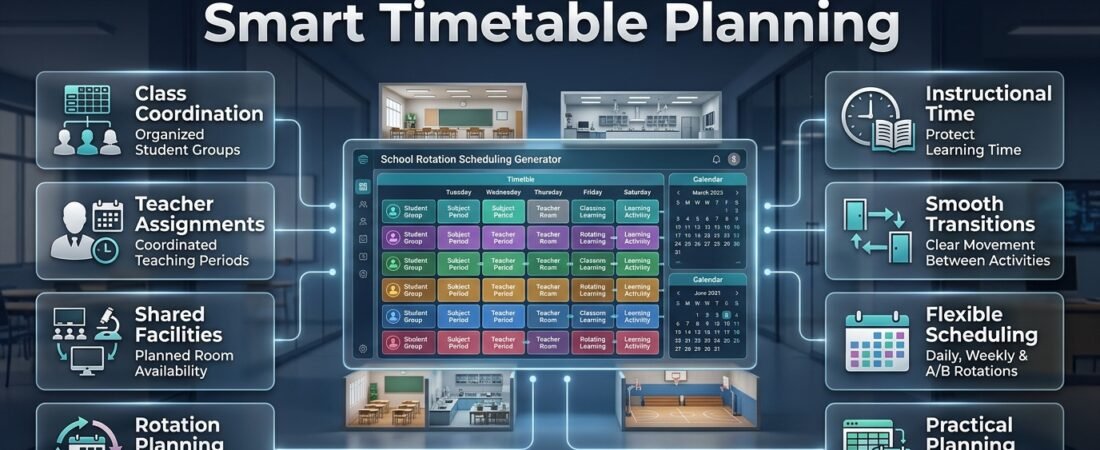
School Rotation Schedule Generator | Managing a school timetable becomes challenging when several classes need to share specialist teachers, laboratories, computer rooms, sports facilities, and learning stations. A small scheduling mistake can cause two groups to arrive at the same room, leave teachers with overlapping assignments, or lose valuable teaching time while students move between activities.
A school rotation schedule generator helps schools organize these activities into a structured timetable that explains which group attends each lesson, when the activity takes place, and where students need to go next. Instead of arranging every rotation manually, administrators can follow a consistent process for coordinating classes, teachers, rooms, subjects, and available periods.
Rotation schedules are particularly useful for primary schools, middle schools, secondary schools, and institutions that rely on shared educational resources. They can support daily classroom stations, weekly subject rotations, alternating-day schedules, practical lessons, and specialist teaching arrangements.
The purpose of a rotation schedule is not simply to fill every available period. It is to create a realistic plan that protects instructional time, distributes resources appropriately, and remains easy for teachers and students to follow.
Schools looking for a more organized approach to academic scheduling can explore RTI Scheduler as part of their broader planning process. The right scheduling method, whether a spreadsheet, reusable template, or dedicated tool, should match the school’s actual requirements.
In this guide, you’ll learn how school rotation schedule generators work, how to create a reliable rotation timetable, which features matter most, how to avoid common scheduling mistakes, and how to maintain an effective schedule throughout the academic year.
What Is a School Rotation Schedule Generator?
A school rotation schedule generator is a planning tool that helps schools organize recurring or alternating learning activities across student groups, teachers, classrooms, and time periods. It creates a structured view of who attends each activity, when the activity occurs, and which resources are required.
Unlike a basic class timetable, a rotation schedule coordinates multiple groups that may need to use the same facilities or teaching staff at different times. Depending on the tool, the schedule may be created manually, through reusable templates, or with automated assignments and conflict checks.
For example, three student groups might rotate between science, computer studies, and art during the same morning. Each group follows a different sequence, but every group receives the required sessions without competing for the same room or teacher.
A generator can simplify this planning process by organizing the available information into a clear timetable. More advanced systems may also help identify overlapping assignments, account for teacher availability, and support printable or digital schedules.
How Is a Rotation Schedule Different From a Regular School Timetable?
A regular timetable usually assigns subjects to fixed periods, while a rotation schedule manages planned changes in the order of activities, classrooms, teachers, or learning stations.
Both formats are useful, and schools often combine them. A class might follow a standard timetable for mathematics and English while rotating between laboratories, specialist teachers, or practical learning stations.
| Feature | Regular school timetable | Rotation schedule |
|---|---|---|
| Lesson arrangement | Usually follows a fixed pattern | Changes according to a defined cycle |
| Room assignments | Often remain stable | May involve several shared rooms |
| Specialist teaching | May follow fixed periods | Coordinates different groups across periods |
| Learning stations | Optional | Often central to the schedule |
| Planning complexity | Usually simpler | Can involve more resource restrictions |
| Typical purpose | Organizing daily lessons | Coordinating shared activities and rotating groups |
The important distinction is that a rotation schedule must account for the relationships between groups. Moving one class to a different period may affect a teacher, room, or another group’s activity.
Who Can Benefit From a School Rotation Schedule Generator?
A rotation schedule generator can support several types of educational planning.
- Primary schools: Organize reading groups, activity stations, practical lessons, and small-group instruction.
- Middle schools: Coordinate specialist subjects and classroom rotations across several classes.
- Secondary schools: Manage laboratory sessions, workshops, computer rooms, and departmental teaching.
- School administrators: Review room availability, teacher assignments, and timetable conflicts.
- Department heads: Distribute specialist lessons and shared facilities across classes.
- Learning support teams: Schedule intervention sessions around core classroom instruction.
- Physical education departments: Coordinate access to sports fields, gyms, and shared equipment.
Smaller schools may be able to manage these activities with a simple spreadsheet. Larger schools with numerous classes, rooms, and restrictions may need a more structured scheduling system.
Why Do Schools Need a School Rotation Schedule Generator?
Schools need rotation scheduling when several groups must complete different activities while sharing limited resources. A structured schedule makes these arrangements easier to coordinate, review, and communicate.
Manual scheduling can work well for a small number of classes. However, the process becomes more difficult when several teachers, specialist rooms, fixed lessons, and transition requirements must be considered together.
1. Prevent Classroom and Teacher Conflicts
One of the main purposes of a rotation schedule is to prevent overlapping assignments.
Suppose two classes need the science laboratory during the same period. If the timetable is prepared without checking room availability, both classes may be assigned to a space that can accommodate only one group.
A properly reviewed schedule checks room assignments alongside teacher availability and student group requirements.
Administrators should verify that:
- Each teacher has only one assignment at a time.
- Every room is available during its assigned period.
- Student groups do not have overlapping activities.
- Specialist equipment is available when needed.
- Room capacity is appropriate for the assigned group.
These checks reduce avoidable disruption before the timetable reaches teachers and students.
2. Improve the Use of Shared Facilities
Specialist facilities can become scheduling bottlenecks when several classes need access to them.
A science laboratory, for example, may be available for only a limited number of periods each day. A rotation timetable helps distribute those periods among eligible classes without unnecessary overlap.
Schools can also use the schedule to identify underused rooms and periods when resources are in high demand.
Expert tip: Plan around the most restricted resources first. A laboratory with limited availability should usually be considered before a flexible activity that can take place in several ordinary classrooms.
3. Protect Teaching and Learning Time
Students lose valuable learning time when they arrive late, wait for equipment, or receive unclear instructions about their next activity.
A rotation schedule helps administrators coordinate lesson durations and transitions so that students can move between activities more predictably.
The timetable should account for the distance between rooms, student age, supervision requirements, and any setup or cleanup work.
A schedule that uses every available minute may appear efficient but can become unreliable if there is no time for movement or preparation.
4. Distribute Teaching Responsibilities More Effectively
Specialist teachers may work with multiple classes throughout the day. Their assignments need to be coordinated with lesson requirements, room availability, and preparation time.
A structured rotation makes these responsibilities easier to review. Administrators can identify periods that are overloaded, check whether consecutive lessons are practical, and make adjustments before the schedule is finalized.
This also helps substitute teachers understand the planned arrangement when staff members are absent.
5. Simplify Communication
Teachers and students need clear information about their next activity, assigned room, and scheduled period.
A consistent rotation timetable gives everyone a shared reference point. It reduces dependence on verbal reminders and makes it easier to communicate changes.
Different audiences may need different views of the same schedule. Teachers may require detailed assignments, while students may need a simplified timetable showing only their group, activity, and location.
6. Make Future Changes Easier
School schedules change because of staff absences, room maintenance, special events, assessment periods, and changing student needs.
A well-organized rotation plan helps administrators identify which assignments will be affected by a change. They can then review the relevant teachers, rooms, groups, and periods before publishing an update.
Schools can coordinate these arrangements with Academic Calendar Planning to account for term dates, holidays, and important school events.
How Does a School Rotation Schedule Generator Work?
A rotation generator uses information about student groups, subjects, teachers, rooms, and time periods to organize a workable schedule. Depending on the system, assignments may be entered manually, generated from templates, or arranged automatically according to supported rules.
The quality of the schedule depends on the accuracy of the information provided.
Information Required Before Generating a Schedule
| Information | What to include | Why it matters |
|---|---|---|
| Student groups | Grade, class, group name, and size | Identifies the students attending each activity |
| Subjects | Required lessons and practical activities | Ensures curriculum requirements are covered |
| Teachers | Availability and assigned responsibilities | Prevents overlapping teaching assignments |
| Rooms | Capacity, equipment, and availability | Avoids room conflicts |
| Periods | Start times, end times, and breaks | Defines the available scheduling windows |
| Rotation cycle | Daily, weekly, alternating-day, or custom | Establishes the activity sequence |
| Restrictions | Fixed lessons and unavailable periods | Prevents unrealistic assignments |
| Transition time | Time needed to move between locations | Supports reliable lesson changes |
Before creating the timetable, administrators should confirm that the information is complete and up to date. Missing details can produce a schedule that appears correct but cannot work in the actual school environment.
Common Types of School Rotation Schedules
Different schools need different rotation patterns. The best choice depends on the curriculum, available resources, teaching arrangements, and age of the students.
Daily rotation: Students move between activities within the same school day. This is useful for learning stations, reading groups, practical work, and small-group instruction.
Weekly rotation: Groups follow a recurring sequence across the school week. This may suit specialist subjects that do not need to occur every day.
Alternating-day rotation: Students follow different lesson patterns on alternating days. Schools may use this structure when specialist facilities or teachers are shared across several classes.
Cycle-based rotation: Activities follow a sequence over a defined number of school days. This can support schedules that do not fit neatly into a standard five-day pattern.
Station rotation: Students move between designated learning areas, which may include teacher-led instruction, independent practice, collaborative work, and technology-supported activities.
A school should choose the simplest pattern that satisfies its instructional requirements. Additional complexity should be introduced only when it solves a real scheduling problem.
How to Create a School Rotation Schedule Step by Step
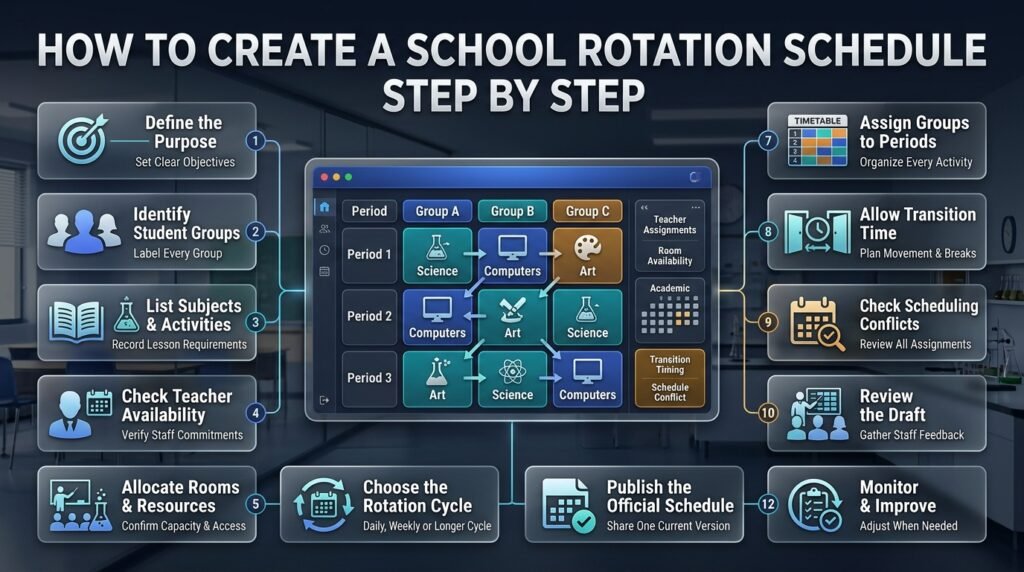
Creating a reliable rotation schedule requires a clear sequence of planning decisions. The following process helps schools move from basic requirements to a timetable that can be tested and maintained.
Step 1: Define the Purpose of the Rotation
Begin by identifying exactly why the school needs a rotation.
The objective might be to share a science laboratory, provide every class with specialist teaching, organize learning stations, or coordinate physical education sessions across several grades.
The purpose determines which information matters most.
For example, a school that needs to share one computer laboratory among four classes must prioritize room availability and required computer sessions. A primary classroom organizing reading stations may focus more on group size, teacher support, and activity duration.
Write down the desired outcome before creating the timetable.
Professional advice: Avoid introducing unnecessary rotation rules. A straightforward schedule is easier to explain, test, and maintain.
Step 2: Identify All Student Groups
Create a complete list of participating groups.
Record the grade, class name, number of students, and any relevant supervision or accessibility requirements. If a class is divided into smaller groups, assign each group a unique label.
For example:
- Group A: Grade 6, 25 students
- Group B: Grade 6, 24 students
- Group C: Grade 7, 27 students
Use consistent names across planning documents. If the same group has different labels in different files, teachers may misunderstand assignments.
Clear naming conventions also make timetable reviews more efficient.
Step 3: List Required Subjects and Activities
Identify every activity each group must complete during the rotation.
Record how frequently each lesson needs to occur, how long it should last, and whether it requires a specialist teacher, room, or equipment.
For example, a group may need two science sessions, one computer lesson, and one art activity during a particular cycle.
Do not assume that all activities need the same period length. A practical science lesson may require more setup and cleanup time than a short reading activity.
A Subject Timetable Maker can complement this process by helping organize subject assignments within the wider timetable.
Step 4: Check Teacher Availability
Record the availability and responsibilities of every teacher involved.
Include existing lessons, meetings, part-time schedules, preparation requirements, and other fixed commitments.
Check whether a specialist teacher is expected to lead two activities simultaneously. Also consider the time required to move between classrooms or prepare equipment.
A schedule should reflect how staff actually work, not simply how assignments fit into a grid.
Step 5: Record Rooms and Shared Resources
List all facilities required for the rotation.
These may include standard classrooms, science laboratories, computer rooms, art studios, libraries, music rooms, sports facilities, and learning support spaces.
For each room, record:
- Maximum appropriate group size.
- Available equipment.
- Periods when the room is unavailable.
- Accessibility requirements.
- Any special supervision or setup needs.
A room that is free during a period may still be unsuitable for a particular group or activity.
Common mistake: Assigning a room based only on availability without checking its capacity and equipment.
Step 6: Choose the Rotation Cycle
Decide how frequently the schedule will repeat.
A one-day cycle may work for classroom learning stations, while a weekly cycle may suit specialist subjects. A longer cycle may be appropriate when different activities need to be distributed over several school days.
Define how the rotation will continue after weekends, holidays, and unexpected closures.
For example, if a school uses a six-day rotation, it must decide whether the next school day continues the sequence or whether the cycle restarts at a fixed point.
Consistency is more important than choosing one universal method.
Coordinate the cycle with the Academic Holiday Calendar Builder so that non-teaching days are accounted for during planning.
Step 7: Assign Groups to Periods
Once the requirements are clear, begin assigning groups to activities and periods.
A simple rotation involving three groups and three stations could look like this:
| Period | Group A | Group B | Group C |
|---|---|---|---|
| Period 1 | Science | Computers | Art |
| Period 2 | Computers | Art | Science |
| Period 3 | Art | Science | Computers |
Each group completes all three activities, and each station serves one group per period.
This example assumes that each station has suitable capacity and an available teacher. A real school schedule may require more periods, fixed lessons, transition time, and additional restrictions.
A Class Timetable Grid Builder can help present assignments in a clear grid when multiple classes need to be reviewed together.
Step 8: Include Transition Time and Breaks
Students need enough time to move between classrooms, collect materials, and prepare for the next lesson.
If one period ends at 10:00 and another begins at 10:00 in a room on a different floor, the schedule may create repeated delays.
Consider the age of the students, the distance between rooms, supervision requirements, and whether equipment must be moved.
Protect recess, lunch, and other fixed breaks. Do not treat every gap in the timetable as available instructional time.
Pro tip: Test the longest and most complicated transition first. If students must cross the campus or collect equipment, that movement may need more time than a change between adjacent classrooms.
How to Create and Manage a Consistent Rotational Timetable Sequence
Schools using rotating timetables need a clearly defined sequence to distribute lessons, subjects, and classroom periods across different school days. A well-planned rotation ensures that students receive balanced instructional time while teachers can manage their assigned classes without unnecessary scheduling conflicts. Start by identifying the subjects, available teaching periods, classroom requirements, and teacher availability. Next, establish a rotation order and assign lessons to each cycle day so that the sequence remains consistent. Administrators should also consider weekends, public holidays, and special academic activities to avoid interruptions in the rotation pattern. Maintaining an organized sequence makes timetable management easier and helps students and teachers understand their changing daily schedules.
For easier rotational timetable planning, explore this resource 👉 Rotational Timetable Sequence Builder
This tool helps organize rotating lesson sequences, coordinate classroom periods, manage subject rotations, and maintain a structured academic timetable throughout the school term.
Step 9: Check for Scheduling Conflicts
Before publishing the timetable, review every assignment.
Check that:
- Teachers do not have overlapping lessons.
- Rooms are not double-booked.
- Student groups have no simultaneous assignments.
- Required subjects receive the correct number of sessions.
- Room capacities match the assigned groups.
- Specialist equipment is available.
- Breaks and fixed lessons remain in place.
- Transition times are realistic.
- The rotation cycle works with the academic calendar.
Automated conflict checks can help, but administrators must still evaluate whether the resulting timetable makes practical and educational sense.
Step 10: Ask Teachers to Review the Draft
Share the proposed timetable with teachers before finalizing it.
Ask them to check room assignments, lesson duration, preparation time, student movement, and any requirements that may have been overlooked.
A teacher may notice, for example, that two consecutive lessons require different equipment that cannot be prepared in the available time.
Correcting these problems before launch is easier than dealing with repeated delays once students begin following the rotation.
Step 11: Publish the Official Schedule
After checking the timetable, prepare clear versions for the people who need them.
Teachers may require detailed schedules with room numbers, group names, and teaching responsibilities. Students may need a simpler view of their activity sequence. Parents may need information about rotation days and significant changes.
Include an effective date and make it clear which version is official.
Avoid circulating several competing copies, as outdated schedules can cause confusion even when the underlying rotation is correct.
Step 12: Monitor and Improve the Schedule
After implementation, review whether the rotation works as intended.
Look for repeated late arrivals, missing equipment, overloaded periods, room bottlenecks, and lessons that consistently begin late.
Ask teachers for feedback and make targeted changes when needed. Record the reason for each adjustment and communicate the update to affected staff and students.
A useful rotation schedule should be maintained as a working document rather than treated as a permanent plan that can never change.
Practical School Rotation Schedule Example
Consider a middle school with three groups that need access to science, computer studies, and art. The school has one dedicated room for each activity and a teacher responsible for each station.
The objective is to ensure that every group completes all three activities without overlapping room or teacher assignments.
Example Three-Group Rotation
| Time | Group A | Group B | Group C |
|---|---|---|---|
| 9:00–9:45 | Science | Computers | Art |
| 9:45–9:55 | Transition | Transition | Transition |
| 9:55–10:40 | Computers | Art | Science |
| 10:40–10:50 | Transition | Transition | Transition |
| 10:50–11:35 | Art | Science | Computers |
In this example, each group completes three activities, while every station accommodates one group at a time. The transition periods provide time for students to move between locations.
This is a simplified planning model. A real school must also account for staff availability, room capacity, equipment preparation, student support, breaks, and the number of sessions required across the week.
How to Create a Balanced A/B Day Schedule for Schools
An A/B day scheduling system allows schools to organize lessons across two alternating schedules instead of following the same timetable every day. A days and B days can include different subjects, classroom periods, teacher assignments, and learning activities, helping institutions distribute instructional time more effectively. To create a balanced schedule, administrators should assign subjects to appropriate days, maintain consistent period timings, and check teacher availability to prevent overlapping lessons. They should also consider holidays, school events, and examination dates when planning the rotation. Clear communication of the A/B day pattern helps students and teachers follow their daily routines without confusion.
For easier alternating timetable planning, explore this resource 👉 A B Day Schedule Maker
This tool helps schools organize A/B day rotations, coordinate alternating subjects, manage class periods, and maintain a structured academic timetable throughout the school term.
How to Plan and Manage a Six-Day Rotating School Schedule
A six-day school cycle requires careful planning to ensure that subjects, classroom periods, teacher assignments, and student activities follow a consistent rotation pattern. Unlike a traditional Monday-to-Friday timetable, a six-day cycle continues through the sequence of school days, even when weekends or holidays interrupt the regular calendar. Administrators should assign subjects to each cycle day, distribute lessons evenly, and check teacher availability to avoid scheduling conflicts. It is also important to communicate the current cycle day clearly so students and teachers know which classes they need to attend. A well-organized six-day schedule improves lesson distribution, supports classroom coordination, and makes academic planning more predictable.
For easier school cycle planning, explore this resource 👉 Six Day School Cycle Planner
This tool helps schools organize six-day rotations, coordinate subject schedules, manage classroom periods, and maintain a consistent academic cycle throughout the school term.
What Can Schools Learn From This Example?
First, a rotation works best when all groups are planned together. Creating one class’s schedule independently can lead to conflicts with the remaining groups.
Second, shared rooms and specialist teachers must be treated as limited resources. Their assignments need to be coordinated across every participating class.
Third, the timetable should make the next activity obvious. Clear labels, times, and locations reduce the risk of students arriving at the wrong lesson.
Finally, a successful rotation balances efficiency with practical needs. A timetable that leaves no time for movement or preparation may look organized but fail during the school day.
Essential Features of a School Rotation Schedule Generator
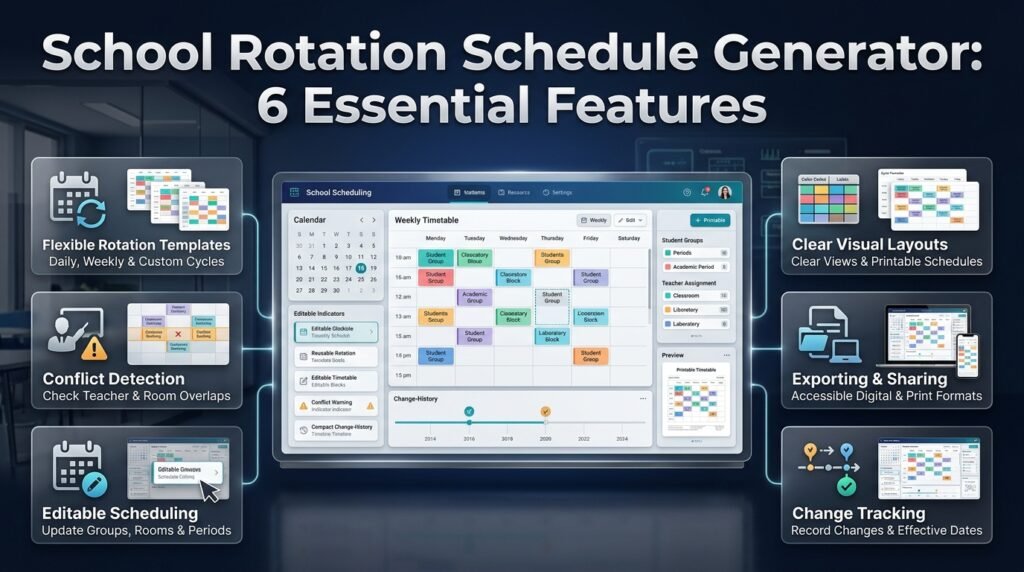
Not every scheduling tool offers the same capabilities. Schools should identify which features are necessary for their own planning process before choosing a generator.
Flexible Rotation Templates
A useful tool should support the school’s actual rotation pattern, whether daily, weekly, alternating-day, or custom-cycle based.
Reusable templates can save time when a familiar timetable returns for a new term. However, templates should be editable so administrators can account for new teachers, rooms, and student groups.
Teacher and Room Conflict Detection
Conflict detection is particularly valuable when several classes share resources.
The system should help identify overlapping teacher assignments and room bookings. More advanced tools may support staff availability, room capacity, and subject-specific restrictions.
However, a conflict-free timetable is not automatically an effective timetable. Human review remains necessary to assess workload, lesson quality, and transitions.
Editable Scheduling
School requirements can change throughout the academic year. A generator should make it practical to update group assignments, periods, rooms, and activity sequences.
Where available, version history can help administrators understand what changed and restore earlier arrangements when necessary.
Clear Visual Layouts
A schedule should be easy to understand at a glance.
Useful features include:
- Clearly labeled periods.
- Consistent group names.
- Readable room assignments.
- Color-coded activities.
- Weekly and cycle-based views.
- Printable layouts.
- Digital sharing options.
Use color consistently, but combine it with written labels so the timetable remains accessible to users who cannot distinguish particular colors.
Exporting and Sharing
Schools may need printable documents, spreadsheets, or digital timetables.
Check whether the tool supports the formats the school uses and whether teachers can access the current version without confusion.
If the timetable will be viewed on different devices, confirm that its layout remains readable on both computers and mobile screens.
Change Tracking
Change tracking can help schools manage timetable updates responsibly.
A useful record identifies what changed, why the change was needed, when it takes effect, and which groups are affected.
This is particularly important when adjustments involve practical lessons, specialist facilities, or activities that require advance preparation.
Manual Templates Versus Automated Generators
| Capability | Manual spreadsheet or template | Automated generator |
|---|---|---|
| Initial setup | Often straightforward | May require configuration |
| Assigning activities | Usually manual | May automate supported assignments |
| Conflict detection | Manual or formula-based | May provide automatic checks |
| Custom requirements | Flexible but potentially complex | Depends on available rules |
| Small schedules | Often sufficient | May be unnecessary |
| Complex schedules | Can become difficult to maintain | Can reduce repetitive checking |
| Final review | Required | Required |
A spreadsheet can be an effective choice for a small school. A dedicated generator becomes more useful when numerous restrictions make manual checking time-consuming.
Test the tool using a realistic school scenario rather than relying only on its advertised features.
How to Organize Different Types of School Rotations
Different educational activities require different scheduling decisions. Understanding the purpose of each rotation helps schools choose an appropriate structure.
Classroom Learning Station Rotations
Learning station rotations allow students to move between activities during a lesson or school day.
A primary classroom might rotate through teacher-led reading, independent practice, collaborative work, and a technology-supported activity.
Each station should have clear instructions, suitable materials, and a defined duration. Students should understand what they need to complete before moving to the next activity.
The timetable should also show which activities require direct teacher supervision and which students can complete independently.
Specialist Subject Rotations
Schools often share specialist teachers for art, music, computing, physical education, and additional languages.
The scheduling challenge is to match the required number of lessons with staff availability and room capacity.
Begin with fixed teaching commitments and specialist requirements. Then assign flexible lessons to available periods, checking transition times and preparation needs.
A Student Class Period Organizer can help present individual group assignments clearly after the broader rotation has been planned.
Laboratory and Equipment Rotations
Science laboratories, computer rooms, workshops, and specialist studios often have limited capacity.
Plan these rotations around resource availability before assigning groups. Confirm that the required equipment is present and that the period allows time for instruction, setup, and cleanup.
Do not assume that every class can use every facility. Equipment, supervision, age requirements, and room capacity may restrict which groups can participate.
Alternating-Day Rotations
Alternating-day timetables use different lesson sequences on designated days.
These schedules require particularly clear labels because the sequence may not repeat in the same way each calendar day.
Publish the cycle pattern, identify the dates associated with each cycle day, and explain how the schedule resumes after holidays or closures.
A Weekly Lesson Period Planner can support the organization of recurring lessons within the wider timetable.
Small-Group Intervention Rotations
Learning support teams may rotate students through reading, mathematics, language development, or other targeted sessions.
The schedule should coordinate intervention periods with core lessons so that students do not unnecessarily miss essential classroom instruction.
Record which students attend each session, confirm staff availability, and communicate changes to the relevant teachers.
Student information should be shared only with staff who need it to perform their responsibilities.
Physical Education and Shared Sports Facilities
When several classes share a gymnasium, playground, or sports field, a rotation can distribute access across the school day.
Consider weather alternatives, equipment availability, supervision, travel time, and the suitability of activities for each age group.
Avoid assigning more students to a facility than it can safely accommodate. Every session should identify the location, time, group, and responsible staff member.
How to Manage Changing School Days With a Rotating Academic Calendar
Schools that use rotating day schedules need a reliable calendar to keep track of changing class periods, subject rotations, teacher assignments, and daily academic activities. Administrators should establish a clear rotation pattern, assign subjects to specific cycle days, and ensure that students and teachers understand which timetable applies each day. It is also important to account for weekends, public holidays, examination periods, and special school events so that the rotation remains consistent throughout the academic year. Maintaining an updated calendar helps prevent confusion, supports better classroom coordination, and ensures that instructional activities continue according to the planned schedule.
To simplify rotating school day planning, explore this resource 👉 Rotating School Day Calendar
This resource helps schools organize rotating days, coordinate changing class schedules, manage subject periods, and maintain a clear academic calendar throughout the school term.
Common School Rotation Scheduling Mistakes to Avoid
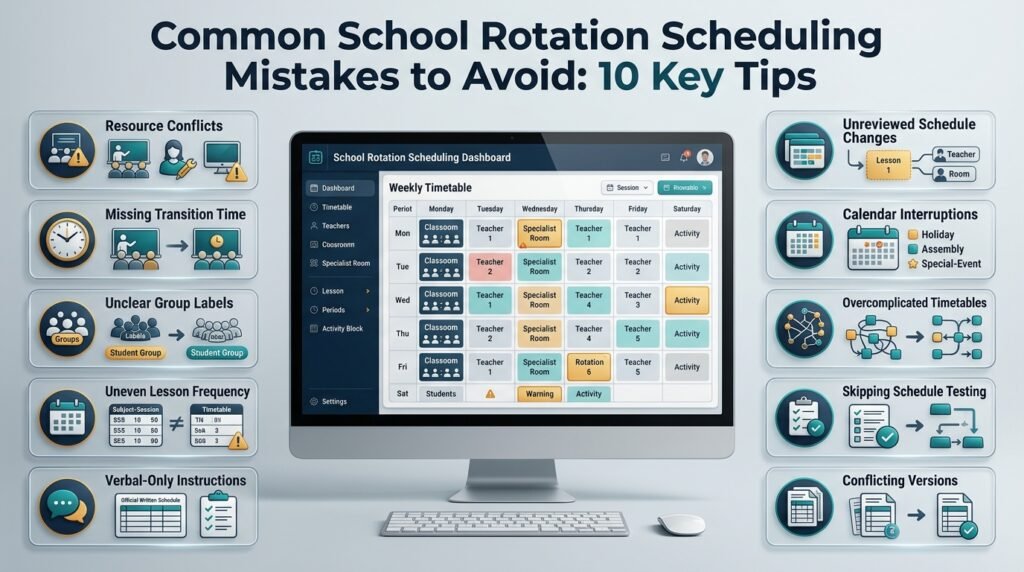
Even a well-designed timetable can fail when administrators overlook practical constraints or make changes without reviewing the wider schedule.
Mistake 1: Scheduling Subjects Before Checking Resources
Why it happens: Planners begin with lesson assignments and check room and teacher availability later.
Why it causes problems: A lesson may be scheduled when the teacher is unavailable, the room is occupied, or the required equipment is being used elsewhere.
How to avoid it: Record fixed constraints first and review teacher, room, and equipment availability together.
Mistake 2: Forgetting Transition Time
Why it happens: Every period is filled tightly to maximize teaching time.
Why it causes problems: Students arrive late, teachers struggle to prepare activities, and small delays accumulate throughout the rotation.
How to avoid it: Include realistic movement time based on room distance, student age, supervision, and equipment requirements.
Mistake 3: Using Unclear Group Labels
Why it happens: Different staff members use different names or abbreviations for the same class.
Why it causes problems: Students may follow the wrong sequence, and teachers may misunderstand their assignments.
How to avoid it: Establish consistent group names and use them across timetables, notices, and updates.
Mistake 4: Ignoring Required Lesson Frequency
Why it happens: The timetable appears balanced, but nobody checks the total number of sessions assigned to each group.
Why it causes problems: Some classes may receive fewer practical lessons or specialist sessions than required.
How to avoid it: Count sessions by group and subject before publishing the schedule. Compare those totals with the school’s instructional requirements.
Mistake 5: Depending on Verbal Instructions
Why it happens: Important details are communicated informally rather than recorded in the official timetable.
Why it causes problems: Staff absences, handovers, and schedule changes can leave teachers without reliable information.
How to avoid it: Maintain a written schedule with room assignments, cycle dates, effective dates, and a clear update process.
Mistake 6: Changing One Period Without Reviewing Other Assignments
Why it happens: An administrator moves a lesson to solve an immediate problem.
Why it causes problems: The new assignment may conflict with another class, room, teacher, or activity.
How to avoid it: Review all affected assignments after each change and notify the people who need the updated information.
Mistake 7: Ignoring Holidays and Special Events
Why it happens: The rotation is planned as if every school day follows the same pattern.
Why it causes problems: Holidays, assemblies, trips, and examination periods interrupt the sequence.
How to avoid it: Coordinate the rotation with the school calendar and define how the sequence resumes after interruptions.
Mistake 8: Making the Schedule Unnecessarily Complicated
Why it happens: Planners introduce too many patterns, exceptions, and abbreviations.
Why it causes problems: Teachers and students struggle to remember where they should be and which sequence applies.
How to avoid it: Use the simplest schedule that satisfies the school’s requirements. Document necessary exceptions clearly.
Mistake 9: Publishing Without Testing
Why it happens: The timetable looks complete, so administrators assume it will work.
Why it causes problems: Practical issues only become visible when students start moving between rooms or teachers begin preparing lessons.
How to avoid it: Ask teachers to review the draft and test the busiest transitions before the schedule becomes official.
Mistake 10: Maintaining Several Conflicting Versions
Why it happens: Staff members continue sharing older files or making independent copies.
Why it causes problems: Different groups may follow different timetables.
How to avoid it: Maintain one authoritative version, date each update, and clearly identify which copy replaces the previous schedule.
Expert Tips for Building a More Reliable Rotation Schedule
Professional scheduling involves more than arranging activities into empty periods. These practices help schools create rotations that remain practical throughout the academic year.
Plan Around Fixed Constraints First
Begin with requirements that cannot easily move, such as staff availability, required laboratory sessions, fixed assemblies, and specialist room restrictions.
Place flexible activities after these commitments have been accounted for.
This approach reduces repeated changes caused by discovering important restrictions late in the planning process.
Separate Hard Constraints From Preferences
A hard constraint is a requirement that must be satisfied. A teacher cannot teach two classes simultaneously, and an exclusively assigned room cannot host two groups at once.
A preference is desirable but potentially flexible, such as scheduling a particular subject earlier in the day.
Distinguishing between the two helps administrators make sensible decisions when every preferred arrangement cannot be accommodated.
Record Important Scheduling Assumptions
Document the rotation length, transition times, lesson frequencies, and rules for school closures.
This makes it easier for another administrator to understand and maintain the timetable when responsibilities change.
It also prevents repeated disagreements about decisions that have already been made.
Review Workload and Fairness
An efficient timetable should not repeatedly assign the most demanding transitions to the same group or leave one teacher with an unreasonable concentration of practical lessons.
Review teaching loads, preparation requirements, access to specialist facilities, and the distribution of less convenient periods.
Fairness does not necessarily mean identical schedules. It means applying clear and defensible rules to the needs of different groups.
Use a Trial Period
If the rotation is new, test it for a limited period before treating it as permanent.
Ask teachers to record repeated delays, missing resources, and confusing transitions. Compare the intended timetable with how lessons actually run.
Use this information to make targeted improvements rather than relying entirely on assumptions.
Coordinate Rotations With the Academic Calendar
Rotation schedules should fit into the wider school calendar.
Coordinate them with term dates, holidays, assessment periods, special events, and major academic milestones. This reduces the risk of a cycle becoming misaligned after a closure or schedule change.
The Semester Milestone Calendar can support broader planning around important academic dates.
Keep Communication Simple
Publish clear instructions explaining where each group goes, when the rotation starts, and how changes will be announced.
Use the same terminology across timetables and staff communications. If a room changes, identify the affected group, the new location, and the effective date.
Clear communication prevents many problems that scheduling software alone cannot solve.
How to Choose the Right School Rotation Schedule Generator
Choosing a suitable generator starts with understanding the school’s size, scheduling complexity, and preferred planning method.
A small school may need only an editable timetable template. A larger institution may need automatic conflict detection, reusable cycles, teacher availability rules, and multiple timetable views.
Questions to Ask Before Choosing a Tool
- Can it support the rotation pattern our school uses?
- Can we assign multiple groups, teachers, rooms, and activities?
- Does it identify overlapping teacher and room assignments?
- Can we account for lesson duration, transitions, and fixed periods?
- Can we edit the schedule when requirements change?
- Can teachers access a clear and current version?
- Can we print or export the timetable?
- Does it preserve previous versions or document changes?
- Can staff use it without extensive technical training?
- Does it meet the school’s data protection requirements?
Not every school needs every feature. Focus on the problems your current scheduling process actually creates.
What Makes a Generator Practical?
A practical generator helps administrators create a timetable that is correct and easy to use.
It should make assignments easy to review, identify supported conflicts clearly, and allow straightforward updates. It should also produce a timetable that teachers and students can understand without learning the software themselves.
Before selecting a tool, test it using a realistic scenario that includes a shared room, a specialist teacher, and at least one scheduling restriction.
This is a useful way to determine whether the tool can handle the school’s actual needs.
Can a Spreadsheet Work as a Rotation Generator?
A spreadsheet can be sufficient for small rotations, particularly when only a few groups and shared resources are involved.
With consistent labels, validation rules, formulas, and separate views, a spreadsheet can support a useful planning process. However, complex schedules may require extensive manual checking, and simple spreadsheets may not recognize every conflict automatically.
As the timetable grows, compare the time spent checking and correcting assignments with the effort required to use a dedicated generator.
The right choice is the one that manages the school’s requirements reliably without creating unnecessary complexity.
How to Measure Whether a Rotation Schedule Is Working
A schedule should be evaluated by its effect on the school day, not simply by whether every timetable cell is filled.
Scheduling Accuracy
Track overlapping assignments, missing sessions, and incorrect room bookings. Reviewing these problems helps administrators identify whether the planning process is reliable.
Transition Reliability
Observe whether students reach their next lessons on time. Repeated delays may indicate insufficient movement periods, confusing routes, or poorly placed activities.
Instructional Time
Check whether lessons start and finish as planned. Frequent interruptions may suggest that lesson durations or transition periods need adjustment.
Resource Utilization
Review whether specialist rooms and equipment are being used effectively without creating overcrowding or unreasonable staff workloads.
High utilization is not automatically a sign of success if it leaves no time for preparation or maintenance.
Staff and Student Feedback
Ask teachers which parts of the timetable work well and which assignments cause recurring problems. Check whether students understand their next activity, location, and rotation sequence.
Feedback is especially useful during the first weeks of a new rotation.
Change Management
Review how quickly the school can make necessary adjustments and whether affected staff receive accurate updates.
A schedule that can be corrected and communicated reliably is more sustainable than one that depends on informal instructions.
Coordinating Rotation Schedules With Other Academic Planning Tools
A rotation schedule is one part of a school’s broader planning system. Coordinating it with related academic processes helps administrators reduce conflicts and maintain a consistent view of school activities.
Academic Planning and Scheduling Tools
Rotation planning connects with other scheduling responsibilities, including class timetables, subject assignments, academic calendars, and specialist activities.
The Academic Planning and Scheduling Tools resource is relevant to schools that want to organize these connected responsibilities within a broader planning process.
Each planning document should have a clear purpose, but all should use consistent dates, group names, and scheduling information.
School-Year Events
Assemblies, school trips, sports days, staff development sessions, and other events can affect room availability and lesson rotations.
Coordinating the timetable with the School Year Event Calendar helps administrators identify interruptions before they create scheduling problems.
Examination and Assessment Planning
Examination periods may require classrooms, laboratories, specialist staff, or quiet spaces that are normally used for rotating lessons.
Schools should review their rotation schedules before finalizing assessment arrangements.
The Exam Schedule Generator supports the separate task of organizing examination sessions, while the rotation timetable can be adjusted around those commitments.
Test Dates and Assessment Sessions
Test dates and examination sessions may create additional room, staffing, and supervision requirements.
A Test Date Timetable Planner can support the planning of assessment dates, while an Exam Session Calendar Builder can help organize sessions across the relevant calendar.
For more detailed operational planning, the Assessment Sitting Schedule and Examination Timetable Organizer resources address related assessment scheduling needs.
Keeping these processes coordinated helps schools avoid assigning the same room or staff member to conflicting activities.
Academic Deadlines and Coursework
Coursework deadlines and assignment submissions can affect teaching plans, student workloads, and the availability of staff for particular activities.
The Academic Deadline Management resource supports the broader task of tracking important academic dates.
Schools can also coordinate their planning with the Coursework Due Date Manager, Assignment Submission Calendar, and Academic Milestone Reminder Planner.
These resources address different parts of academic planning. Their purpose is to help staff consider important deadlines and milestones when reviewing the wider school schedule.
School Deadline Overview
Administrators may also need a consolidated view of deadlines that affect several departments or student groups.
The School Deadline Overview Tool is relevant when reviewing upcoming school deadlines alongside other planning responsibilities.
The goal is not to place every school activity into a single complicated timetable. Instead, it is to make sure that connected schedules remain consistent and that important commitments are not overlooked.
How Do You Create an Effective School Rotation Schedule for Multiple Classes?
Creating an effective school rotation schedule requires careful coordination of student groups, teachers, classrooms, subjects, and lesson periods. The goal is to ensure that every class receives its required instruction while shared resources remain available and students can move between activities without unnecessary delays. Schools should begin by identifying fixed scheduling requirements, such as specialist teacher availability, laboratory access, lesson frequency, and break times, before assigning groups to individual periods.
A practical approach is to build the rotation around the resources with the fewest available time slots. For example, if several classes share one science laboratory, administrators should allocate laboratory sessions first and then arrange more flexible lessons around those assignments. Once the initial schedule is prepared, the school should review every group, teacher, and room to identify conflicts before publishing the timetable.
Important points to consider:
List all student groups, required subjects, teachers, and available rooms before scheduling.
Choose a daily, weekly, alternating-day, or custom rotation pattern that matches the school’s needs.
Include realistic transition time between classrooms and specialist activities.
Verify that every group receives the required number of lessons.
Ask teachers to review the draft and report practical problems before implementation.
What Features Should You Look for in a School Rotation Schedule Generator?
The most useful school rotation schedule generator is one that addresses the school’s actual scheduling challenges rather than simply displaying activities in a timetable. Schools should look for features that help organize groups, assign teachers and rooms, manage recurring rotations, and identify scheduling conflicts. The right combination depends on the number of classes, the complexity of the timetable, and how frequently changes occur.
For a school with a few groups, an editable timetable and clear visual layout may be sufficient. A larger institution may benefit from automatic conflict detection, reusable scheduling templates, flexible rotation cycles, and options for exporting or sharing updated schedules. Administrators should also check whether the tool allows them to adjust assignments when staff availability, room access, or academic requirements change.
Essential features to evaluate:
Conflict detection: Helps identify overlapping teacher assignments and double-booked rooms.
Flexible rotation patterns: Supports daily, weekly, alternating-day, or custom schedules.
Editable timetables: Makes it easier to respond to changing school requirements.
Clear visual layouts: Helps teachers and students understand their assignments quickly.
Export and sharing options: Makes the current timetable easier to distribute.
Practical customization: Allows schools to account for lesson lengths, room restrictions, and fixed periods.
How Can Schools Prevent Teacher, Classroom, and Student Scheduling Conflicts?
Schools can prevent many scheduling conflicts by checking teacher availability, room capacity, student group assignments, and required resources before finalizing a rotation timetable. These elements must be considered together because changing one assignment can affect several other parts of the schedule. A classroom may be available, for example, but the teacher assigned to it may already be teaching another group.
The most reliable approach is to identify fixed constraints first, then schedule the activities that have the fewest alternatives. Administrators should check the complete timetable after every significant change rather than assuming that moving one lesson will solve the problem without creating another. Automated conflict-checking features can assist with this process, but staff should still review the schedule for practical issues such as room capacity, transition times, and equipment preparation.
Best practices for reducing conflicts:
Maintain accurate teacher availability and room booking records.
Schedule specialist facilities before flexible classroom activities.
Check that student groups have no overlapping lessons.
Confirm that each room can safely accommodate its assigned group.
Recheck related assignments whenever a teacher, room, or period changes.
Keep one official timetable so staff do not follow outdated versions.
How Often Should a School Rotation Schedule Be Updated or Reviewed?
A school rotation schedule should be reviewed before each new term, during the initial weeks of a new rotation, and whenever a meaningful change affects teachers, classrooms, student groups, or lesson requirements. Regular review helps administrators identify problems before they become recurring disruptions. However, updating the timetable does not mean changing it unnecessarily whenever a minor issue occurs. Each adjustment should solve a clear problem without compromising the rest of the schedule.
For example, if students repeatedly arrive late to a specialist lesson because the classroom is too far away, administrators may need to increase transition time or change the rotation order. If a teacher becomes unavailable, the school should review alternative assignments and check for new conflicts before communicating the revised schedule. Keeping a record of changes also helps staff understand which timetable is current.
A practical review process includes:
Check the schedule before the start of each academic term.
Monitor transitions, room usage, and lesson timing during the first weeks.
Review the timetable after staff changes, room closures, or major school events.
Collect feedback from teachers and identify repeated scheduling problems.
Record the effective date of each revision and inform affected groups.
Coordinate the rotation with holidays, examinations, and other academic commitments.
Can a School Rotation Schedule Generator Improve Learning Time and Resource Management?
A school rotation schedule generator can improve the organization of learning time and shared resources by helping administrators coordinate activities, teachers, classrooms, and equipment more consistently. When a rotation is carefully planned, students spend less time waiting for rooms or receiving instructions about where to go next. Teachers can also prepare for upcoming lessons more effectively because their assignments and locations are clearly defined.
The benefits depend on how well the schedule reflects real school conditions. A timetable that fills every period but ignores room capacity, student movement, or teacher preparation may create more disruption rather than less. Schools should therefore evaluate the schedule after implementation and make adjustments based on actual performance, not simply the appearance of the timetable.
Ways to improve scheduling outcomes:
Allocate shared facilities according to lesson requirements and room capacity.
Include sufficient time for movement, setup, and cleanup.
Distribute specialist lessons and teaching responsibilities fairly.
Track repeated delays, missed sessions, and resource conflicts.
Ask teachers whether the timetable supports smooth lesson delivery.
Review resource usage to identify underused periods and avoid unnecessary bottlenecks.
A well-managed rotation schedule should make the school day more predictable while protecting instructional quality. The objective is not to maximize the number of activities packed into a day, but to ensure that students and teachers can complete their planned work efficiently and consistently.
Conclusion
A well-planned school rotation schedule helps schools organize classes, teachers, classrooms, subjects, and shared learning resources without unnecessary conflicts or interruptions. By creating a clear rotation structure, administrators can improve timetable consistency, make better use of available facilities, balance teacher workloads, and ensure that students receive fair access to learning opportunities. The key is to build the schedule around real school requirements rather than relying on a fixed pattern that may not suit every class or department.
Using a School Rotation Schedule Generator can simplify this process by helping administrators organize rotation cycles, identify scheduling conflicts, and adjust arrangements when school needs change. However, effective scheduling still requires accurate information, communication with teachers, and regular reviews throughout the academic year. Schools should also coordinate rotation plans with lesson periods, school events, holidays, assessments, and important academic deadlines to maintain consistency across the wider timetable.
Ultimately, the most effective rotation schedule is one that is practical, flexible, and easy for teachers and students to follow. With careful planning and ongoing improvement, schools can reduce administrative pressure, use their resources more efficiently, and create a smoother learning environment for everyone.